H61H2-M16 USER MANUAL
37
Chapter 3
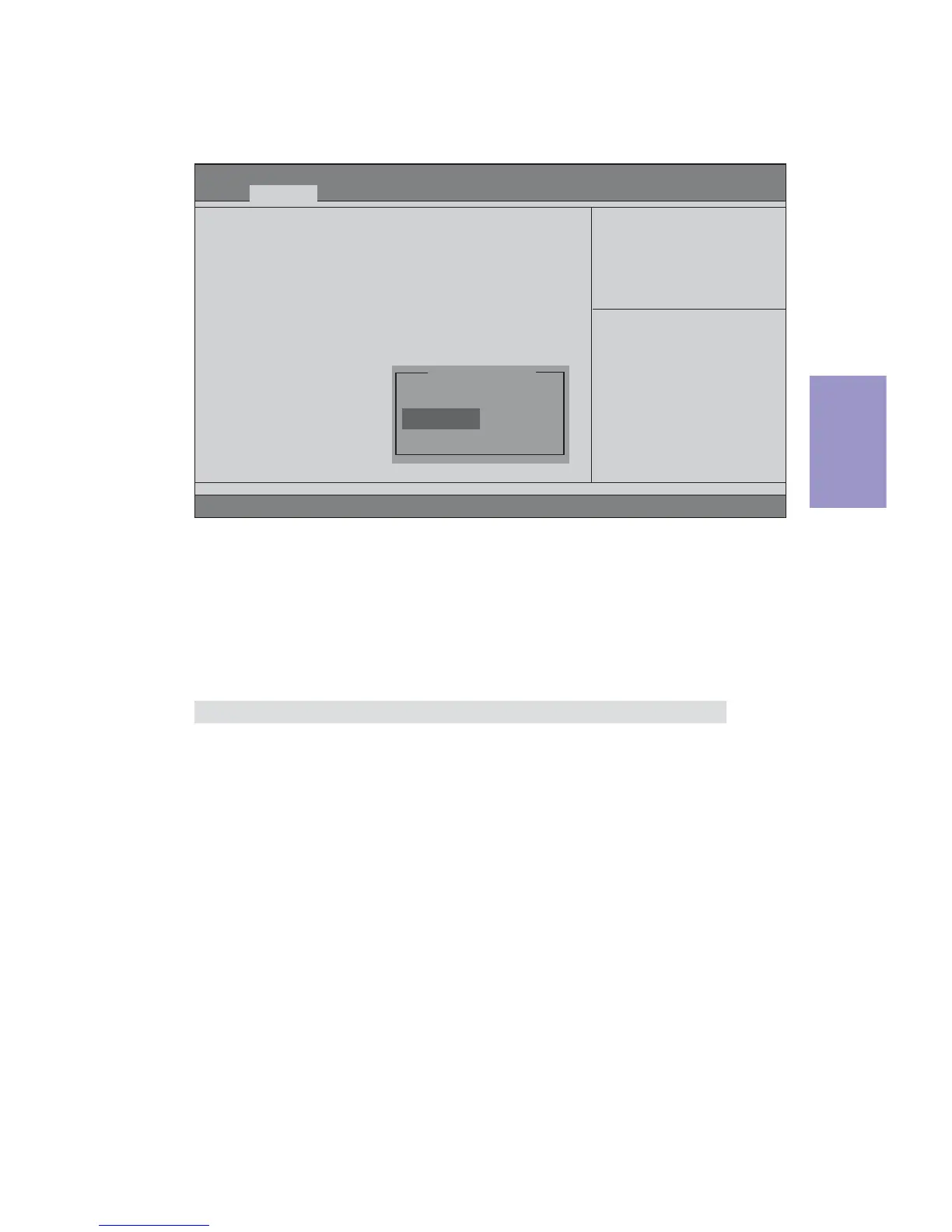
SATA Configuration
Use this item to show the mode of serial SATA configuration options.
SATA Mode (IDE Mode)
Use this item to select SATA mode.
SATA Configuration
SATA Mode [IDE Mode]
SATA Port1 Not Present
SATA Port2 Not Present
SATA Port3 Not Present
SATA Port4 Not Present
Determines how SATA
controller(s) operate.
SATA Port 1~4 (Not Present)
This motherboard supports four SATA channel and each channel allows one SATA
device to be installed. Use these items to configure each device on the SATA channel.
Press <Esc> to return to the Advanced Menu page.
F2:Previous Values
F1:General Help
+/- : Change Opt.
Enter : Select
:Select Screen
:Select Item
F3:Optimized Defaults
F4:Save & Exit
ESC:Exit
Disabled
IDE Mode
AHCI Mode
SATA Mode
Aptio Setup Utility - Copyright (C) 2012 American Megatrends, Inc.
Version 2.15.1229. Copyright (C) 2012, American Megatrends, Inc.
Main
Advanced Chipset M.I.B III Boot Security Exit


 To Next Page