23
Installing the Motherboard
Connecting I/O Devices
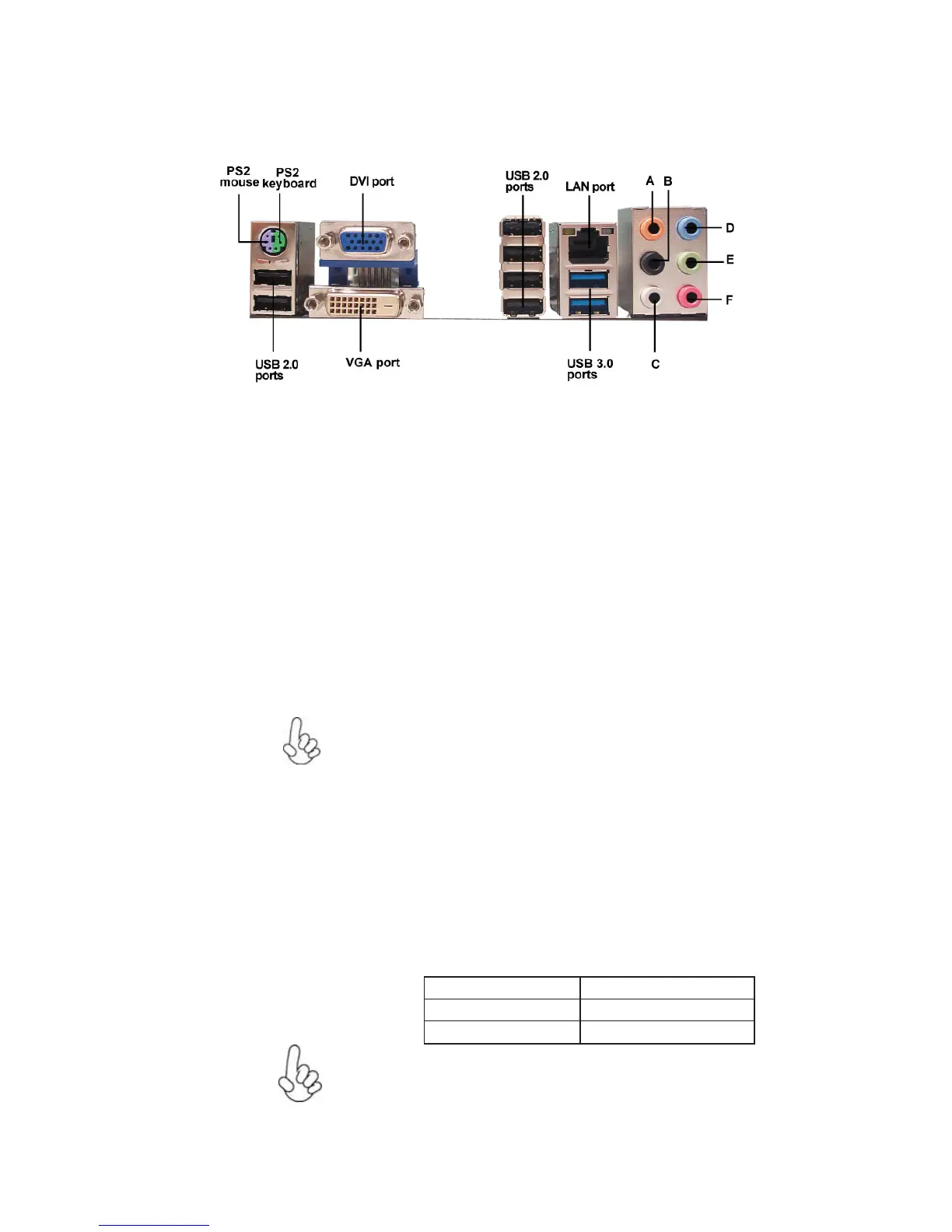
The backplane of the motherboard has the following I/O ports:
The USB 3.0 connectors are optimized for SuperSpeed USB
3.0 devices, aslo are fully backwards-compatible with Hi-
Speed USB 2.0 devices.
Use the USB 3.0 ports to connect USB 3.0 devices.
LAN Port
Connect an RJ-45 jack to the LAN port to connect your
computer to the Network.
VGA Port Connect your monitor to the VGA port.
Connect the HDMI port to the HDMI device. (optional)
Use the USB 2.0 ports to connect USB 2.0 devices.
USB 2.0 Ports
HDMI Port
USB 3.0 Ports
PS2 Keyboard Use the lower PS/2 port to connect a PS/2 keyboard.
PS2 Mouse Use the upper PS/2 port to connect a PS/2 pointing device.
Audio Ports
The above port definition can be changed to audio input or
audio output by changing the driver utility setting.
Use the audio jacks to connect audio devices. The D port is
for stereo line-in signal, while the F port is for microphone
in signal. This motherboard supports 8-channel audio de-
vices that correspond to the A, B, C, and E port respec-
tively. In addition, all of the 3 ports, B, C, and E provide
users with both right & left channels individually. Users
please refer to the following note for specific port function
definition.
A: Center & Woofer D: Line-in
C: Side Surround F: Mic_in Rear
B: Back Surround E: Front Out
Connect the DVI port to the monitor. (optional)
DVI Port


 To Next Page