Channel Output Indicator
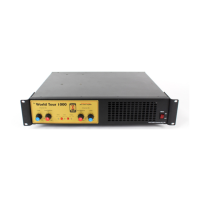
This LED indicates that the amplifier channel has reached maximum output
and is going into limiting.
On / Off Switch
This turns the unit on and off .
Front Panel Air Intake
Do not obstruct the airflow to this intake.
Back Panel Features
Inputs ( Balanced & Unbalanced)
The inputs are configured as a Balanced/unbalanced TRS ( Tip, ring, sleeve
¼” jack ) and a 3 pin XLR balanced Mic. Connector. These are wired in
parallel without buffers.
Signal outputs
These are provided by TRS ¼” jacks with buffers (150 Ohms). Use these for
linking to other amplifiers etc.
Main Power Amplifier Outputs
NOTE** Be careful with these connection points, this is a big amplifier. It
can produce a lot of output voltage. It is possible to get a shock from any
large audio amplifier under certain conditions.
The WT-1000 is provided with the following connections , 2 of the ¼”
phone plug, 5 way binding post, and NL4 connectors.




 To Next Page