INTRODUCTION PARTS DESCRIPTION INSTALLATION OPERATING INSTRUCTIONS INTERNET UPDATES APPENDIX
OPERATING INSTRUCTIONS
24
USER GUIDE
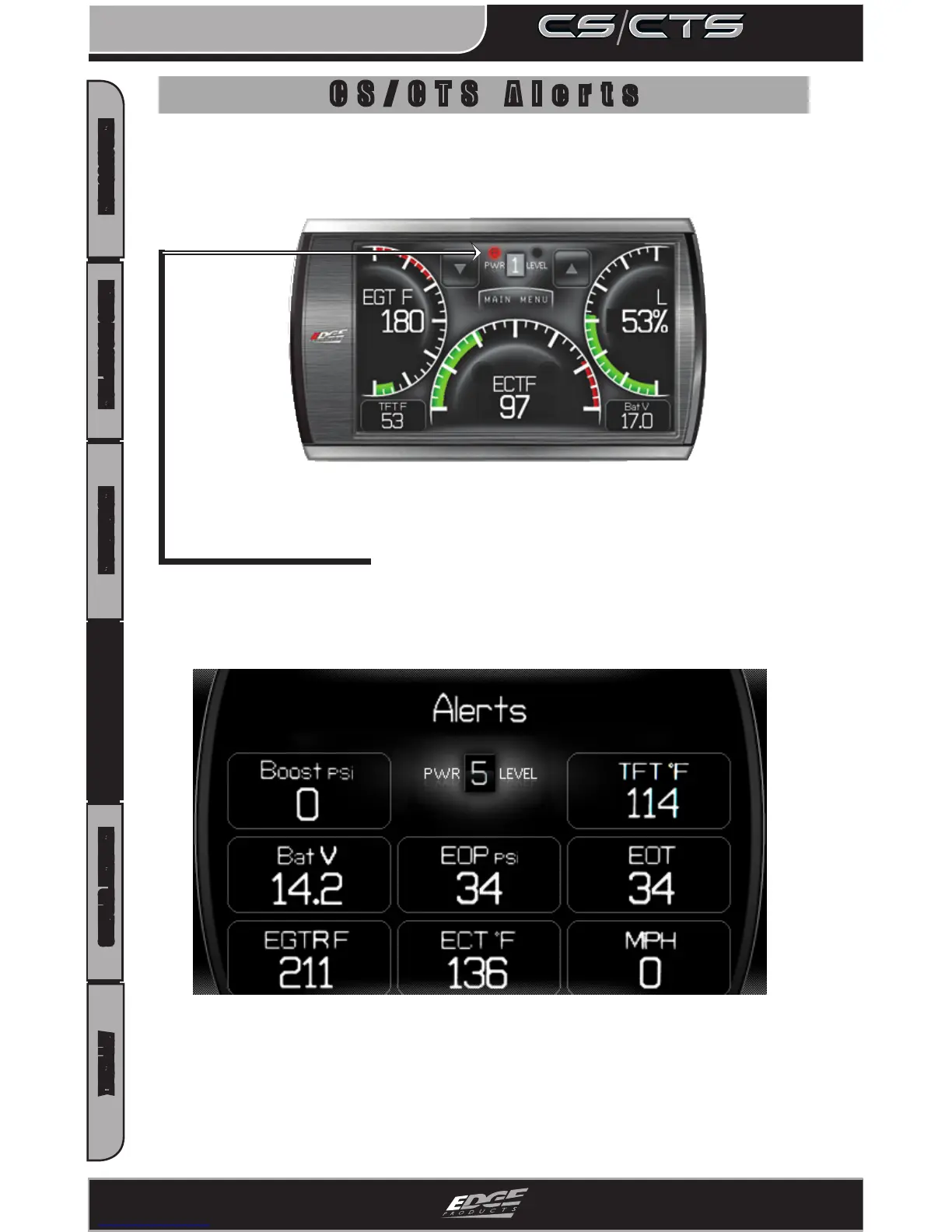
There are several ways CS/CTS alerts are indicated. The rst is on
the main screen. If you have an alert condition the alert indicator
light will illuminate. On the main screen the alerting parameter
will ash red and the alert notication will sound. If the alert-
ing parameter is not displayed on the main screen, the following
screen will appear.
The CS/CTS device is equipped with an alert system that noties the
user when vehicle parameters are outside a user-dened value.
This Alerts screen will show all parameters for which an alert has
been set. If an alert value is outside the user-dened setting, it will
ash red. The Alerts screen will stay in view for a minimum of three
seconds, until no alert condition exists, or until the screen/menu
button is touched, at which point it will return to the main gauge
screen.
CS/CTS Alerts


 To Next Page