96
3-2-3 Virtual Server
This function allows you to redirect a port on Internet IP address (on WAN
port) to a specified port of an IP address on local network, so you can setup
an Internet service on the computer on local network, without exposing it on
Internet directly. You can also build many sets of port redirection, to provide
many different Internet services on different local computers via a single
Internet IP address.
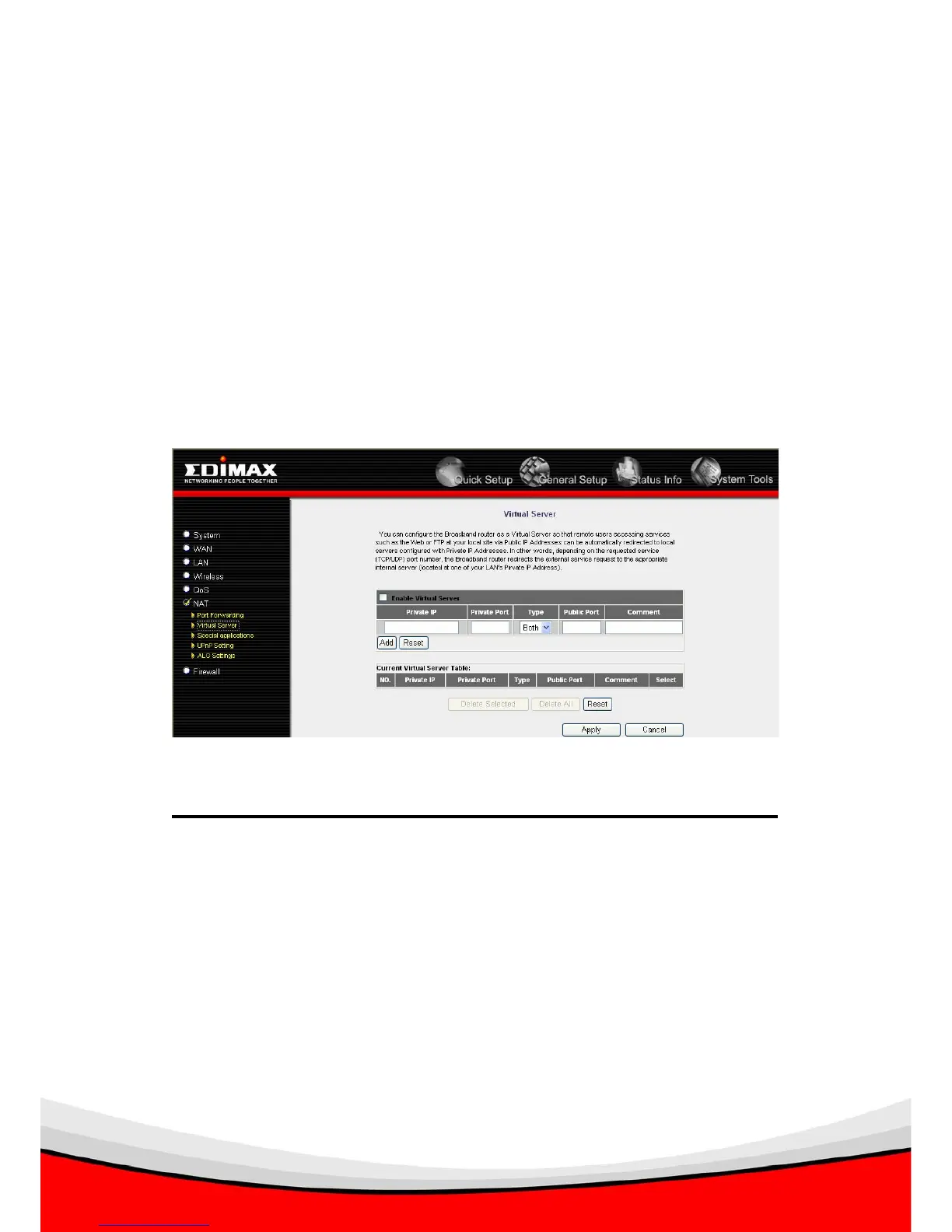
Please click ‘NAT’ menu on the left of web management interface, then click
‘Virtual Server’, and the following message will be displayed on your web
browser:
Here are descriptions of every setup items:
Enable Virtual Check this box to enable virtual server,
Server : and uncheck this box to disable virtual server.
Private IP : Input the IP address of the computer which
provides Internet service.
Private Port : Input the port number of the IP address
which provides Internet service.
Type : Select the type of connection, TCP or UDP. If you’re
not sure, please select ‘Both’.
1
7 8


 To Next Page