19
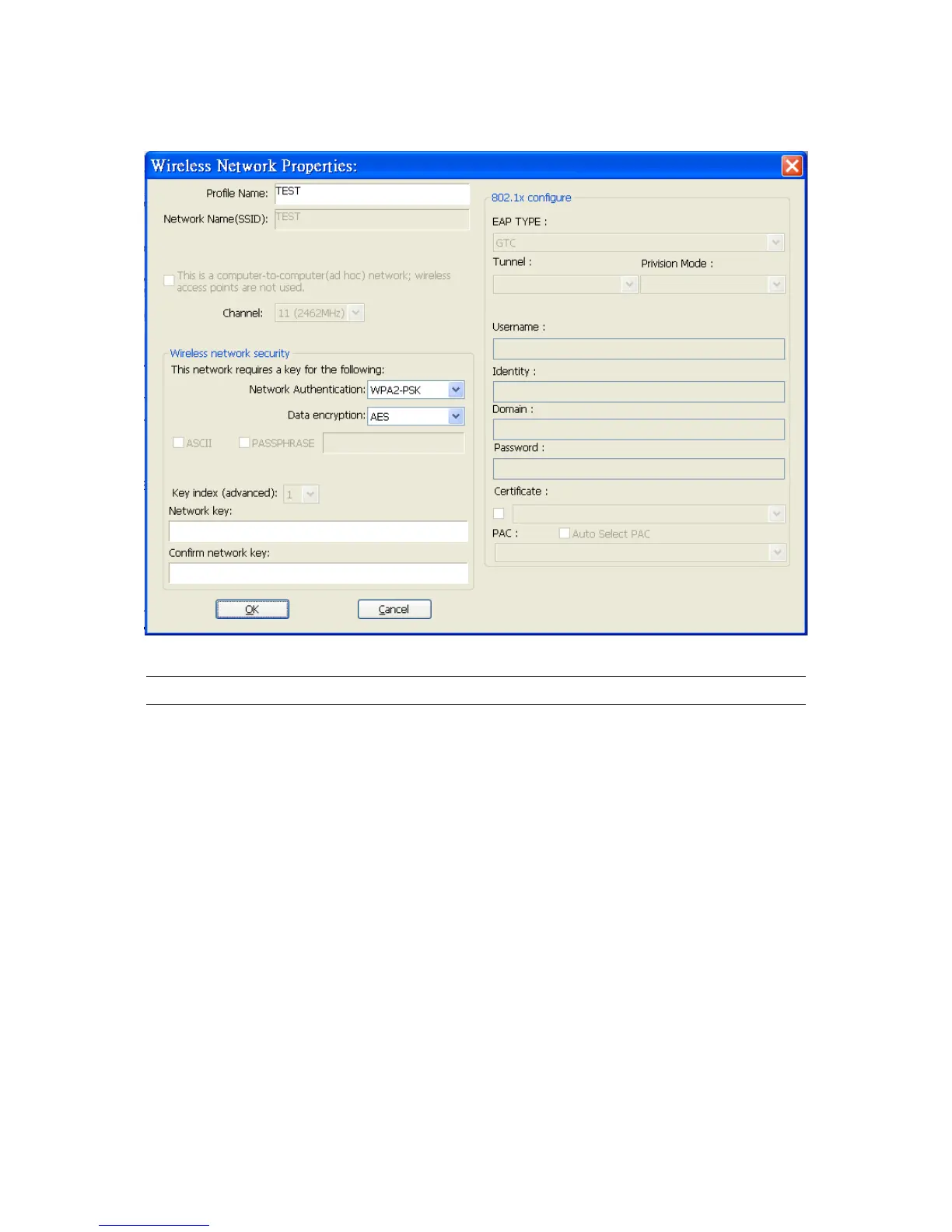
3.4.1 Configure the Profile
Parameter Description
Profile Name Define a recognizable profile name for you to identify the different
networks ( Access Point ).
Network Name (SSID) The SSID (up to 32 printable ASCII characters) is the unique
name identified in a WLAN. The ID prevents the unintentional
merging of two co-located WLANs.
You may specify a SSID for the adapter and then only the device
with the same SSID can interconnect to the adapter.
This is a computer-to-computer
(ad hoc) network; wireless access
points are not used.
There are two kinds of network type described as follows.
Infrastructure – This operation mode requires the presence of an
802.11 Access Point. All communication is done via the Access
Point or Router.
Ad Hoc – Connect to another wireless adapter in the Wireless
LAN network without through an Access Point or Router.
If this item is selected, the adapter will work in Ad Hoc mode.



 To Next Page