64
VI. FAQs
If you are experiencing problems with your camera, please check below
before contacting your dealer of purchase for help.
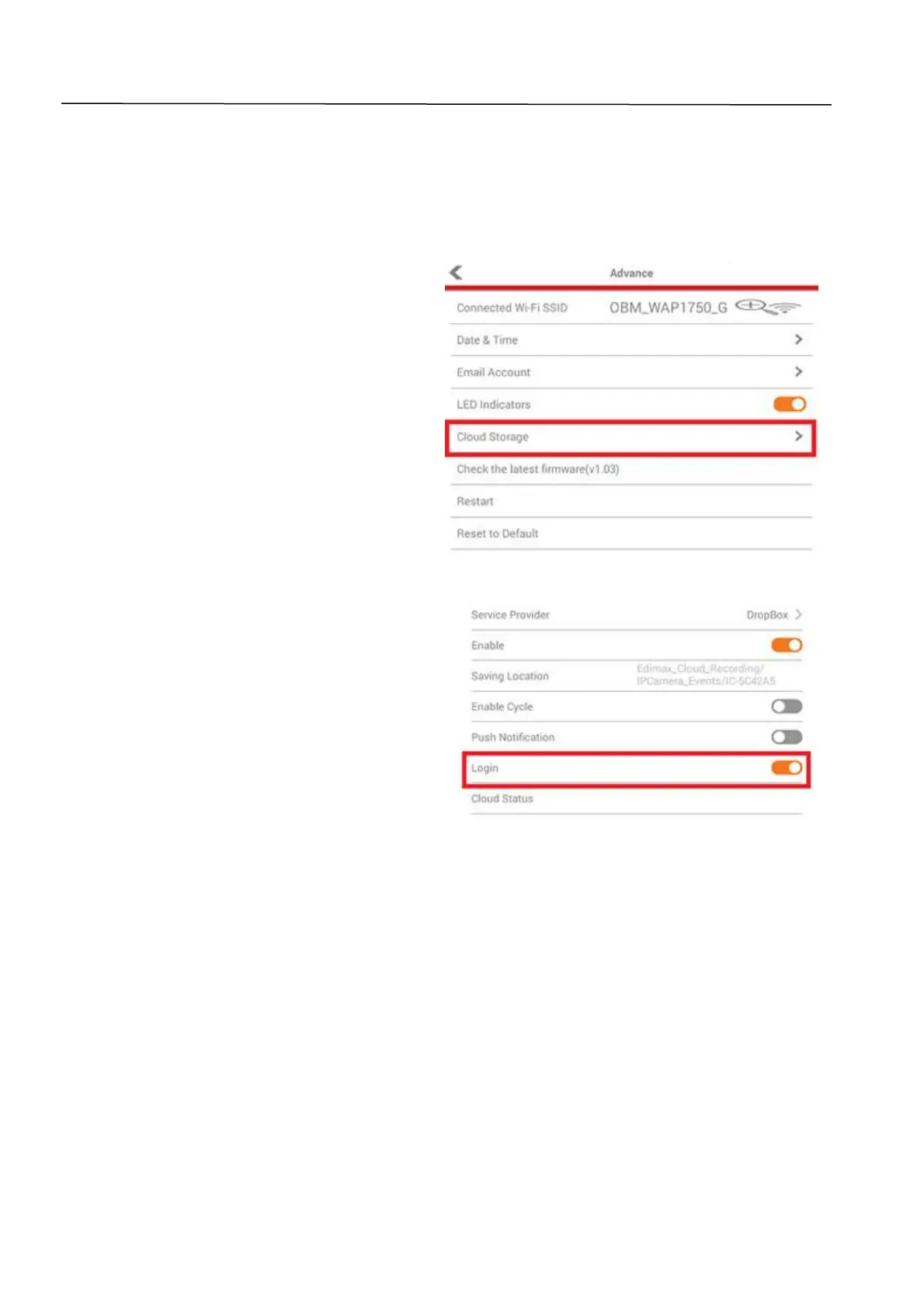
1. How can I setup my IC-6220DC to store recordings to a Dropbox
account?
a. You need to enter your Dropbox
account login credentials into the
EdiLife app after the camera is
setup and working properly.
Go to Settings Advanced
Cloud Storage.
Tap the Login switch to login to your
account. You can enable cycle
recording (overwrite earlier
recordings when data storage is full)
with push notifications and check
the cloud status, as well as enable or
disable the cloud service function
altogether.
2. Are there any microSD/SDHC cards recommended for the IC-
6220DC, IC-6230DC, IC-5160GC, IC-9110W, IC-7113W & IC-3140W?
b. Minimum 8GB capacity is recommended with Class 10 speed rating. Below 2GB
and above 32GB are not supported.
The following Class 10 cards have been tested for compatibility without issues:
Kingston 4GB
Sandisk 4GB
Sandisk 8GB
Toshiba 8GB


 To Next Page