41
Software settings
5.
Restart SONAR, and from SONAR’s
Options
menu, choose
Audio
to open the
Audio Options
dialog box.
6.
In the
General
tab, click
Wave Profiler
.
When
Wave Profiler
is finished, click
[Close]
.
fig.sonar-2.eps
7.
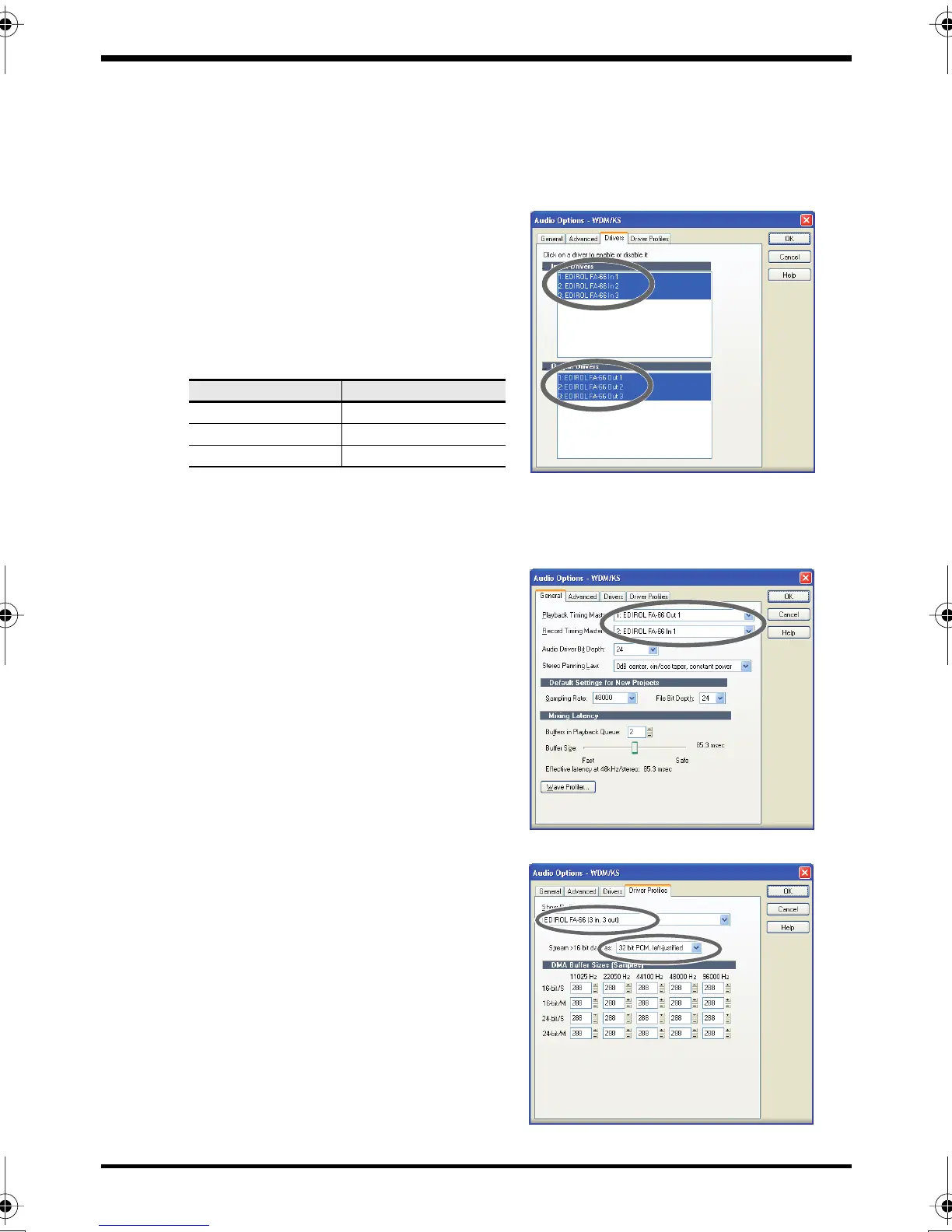
Click the
Drivers
tab.
In the lists of
Input Drivers
and
Output
Drivers
, click the following devices to
highlight them (white characters on blue
background), and un-highlight all other
devices. Click
[OK]
.
8.
Restart SONAR, and from SONAR’s
Options
menu, choose
Audio
to open the
Audio Options
dialog box.
fig.sonar-1b.eps
9.
In the
General
tab, make sure that
Playback Timing Master
is set to
EDIROL
FA-66 OUT
, and
Record Timing Master
is
set to
EDIROL FA-66 IN
.
fig.sonar-3.eps
10.
Click the
Driver Profiles
tab.
Select
EDIROL FA-66 (3 in, 3 out)
as the
setting for
“Show Profile for,”
and then
select
“32 bit PCM, left-justified”
as the
setting for
“Stream > 16 bit data as.”
Input devices
Output devices
EDIROL FA-66 In 1
EDIROL FA-66 Out 1
EDIROL FA-66 In 2 EDIROL FA-66 Out 2
EDIROL FA-66 In 3 EDIROL FA-66 Out 3
FA-66_e.book 41 ページ 2006年1月12日 木曜日 午前11時32分


 To Next Page