55
Troubleshooting
In Windows, did you make the setting described in “Giving priority to
background services”?
In order to ensure that audio/MIDI processing occurs smoothly, make the setting
described in “Giving priority to background services.”
(
➔
“Giving priority to background services”
(p. 29))
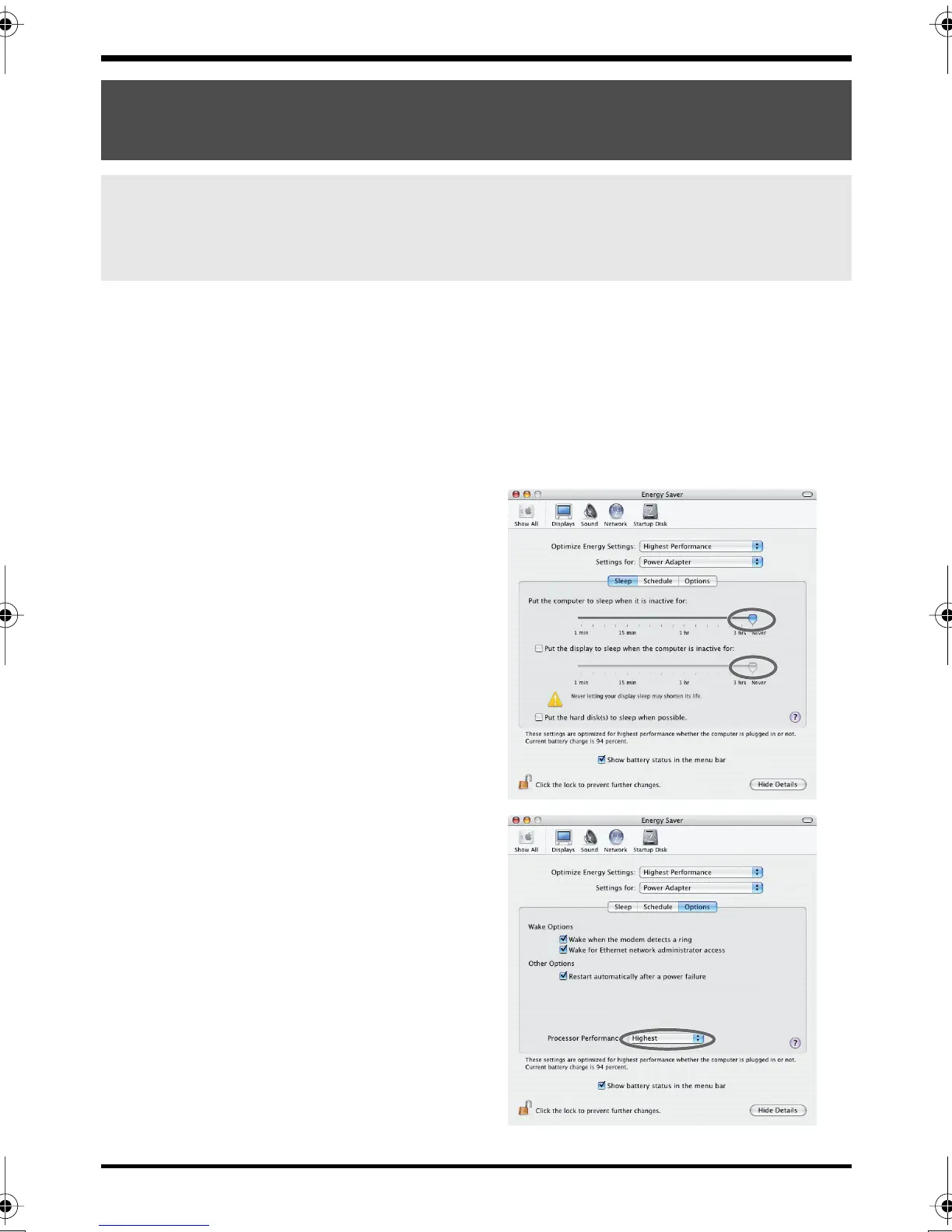
In Macintosh, check the Energy Saver settings.
In the Mac OS System Setup, set Energy Saver as follows.
fig.power-save2
Click the
Sleep
tab.
Set
“Put the computer to sleep when it
is inactive for:”
to
Never
.
Set
“Put the display to sleep when the
computer is inactive for:”
to
Never
.
fig.power-save1
Click the
Options
tab.
If there is a
Processor Performance
setting, set it to
Highest
.
Noise or pops are heard when recording/
playing on your computer
Noise is heard during audio playback
Pops/clicks occur during audio playback
Noise is heard in the recorded sound
FA-66_e.book 55 ページ 2006年1月12日 木曜日 午前11時32分


 To Next Page