44
Software settings
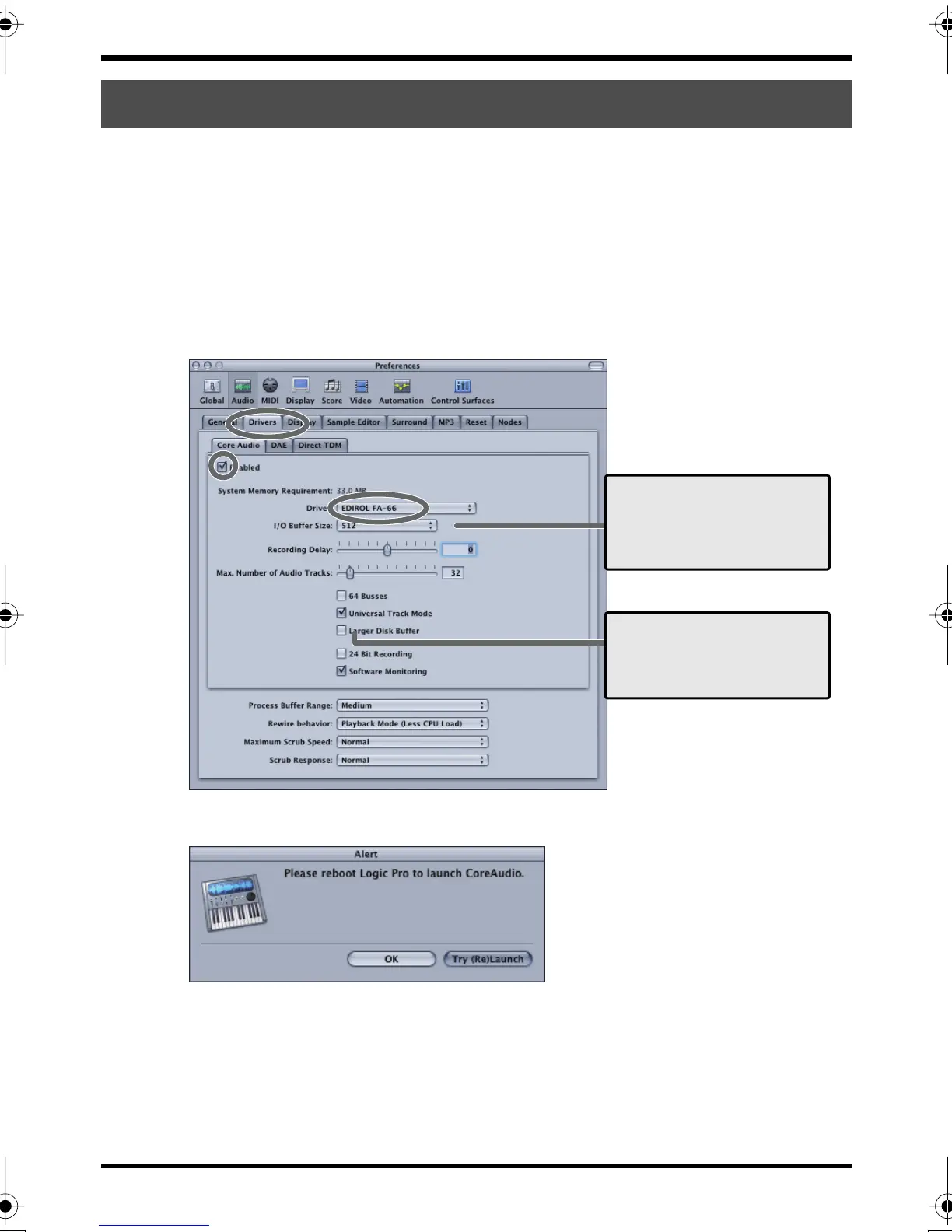
Here is an example using Logic Pro 7.0.1.
1.
Power up the FA-66, and then start up Logic.
2.
From the
Logic Pro
menu, choose
Preferences - Audio
to open the
Preferences
dialog box.
3.
Click the
Drivers
tab.
4.
In the
Core Audio
section, select (add a check mark to) the checkbox located at
the left of Core Audio.
fig.logic.eps
5.
If a dialog box like the following appears, click
[Try (Re)Launch]
.
fig.logic.eps
6.
Set
Driver
to
EDIROL FA-66
.
7.
Close the dialog box.
8.
If the Aleart dialog box appears, click
[Try (Re)Launch]
.
Logic
33
66
44
I/O Buffer Size
[Example setting for use at 96 kHz]
As a general guideline, use the following
setting:
PowerPC G4 1 GHz or higher 512
PowerPC G4 1 GHz or lower 1024
Larger Disk Buffer
Check this box if a warning dialog box
such as “Disk is too slow” is displayed.
FA-66_e.book 44 ページ 2006年1月12日 木曜日 午前11時32分


 To Next Page