12. Line IN:
Using balanced XLR cable (not supplied) connect the speaker to an
audio source.
13. MIC IN: Plug your microphone into the appropriate XLR cable input to sing
along with the music.
14.
AC Power: Connect the detachable power cord to speaker and plug in to the
main wall outlet.
15.
POWER: Press to switch on /off the speaker.
16.
LED Switch: Press to switch on /off the lights.
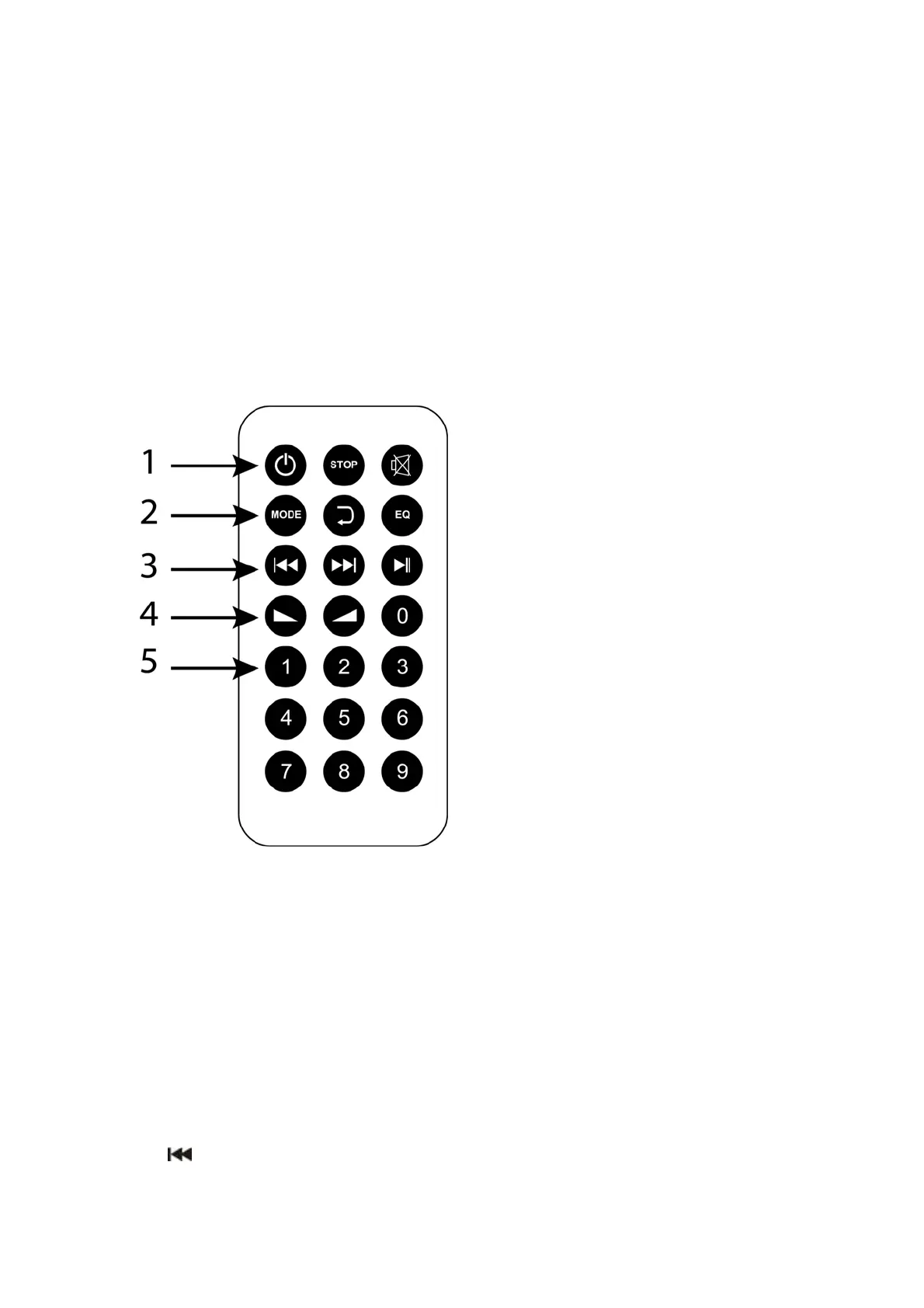
Remote control
1. POWER: When the Power switch on the unit is ON, press the Power button on
remote control and unit will go in STANDBY mode. Press power button again and
it will resume to normal mode.
2. STOP: In SD Card and USB mode press to stop the media being played.
3. MUTE: Press to mute music in any mode, press again to resume sound.
4. MODE: Press repeatedly to select the following modes LINE IN (AUX IN)/USB/TF
CARD / FM Radio/Wireless BT.
5. REPEAT: Press to repeat one song or repeat all songs.
In Wireless BT mode, this button has no function.
6. EQ: Press to switch between the different EQ modes. This works only in USB/SD
card mode. (EQ modes: Normal/Classical/Jazz/POP/Rock).
7. : In USB/ SD card and AUX mode press once to go back to the previous song;
press and hold for 3 seconds to rewind the current song.


 To Next Page