FIELDBEE WITH RTK BEE STATION IN WIFI MODE
This mode uses Wi-Fi and Internet to deliver RTK correction to the FieldBee
and can be used in 10 km+ range from the base station
Additional requirements
Wi-Fi access point with Internet access or Android device with shared Internet
(Hotspot). You will need separate Wi-Fi points for RTK Bee Station and FieldBee
rover antenna, however, you can use same access point for initial system testing.
Configuration
1. Perform steps 1-11 from FieldBee with RTK Bee Station in Radio (LoRa) mode
configuration.
2. Tap «Connect to Wi-Fi» button.
3. Select Wi-Fi access point you want to use for RTK Bee Station Internet
connection. Icon on each item will show Wi-Fi strength and if network is
protected.
4. If you select protected network a password prompt will appear. Enter network
password. You can always change the preferred Wi-Fi access point and enter
new password in the Settings using FieldBee app.
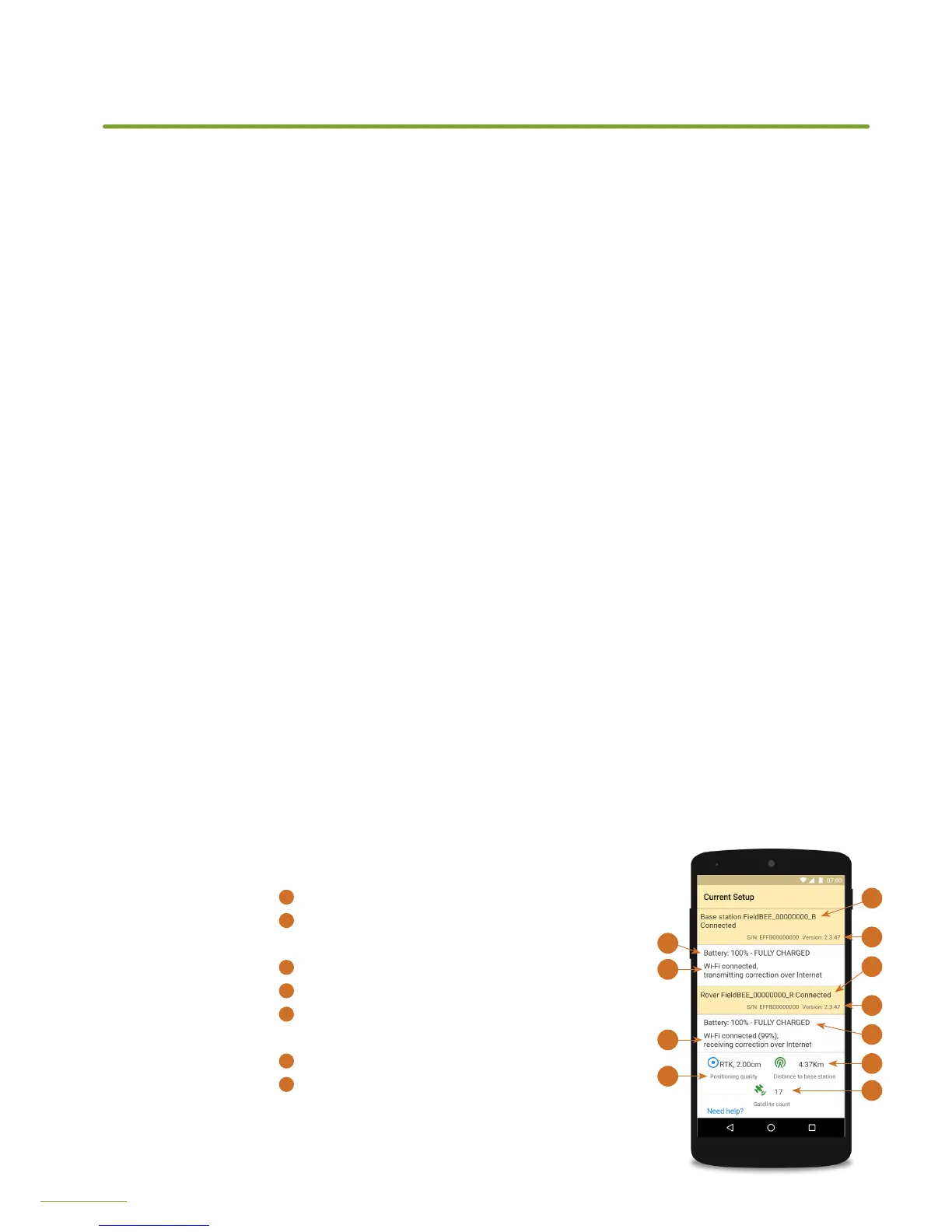
5. You will see a screen with RTK Bee station status:
a. Antenna name, connection status
b. Serial number and version, use this information when contacting eFarmer
support.
c. Battery level and charger status.
d. Wi-Fi mode status.
6. Along with base station status you will
see FieldBee rover status:
1
Antenna name, connection status
2
Serial number and version, use this information
when contacting eFarmer support.
3
Battery level and charger status.
4
Wi-Fi mode status.
5
Positioning quality: type of GPS fix and accuracy
in meters, lower value - greater accuracy.
6
Distance between rover and base station.
7
Satellite count: number of visible GPS and
GLONASS satellites, more satellites - better
conditions, value can vary from amount of
satellites used for calculating location.
CONFIGURATION
2
1
3
4
5
6
6
Screen from FieldBee
app with antenna status
2
1
4
3


 To Next Page