Getting
Started
7
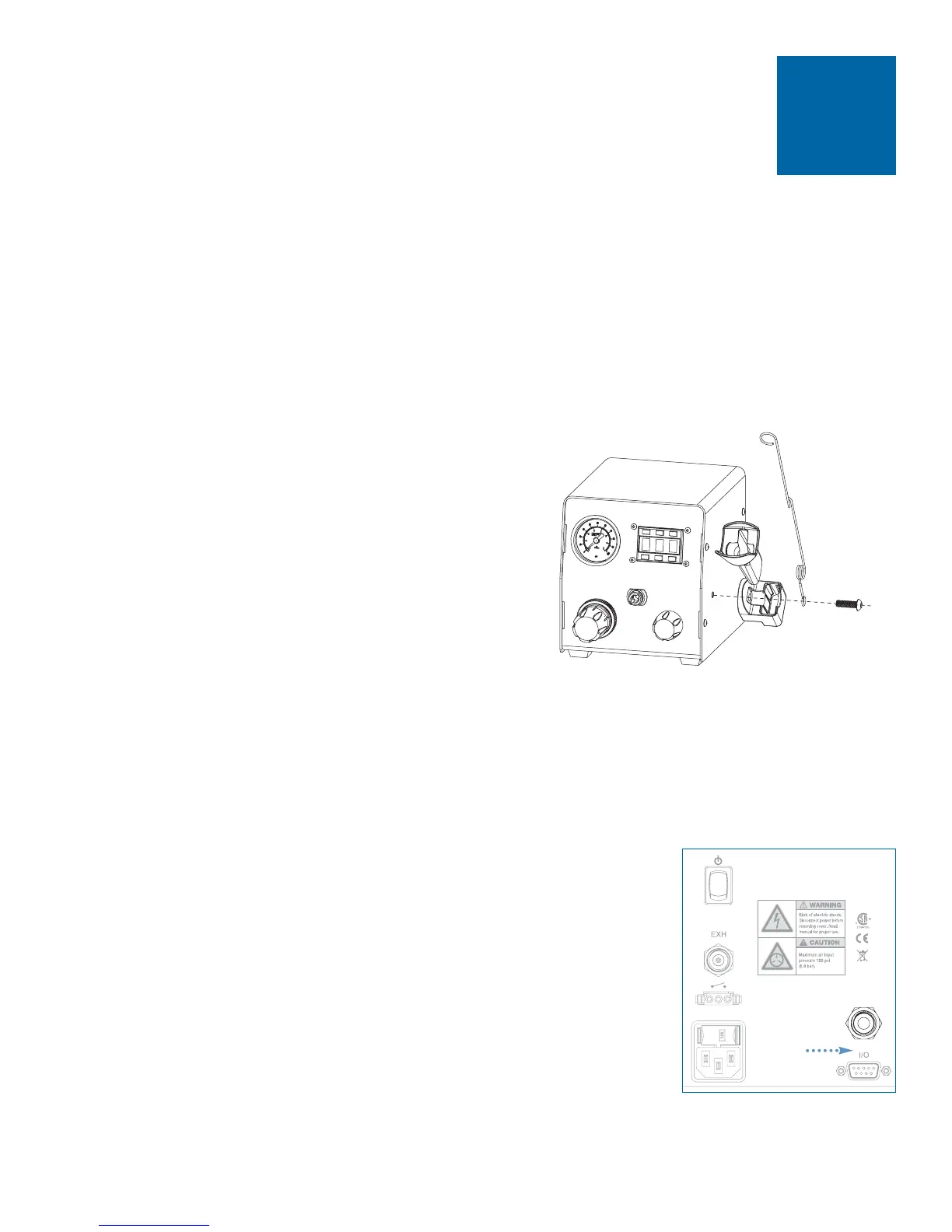
• Remove sleeve from barrel holder.
• Insert 6 mm screw through wire adapter
hose holder, then through barrel holder
❶
.
• Tighten screw to secure holder to
dispenser cover. Holder can be mounted
left or right.
• Insert barrel holder sleeve.
Note: If you prefer, the wire adapter hose
holder can be mounted on the opposite side of
the cabinet, separately from the barrel holder.
1
• Unpack the unit.
• Now is a good time to activate your Two Year Warranty. Register the
warranty online at www.efd-inc.com/warranty/two. Or if you prefer, follow
the instructions in the enclosed “Welcome” letter to contact your EFD
representative.
Unpack the Unit / Warranty
2
Install Barrel Holder
3
Note: Clean, dry filtered factory air is required to meet
warranty. If your air supply is not filtered, order the EFD
five micron filter regulator (EFD part #2000F755).
Turn air pressure regulator knob to zero before connecting
main air input to the Ultra 1400.
• Push one end of the 6 mm air input hose into the input fitting
on the back of the Ultra 1400.
• Connect the other end of the hose to your plant air supply.
A standard 1/4-inch NPT fitting is included with your dispenser.
• Set plant air supply at minimum 80 to 100 psi (5.5 to 6.9 bar).
Connect Air Input
air input
❶


 To Next Page