EasyManua.ls Logo

Ego Power+ ST1510S - User Manual

Default Icon
108 pages
Print Icon
To Next Page IconTo Next Page
Loading...
OPERATOR'S MANUAL
56-VOLT LITHIUM-ION
CORDLESS
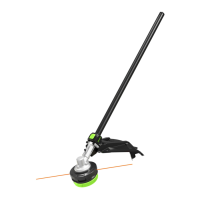
15" STRING TRIMMER
MODEL NUMBER
ST1520/ST1520-FC(CARBON FIBER, STRAIGHT SHAFT)
ST1510/ST1510-FC(ALUMINUM, STRAIGHT SHAFT)
ST1520S/ST1520S-FC(CARBON FIBER, HINGED SHAFT)
ST1510S/ST1510S-FC(ALUMINUM, HINGED SHAFT)
WARNING: To reduce the risk of injury, the user must read and understand the
Operator’s Manual before using this product. Save these instructions for future reference.
Español p. 73
Français p. 35
17-0906_EGO_ST1520 & ST1520S_StringTrimmer_manual_NA_V1

Questions and Answers

  • B
    brandonrossAug 14, 2025
    How to fix the trimmer head if it will not advance line on my Ego Power+ ST1510S Trimmer?
    • N
      Nicole BarreraAug 14, 2025
      If the trimmer head on your Ego Power+ Trimmer won't advance the line, it could be due to a few reasons: * The motor shaft or trimmer head may be bound with grass. Stop the trimmer, remove the battery, and clean the motor shaft and trimmer head. * There might not be enough line on the spool, or the line is breaking at the eyelet. Remove the battery and replace the cutting line. * The line could be tangled. Remove the battery, remove the line from the trimmer head, and rewind it. * The line might be too short. Remove the battery and manually pull the lines while alternately pressing down and releasing the trimmer head.
  • E
    Emma HuffmanAug 17, 2025
    What to do if the cutting line cannot be passed through the trimmer head on my Ego Power+ Trimmer?
    • G
      greillyAug 17, 2025
      If the cutting line cannot be passed through the trimmer head when inserting the line on your Ego Power+ Trimmer, it could be due to: * The cutting line being split or bent at the end. Cut the worn end of the line and reinsert it. * The lower cover not being released to position after reinstalling. Attach the battery pack onto the trimmer and press the line loading button to briefly start the power loading to release the lower cover.
  • L
    Leslie ZimmermanAug 21, 2025
    Why the cutting line cannot be wound into the trimmer head properly on my Ego Power+ Trimmer?
    • S
      Sara MullenAug 21, 2025
      If the cutting line cannot be wound into the trimmer head properly on your Ego Power+ Trimmer, it could be due to: * The cutting line being too long. Cut the line so that about 5.5 inches (14cm) is showing on each side. * Improper cutting line being used. It is suggested to use EGO original nylon cutting line. * Grass debris or dirt accumulating in the trimmer head and blocking the movement of the line spool. Remove the battery, open the trimmer head, and clean it thoroughly. * The motor overheating due to repeatedly operating the line winding system. Let the string trimmer work under no load for a few minutes to cool the motor, then try to reload the line. * Low battery. Charge the battery.
  • A
    Andrew WoodAug 25, 2025
    Why does my Ego Power+ ST1510S fail to start?
    • U
      umillerAug 26, 2025
      If your Ego Power+ Trimmer fails to start, several issues could be the cause: * The battery pack might not be properly attached. Ensure the battery pack is securely attached to the trimmer. * There may be poor electrical contact between the trimmer and battery. Remove the battery, inspect the contacts, and then re-install the battery pack. * The battery pack could be depleted. Charge the battery pack fully. * You might not be pressing the lock-off button and switch trigger simultaneously. Press and hold the lock-off button, then depress the switch trigger to activate the string trimmer.
  • B
    Brandi WrightSep 1, 2025
    Why is grass wrapped around the trimmer head and motor housing of my Ego Power+ Trimmer?
    • A
      Angelica ClarkSep 1, 2025
      If grass is wrapping around the trimmer head and motor housing of your Ego Power+ Trimmer, it's likely because you are cutting tall grass at ground level. To prevent this, cut tall grass from the top down, removing no more than 8 inches in each pass.
  • R
    Richard Wilson IIISep 5, 2025
    Why is the blade not cutting the line on my Ego Power+ ST1510S Trimmer?
    • C
      Charles GallowaySep 5, 2025
      If the blade on your Ego Power+ Trimmer is not cutting the line, it's likely that the line-cutting blade on the edge of the guard has become dull. Sharpen the line-cutting blade with a file or replace it with a new blade.
  • D
    David HoffmanSep 9, 2025
    What causes cracks on the trimmer head or the spool retainer to come loose from the spool base on my Ego Power+ Trimmer?
    • F
      fdanielsSep 9, 2025
      Cracks on the trimmer head or a loose spool retainer on your Ego Power+ Trimmer can occur if: * The trimmer head is worn out. Replace the trimmer head immediately. * The nut that locks the trimmer head is loose. Open the trimmer head and use an impact wrench to tighten the nut.
  • L
    Lisa LambNov 27, 2025
    What to do if my Ego Power+ Trimmer stops while cutting?
    • W
      William AndersonNov 27, 2025
      Your Ego Power+ Trimmer might stop while cutting due to several reasons: * The guard might not be mounted, leading to an overly long cutting line and motor overload. To fix this, remove the battery pack and mount the guard onto the trimmer. * You might be using a heavy cutting line. Use the recommended nylon cutting line with a diameter no greater than 0.095 inches (2.4 mm). * Grass might be binding the motor shaft or trimmer head. Stop the trimmer, remove the battery, and clear any grass from the motor shaft and trimmer head. * The motor may be overloaded. Remove the trimmer head from the grass to allow the motor to recover. When cutting, move the trimmer head in and out of the grass, removing no more than 8 inches in a single cut. * The battery pack or string trimmer might be ...

Summary

Safety Symbols

Safety Instructions

Understanding Safety Alerts

Details safety alerts, personal injury hazards, and symbol interpretations.

Important Safety Instructions

General Safety Precautions

Covers warnings on electric shock, hearing protection, and environmental hazards.

Safe Operating Practices

Provides guidance on clothing, tool use, footing, alertness, and storage.

Continued Safety Instructions

Pre-Operation Checks and Handling

Emphasizes checking parts, clearing area, and proper grip before operation.

Avoiding Abnormal Operation

Advises on handling abnormal vibration, damage, and appropriate line usage.

Battery Safety and Product Care

Safe Battery Handling and Disposal

Covers battery charging, disposal, care, and tool storage advice.

Assembly

Unfolding the Shaft

Mounting the Guard

Mounting and Adjusting Front-Assist Handle

Operation

General Operation Warnings

Warns against carelessness, lack of protection, and unapproved accessories.

Battery Installation and Removal

Instructs on installing and removing the battery pack safely before adjustments.

Battery Pack Installation and Removal

Holding the String Trimmer

Starting;Stopping the String Trimmer

Pre-Start Checks

Ensures secure footing and proper trimmer positioning before initiating operation.

Starting and Stopping Operation

Starting the String Trimmer

Explains how to use the lock-off button and switch trigger to start.

Stopping the String Trimmer

Instructs on how to stop the trimmer by releasing the switch trigger.

Safe Trimmer Usage

Reinforces safety with goggles, masks, and battery removal during use.

Pre-Use Checks and Trimming Tips

Cutting Line Management

Line Winding Procedure

Reloading the Cutting Line

Maintenance

Trimmer Head Removal

Trimmer Head Installation and Cleaning

Troubleshooting: Trimmer Start and Stop Issues

Trimmer Fails to Start Causes

Lists common reasons why the trimmer might not start.

Trimmer Stops While Cutting Causes

Identifies common causes for the trimmer stopping during operation.

Troubleshooting: Trimmer Head and Blade Issues

Trimmer Head Line Advancement Issues

Explains problems with line advancement and their solutions.

Blade Not Cutting Line Issues

Addresses problems with the blade not cutting the line effectively.

Trimmer Head Cracks or Loose Nut

Covers issues with the trimmer head integrity and retaining nut tightness.

Troubleshooting: Cutting Line Issues

Cutting Line Winding Problems

Solutions for problems with winding the cutting line into the head properly.

Cutting Line Insertion Problems

Addresses difficulties in inserting the cutting line through the trimmer head.

Ego Power+ ST1510S Specifications

General IconGeneral
TypeString Trimmer
MotorBrushless
Power SourceBattery
Voltage56V
Cutting Width15 inches
Cutting Path15 inches
Line Diameter0.095 inches
Line FeedBump Feed
Shaft TypeStraight
Battery56V Lithium-Ion
Feed SystemAutomatic
Warranty5-year limited warranty

Related product manuals