EHC Fusion E10 Combi – Installation and technical manual Page 23
14. Commisioning: Programmer/Cont.
Setting the date and time
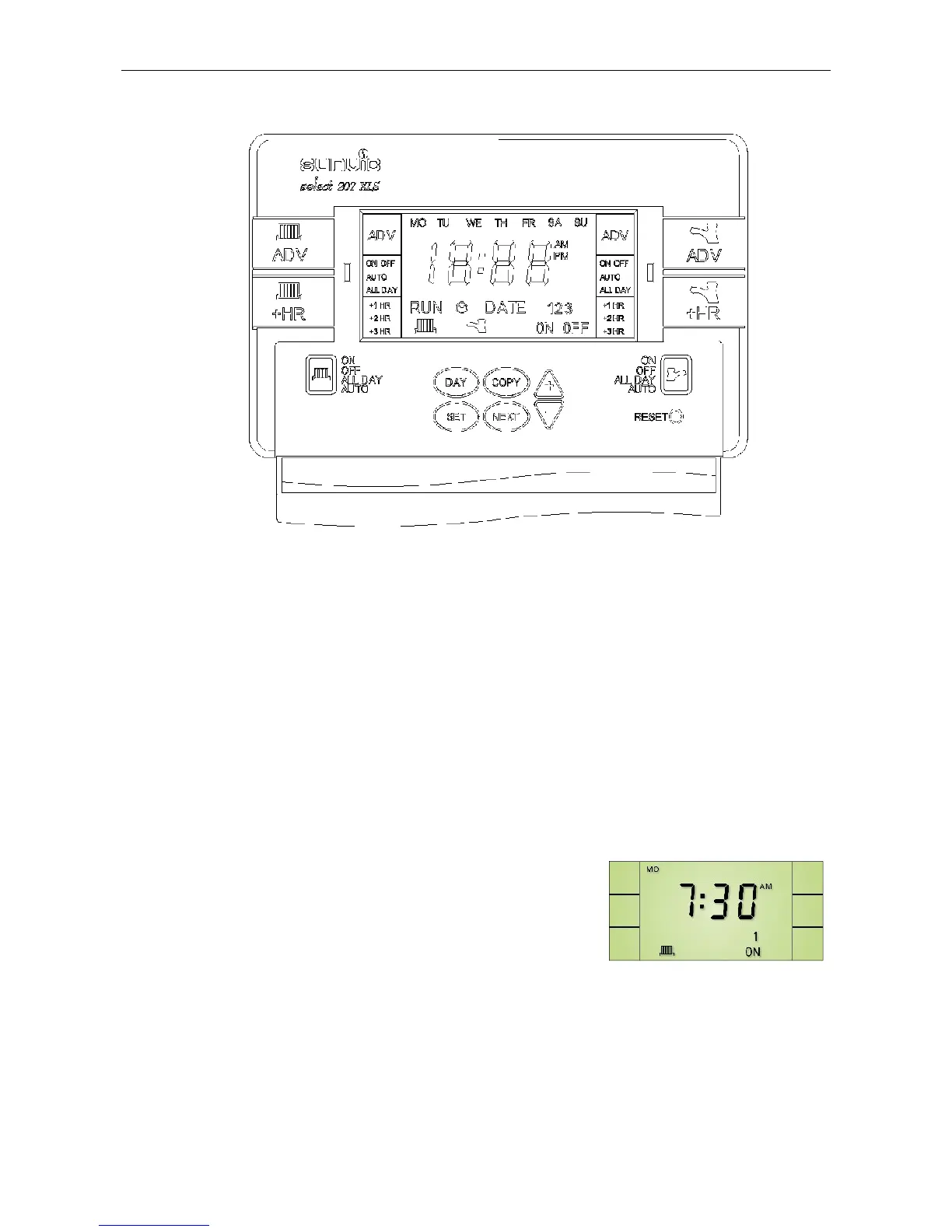
Press the SET button and the clock icon on the screen will flash. Press the +/- buttons to
adjust the time. Hold down the button to change the time quicker.
Press
SET button till the Y:00 icon (year) appears and the letter D flashes. Press the +/-
button to set the year. Press NEXT, and N:00 appears (month). Press +/- button to set
month. Press Next.
d:00 appears (day). Press +/- button to set day.
NOTE:The unit will automatically return to run mode if a period of 5 minutes passes without
any buttons being pressed.
Changing programme times
The built-in programmes for Central heating and Hot water can be easily changed to better
suit your needs.
To change the Central Heating programme, press
SET
until the radiator icon flashes in the screen and 1 ON
appears. This indicates the time shown on the display is
the first ON time. Change this to the required ON time by
pressing the +/- buttons.
Press
NEXT button, the display will now show 1 OFF. Change as before.
Use
NEXT and +/- buttons in this way to programme the second time period.
If the unit is set for 3 ON/OFF periods, the number
3 will appear. This is set in exactly the
same way as the previous first and second time period.


 To Next Page