18
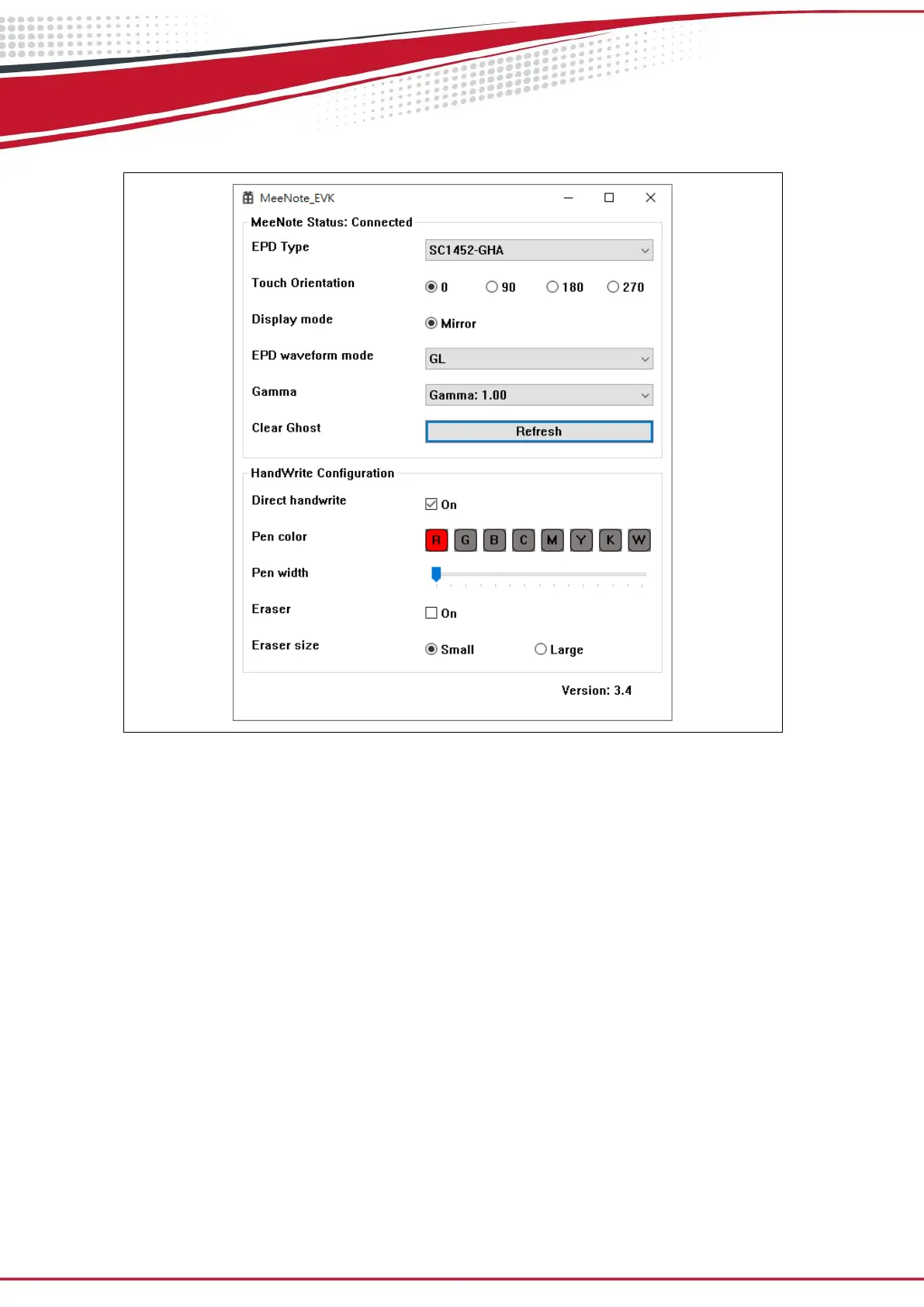
(2) Configuration of MeeNote.exe
Figure 3.9
MeeNote status: Used to display the current USB connection status, there are two
types, “Connected” and "Disconnected"
EPD type: Users can choose what kind of EPD type of MeeNote which they are
using, “Mono” for black and white EPD, “SC1452-FOA” and “SC1452-GHA” for
printed color EPD.
Touch orientation: Users can adjust the rotation angle of touch panel while the
touch coordinate is not normal, there are 4 different angles can be chosen: 0°, 90°,
180°, 270°
EPD waveform mode: Users can select which EPD waveform mode they would like
to use: A2, DU, GL, GC.
Gamma: Users can adjust the Gamma value to obtain clearer picture quality, there
are 7 different values can be set: Auto, 0.25, 0.45, 0.75, 1.00, 1.40, 2.20
Clear Ghost: Users can press this button to clear ghost by applying GC refresh.
Direct Handwrite: Direct Handwrite is a technology that allows T1000 to draw lines


 To Next Page