9
3 How to Demo the Picture
(1) Recommend picture format
The picture is recommended in BMP (24bit) or JPG (24bit) format and size needs to fit
the resolution of 7.8" Kaleido plus color ePaper display SC1452-GHA [1404(H)
×1872(V)] or 6" Kaleido plus color ePaper display SC1452-FOA [1072(H) × 1448(V)]
(2) Operating procedures
Make sure MeeNote kit 6"/7.8" EPD and PC are connected properly.
Connect the 6"/7.8" Kaleido plus color ePaper display to the MeeNote evaluation
kit (refer to Figure 2.1)
The PC is connected to the MeeNote evaluation kit via a Micro-USB cable.
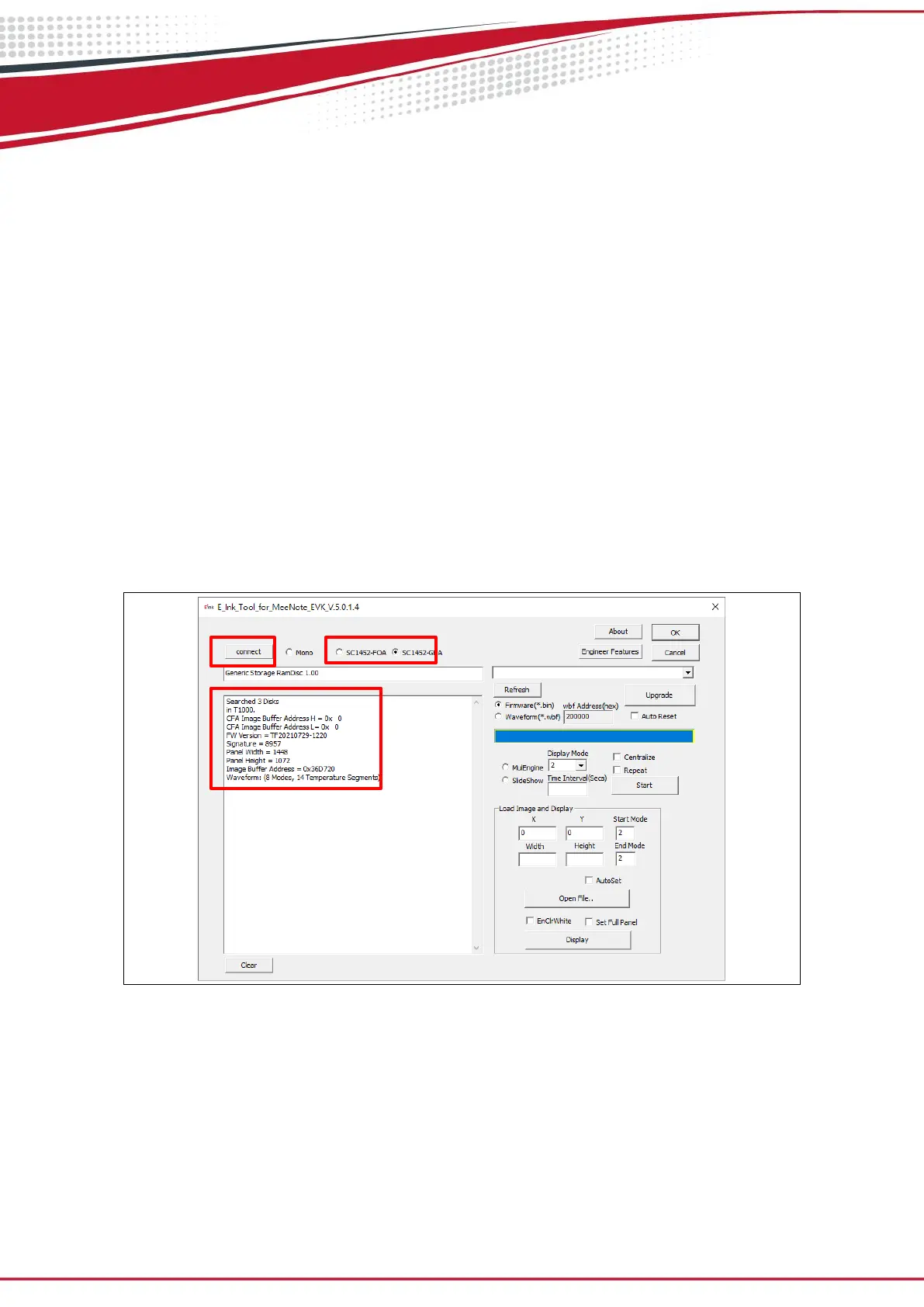
Execute the "E_Ink_Tool_for_MeeNote_EVK_V5.0.1.4.exe" software select
SC1452-FOA /SC1452-GHA and click the "connect" button to ensure that the
software is successfully connected to the physical drive (refer to Figure 3.1)


 To Next Page