31 | Avoset Quick Guide
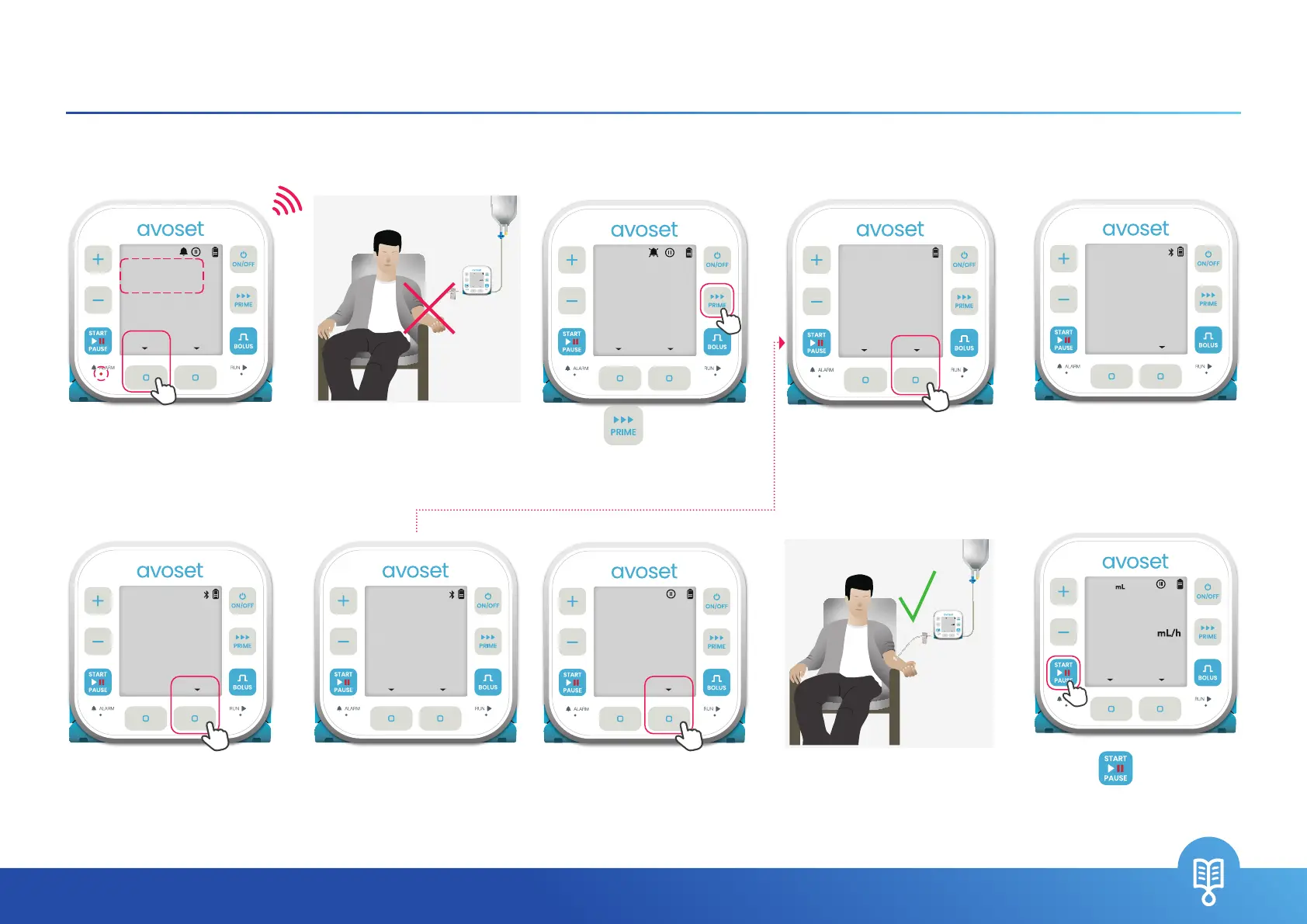
Air In Line
The pump detects an air bubble. The administration set needs to be primed
1. Press the
MUTE
multi- function button
2. Disconnect the
administration set from
the patient before priming
3. Press
to start
priming
+
–
START
BOLUS
PRIME
PAUSE
ON/OFF
GO
RUN
ALARM
3OO
PRESS START
NORMAL SALINE
REVIEW
1OOO
EDIT
BEEP
4. Make sure the patient is
disconnected and press
the
PRIME
multi-function
button
+
–
START
BOLUS
PRIME
PAUSE
ON/OFF
GO
RUN
ALARM
DISCONNECT
PATIENT
PRIMECANCEL
+
–
START
BOLUS
PRIME
PAUSE
ON/OFF
GO
RUN
ALARM
AIR IN LINE
PRIME SET
DISMISSMUTE
10. Press to resume
the infusion
+
–
START
BOLUS
PRIME
PAUSE
ON/OFF
GO
RUN
ALARM
3OO
MEDICATION
INFO
999.S
EDIT
5. Priming process
indication (will end
automatically unless
you press the
STOP
multi-function button)
7. Verify there is no air in
the set and liquid reaches
the end of the set and
Press
NO AIR
. Otherwise,
press
PRIME
6. Press
OK
multi- function
button
+
–
START
BOLUS
PRIME
PAUSE
ON/OFF
GO
RUN
ALARM
8. Once the patient is
connected, press
OK
multi- function button
9. Following successful
priming, connect the
administration set to the
patient
VERIFY AIR IS
OUT OF LINE
NO AIR
+
–
START
BOLUS
PRIME
PAUSE
ON/OFF
GO
RUN
ALARM
PRIMING...
O.S/9.0
mL
STOP
+
–
START
BOLUS
PRIME
PAUSE
ON/OFF
GO
RUN
ALARM
3OO
PRESS START
NORMAL SALINE
REVIEW
1OOO
EDIT
+
–
START
BOLUS
PRIME
PAUSE
ON/OFF
GO
RUN
ALARM
AIR IN LINE
PRIME SET
DISMISSMUTE
+
–
START
BOLUS
PRIME
PAUSE
ON/OFF
GO
RUN
ALARM
PRIME COMPLETE
9.0/9.0
mL
OK
+
–
START
BOLUS
PRIME
PAUSE
ON/OFF
GO
RUN
ALARM
CONNECT SET
TO PATIENT
OKPRIME


 To Next Page