32 | Avoset Quick Guide
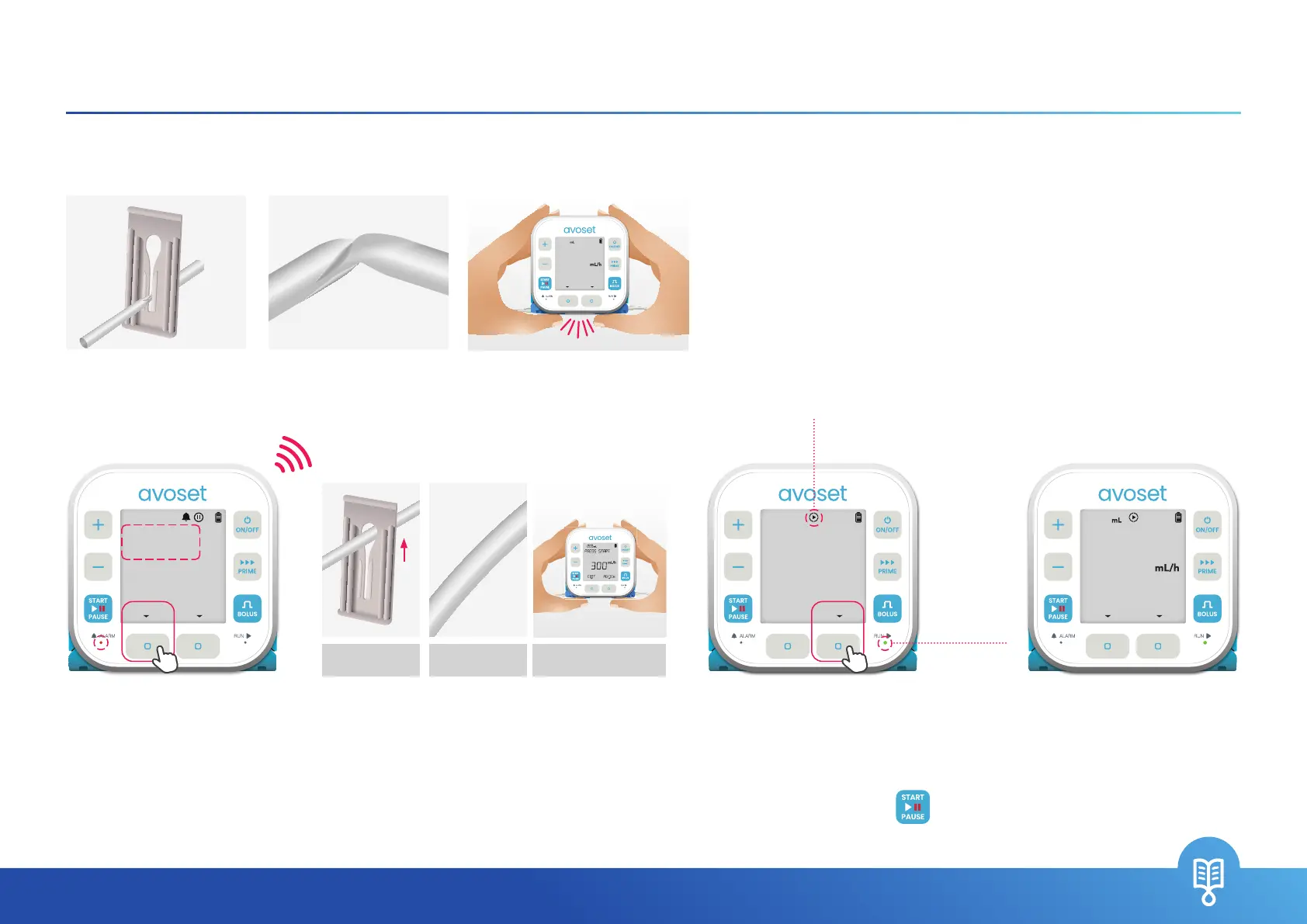
Downstream Occlusion
Reasons for an Occlusion alarm:
3. The infusion resumes
automatically once the
occlusion is resolved.
Press
OK
to acknowledge.
If the pump doesn’t resume
automatically, press the
key
to resume the infusion
4. The infusion is running
+
–
START
BOLUS
PRIME
PAUSE
ON/OFF
GO
RUN
ALARM
+
–
START
BOLUS
PRIME
PAUSE
ON/OFF
GO
RUN
ALARM
+
–
START
BOLUS
PRIME
PAUSE
ON/OFF
GO
RUN
ALARM
+
–
START
BOLUS
PRIME
PAUSE
ON/OFF
GO
RUN
ALARM
1. Press the
MUTE
multi-function button
+
–
START
BOLUS
PRIME
PAUSE
ON/OFF
GO
RUN
ALARM
Clamp is open
(set is not pinched)
Set is straightened
(no kinks)
Set cassette is not pressed
2. Verify all reasons for occlusion were
resolved (open closed clamps, straighten
kinks or verify cassette is not pressed)
BEEP
Green light
is ashing
The Running icon
is spinning
DOWNSTREAM
OCCLUSION
DISMISSMUTE
PUMP RUNNING
NO OCCLUSION
OK
3OO
MEDICATION
INFO
999.S
EDIT
+
–
START
BOLUS
PRIME
PAUSE
ON/OFF
GO
RUN
ALARM
3OO
PRESS START
MEDICATION
REVIEW
1OOO
EDIT
2. Set is kinked 3. Administration set cassette is pressed1. Clamps are closed
MEDICATION


 To Next Page