24
Chapter 2 Adjusting Screens
To set clipping
The method of displaying the dened color gamut outside the normal gamut of the monitor can be set.
Procedure
1. Choose “Color” from the Adjustment menu, and press
.
2. Choose “Advanced Settings” from “Color”, and press
.
3. Choose “Clipping”, and press
.
4. Select “On” or “Off” with
or .
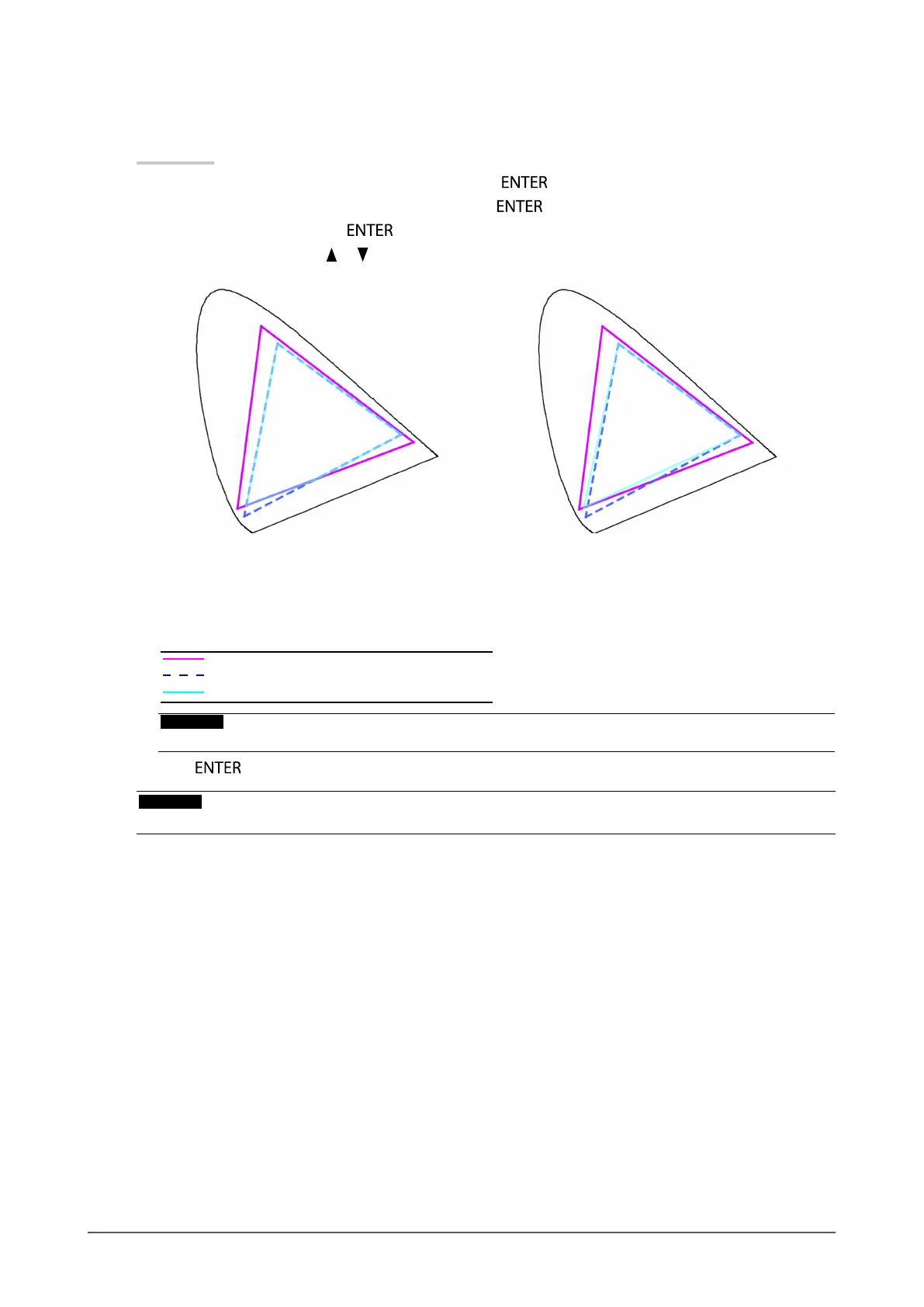
On Off
Displays colors based on the standard values. The
colors outside the gamut of the monitor are clipped.
Displays colors with priority on the color gradation
rather than the color accuracy. The primary colors
outside the gamut of the monitor (blue in the diagram)
are adjusted to the colors most similar to those that
can be displayed by the monitor.
Color gamut of monitor
Color gamut defined by standard
Color gamut displayed on screen
Attention
• This is a conceptual diagram, and does not display the actual color gamut of the monitor.
5. Press to exit.
Attention
• This function will be disabled if “Native” is selected at “To set color gamut” (page 22).


 To Next Page