9
Chapter 1 Introduction
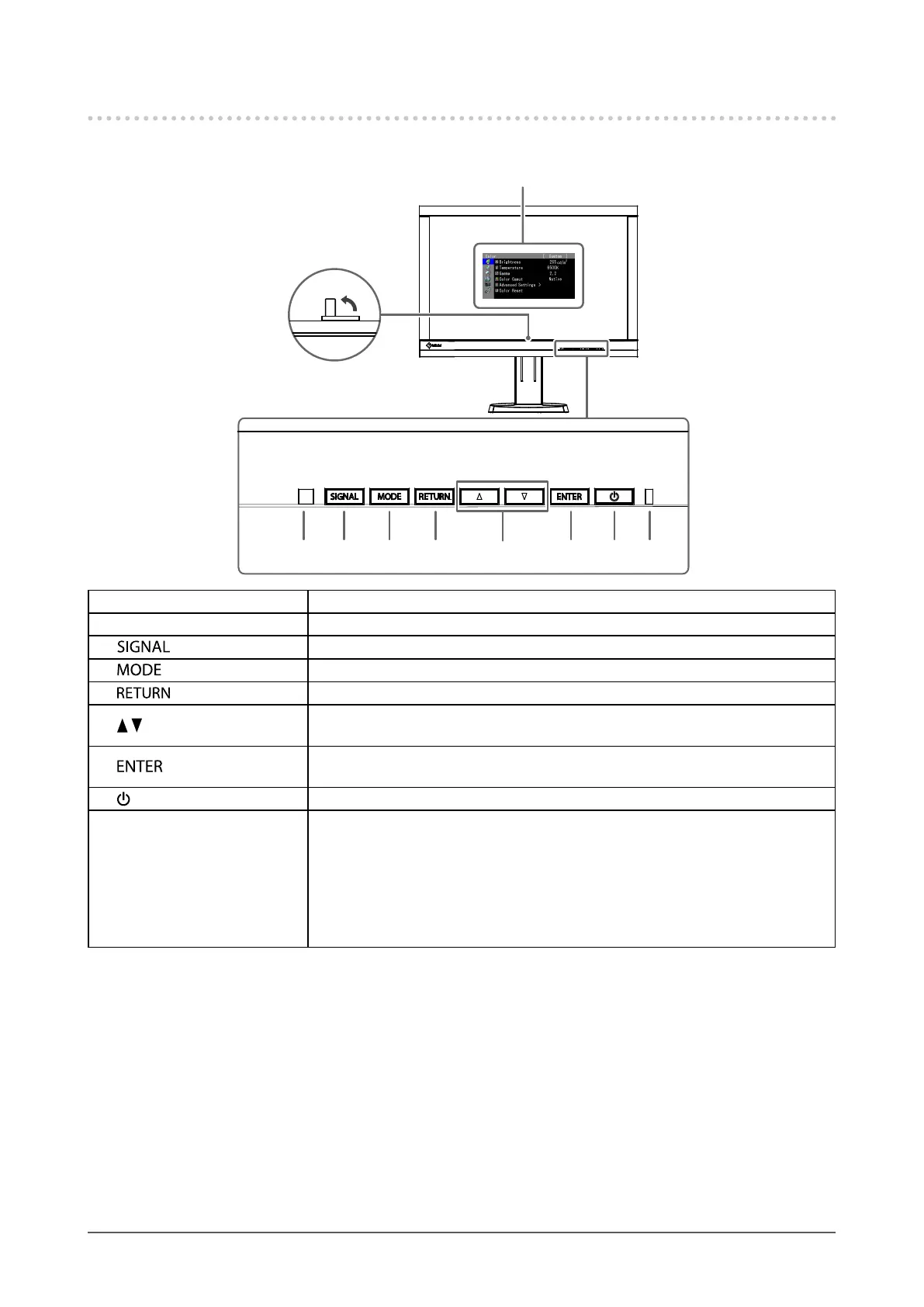
1-2. Controls and Functions
●
Front
7 8 92 4 53
6
1
Adjustment menu
*1
1. Built-in calibration sensor Executes calibration for an independent monitor. SelfCalibration function (page 35)
2. Ambient Light Sensor Measures ambient light.
3.
button Switches input signals for display (page 42).
4.
button Changes Color Mode (page 19).
5.
button Cancels the setting/adjustment and exits the Adjustment menu.
6.
buttons
• Provides the menu selection as well as the adjustment and setting of a function.
• Displays the Brightness menu (page 20).
7.
button
Displays the Adjustment menu, determines an item on the menu screen, and saves
values adjusted (page 12).
8.
button Turns the power on or off.
9. Power Indicator
Indicates the monitor’s operation status.
Blue: Operating
Flashing blue (2 times for each): Indicates that recalibration is required if the
SelfCalibration schedule (page 36) is set.
Orange: Power saving mode
OFF: Main power/Power off
*1 See “1-4. Basic Operations and Functions” (page 12) for how to use.



 To Next Page