37
Chapter 4 SelfCalibration
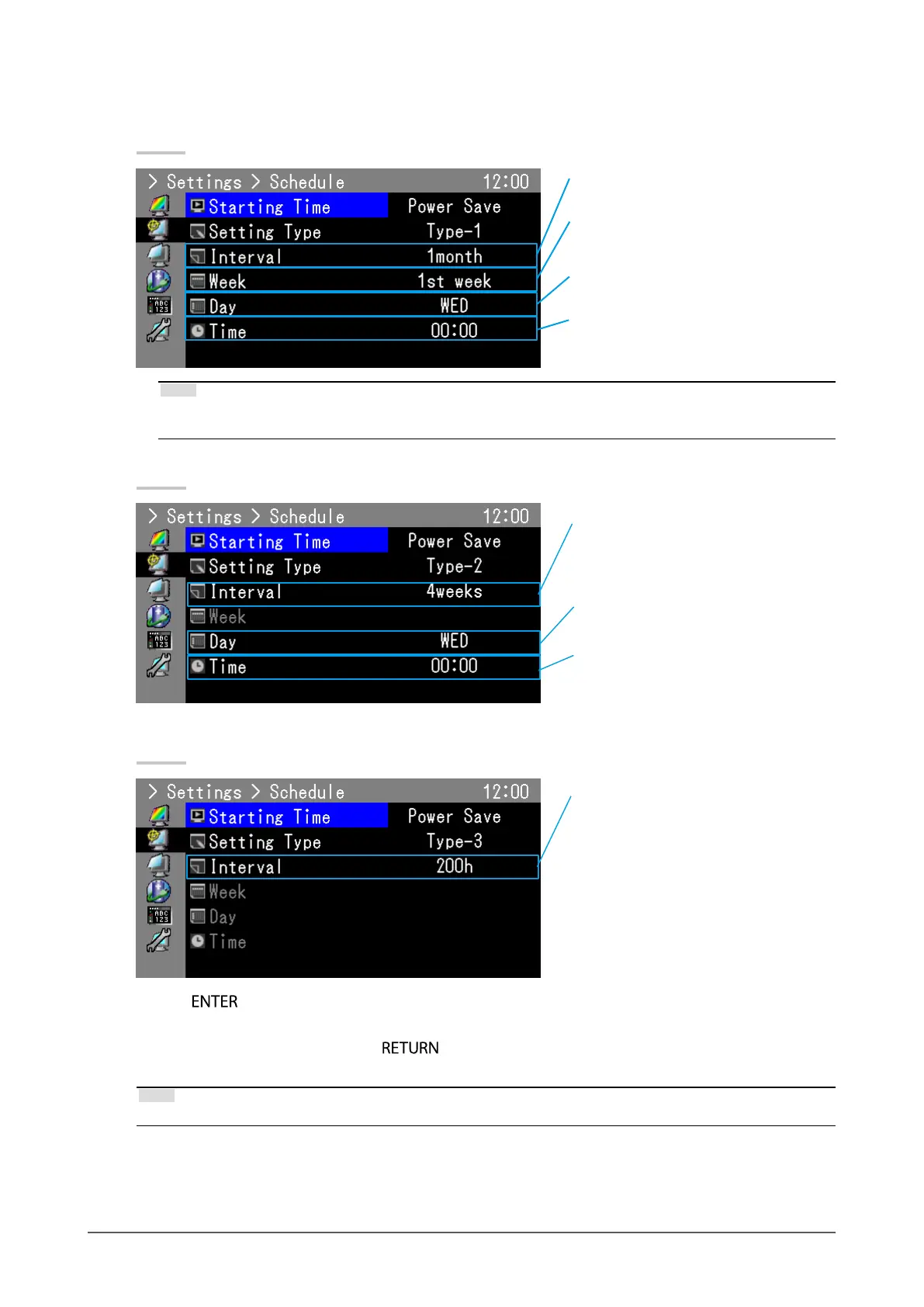
7. Select the interval for execution
The setting details differ depending on the type of “Setting Type” set.
Type-1
Set the interval between executions in months.
Set within 1 month to 12 months.
Set the week of the month for execution.
Make the setting between the 1st to the 5th
week.
Select the day for execution. Select from SUN/
MON/TUE/WED/THU/FRI and SAT.
Set the time at which SelfCalibration is
executed. Set within 0:00 to 23:30.
Note
• If the fth week is selected but the fth week doesn’t have the selected day, adjustment will be executed on the
fourth week.
Type-2
Set the interval between executions in weeks.
Set within 1 week to 5 weeks.
Select the day for execution. Select from SUN/
MON/TUE/WED/THU/FRI and SAT.
Set the time at which SelfCalibration is
executed. Set within 0:00 to 23:30.
Type-3
Set the number of hours of monitor usage to
elapse until execution. Set within 50 to 500
hours.
Press to exit.
8. After completing all settings, press .
Calibration schedule is set.
Note
• Upon reaching the set timing, the power indicator will blink in blue (quickly twice).


 To Next Page