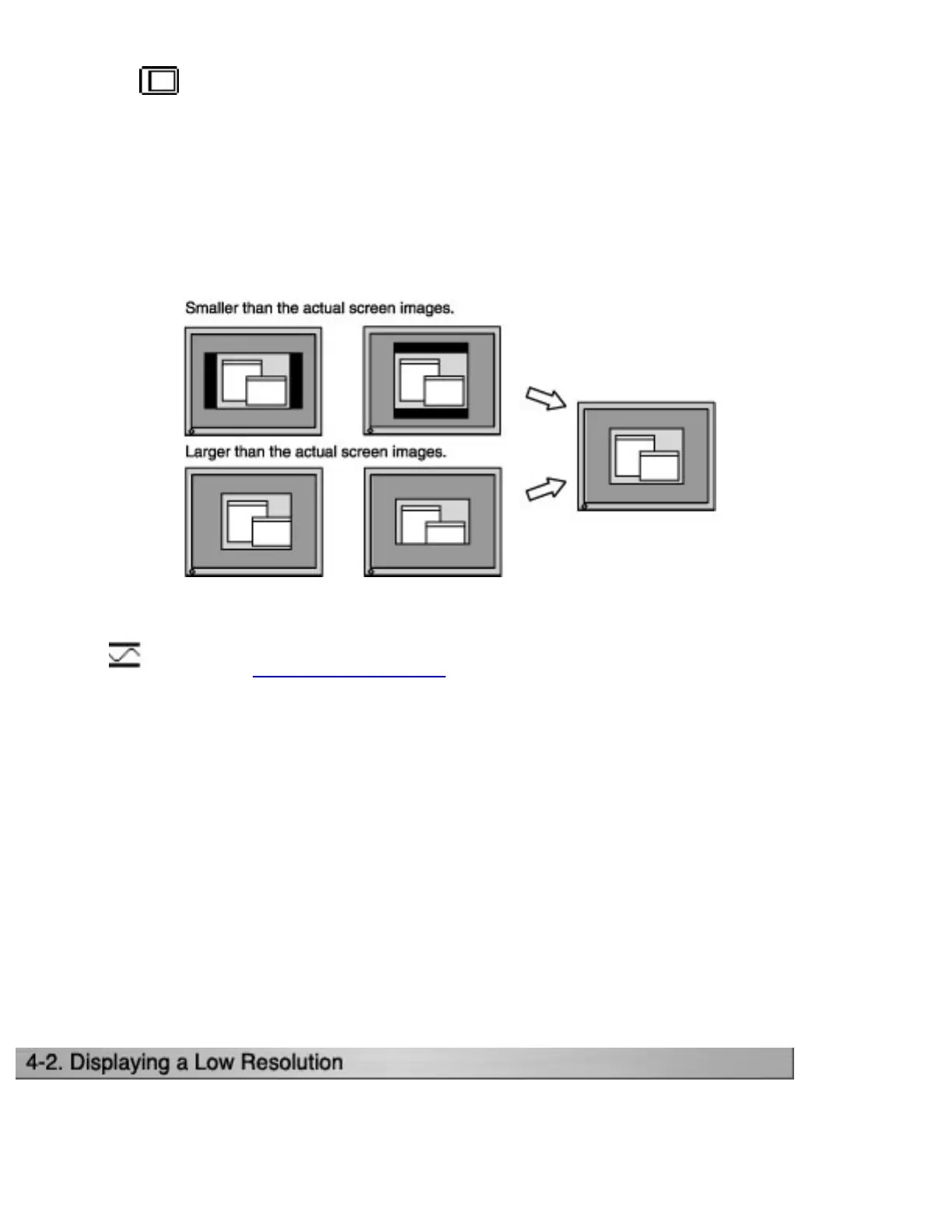
(4) Screen image is smaller or larger than the actual screen images.
=> Use the <Resolution> adjustment.
Adjustment is needed when the input signal resolution and the resolution now
being displayed are different.
Select <Resolution> and confirm if the resolution now being displayed is the
same as the input resolution. If it is not, adjust the vertical resolution using the
Up and Down button and adjust the horizontal resolution using the Right and
Left buttons.
4.Adjust the output signal range (Dynamic Range) of the signal.
=>
Use the <Range Adjustment> of <Screen> menu.
This controls the level of output signal range to display the whole color gradation (256
colors).
[Procedure]
Select the <Range Adjustment> in the ScreenManager. While the message is on the
screen, press the Auto Adjustment button on the control panel to adjust the Range
Adjustment.
The screen blanks for a moment and adjusts the color range to display the whole color
gradation of the current output signal.




 To Next Page