EasyManua.ls Logo

Eizo ColorEdge CS240 - Chapter 4 Connecting Multiple External Devices

Eizo ColorEdge CS240
77 pages
Print Icon
To Next Page IconTo Next Page
To Previous Page IconTo Previous Page
Loading...
36
Chapter 4 Connecting Multiple External Devices
Chapter 4 Connecting Multiple External
Devices
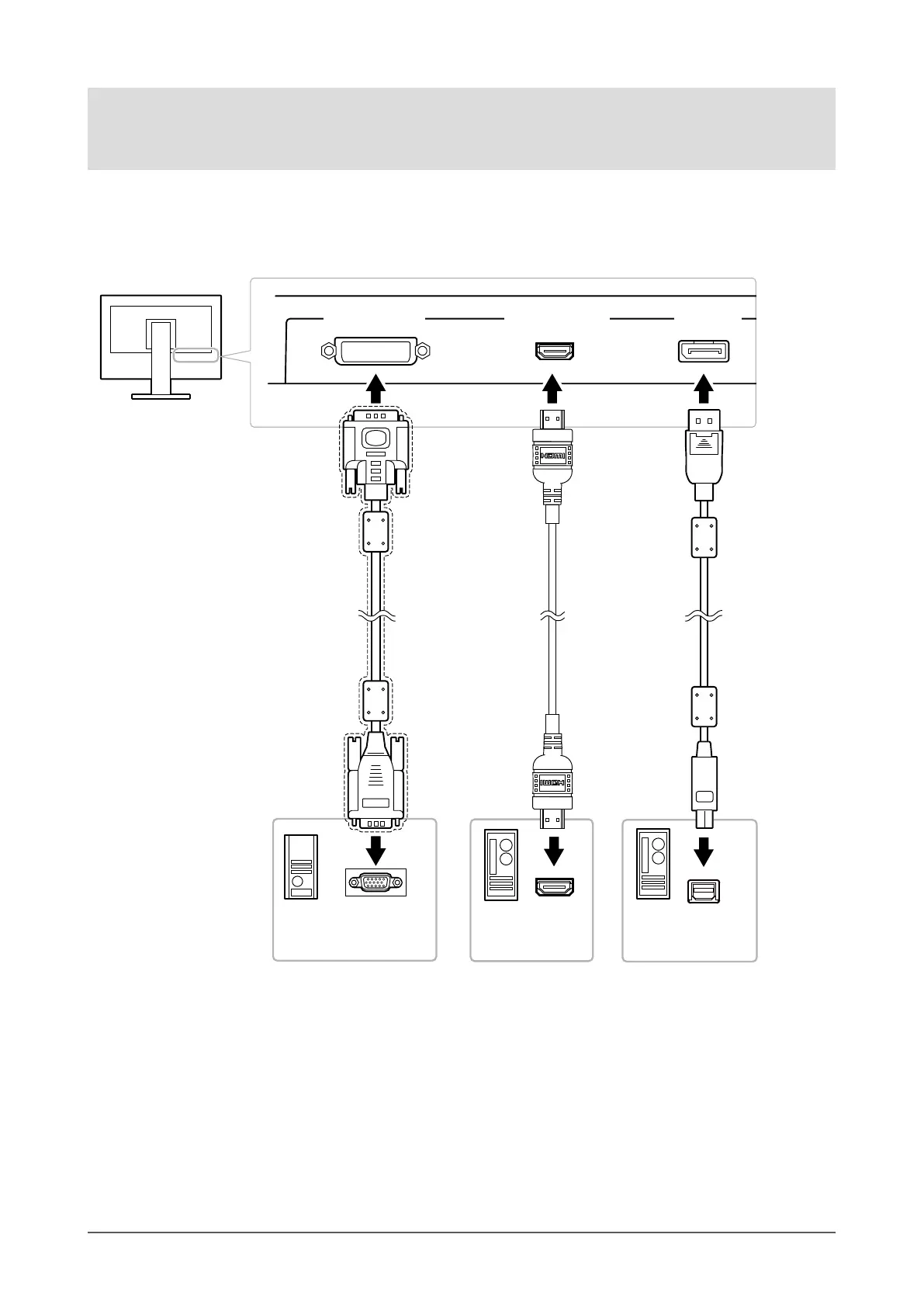
The product has multiple connections to external devices and allows you to switch to one of the connections for
display.
Connection examples
DisplayPort
connector
HDMI connector
HDMI cable
(Commercially
available product) *
1
Digital
(HDMI)
To external device 2
Mini DisplayPort /
Thunderbolt
connector
HDMI connector
To external device 3
D-Sub mini 15-pin
connector
Signal cable
FD-C16 (option)
Signal cable
(supplied PM200)
Analog
(DVI)
To external device 1
Digital
(DisplayPort)
*1 Use a product able to handle High Speed .
DVI-I connector

Table of Contents

Related product manuals