37
Chapter 6 Reference
6-4. Connecting Multiple PCs
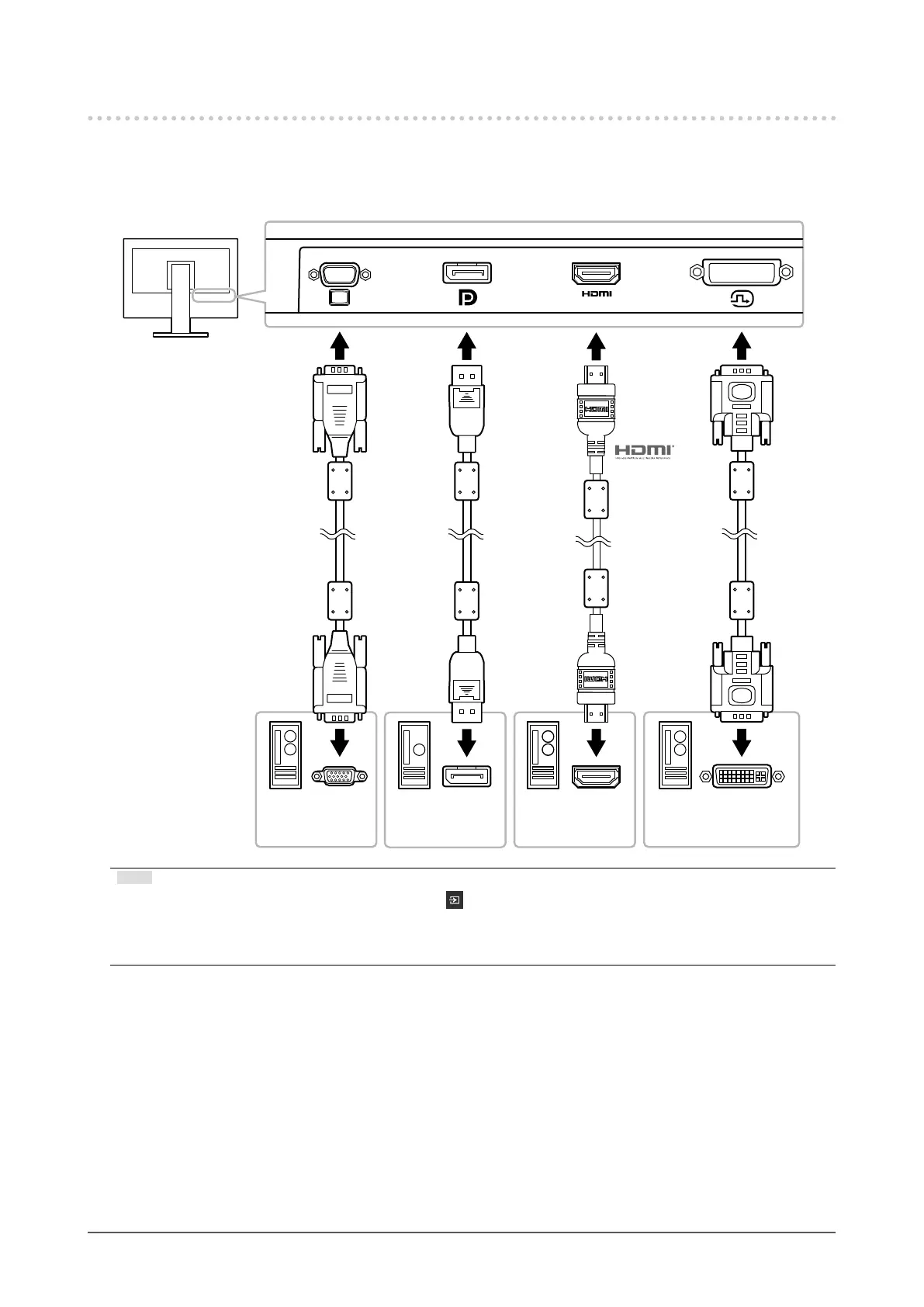
This product can be connected to multiple PCs and allows you to switch between the connections for
display.
●
Connection examples
Signal cable
HH200HS
(option)
Signal cable
FD-C39
(option)
Digital
(DVI)
Digital
(HDMI)
Signal cable
MD-C87
(option)
Analog Input
(D-Sub)
To PC 1 To PC 2 To PC 3 To PC 4
DVI connectorHDMI connector
D-Sub mini
15-pin connector
DisplayPort
connector
Digital
(DisplayPor)
Signal cable
PP200
(supplied)
Note
• You can select the input signal to display using the operation switch on the front of the monitor. For details,
see “2-2. Switching Input Signals” (page 12).
• This product provides a function that automatically recognizes the connector through which PC signals are input,
and displays images on the screen accordingly. For details, see “Auto Input Detection” (page 27).



 To Next Page