9
Chapter 1 Introduction
●
Rear
8
5 6 7
10
11
12
9
16
13 13
14
15
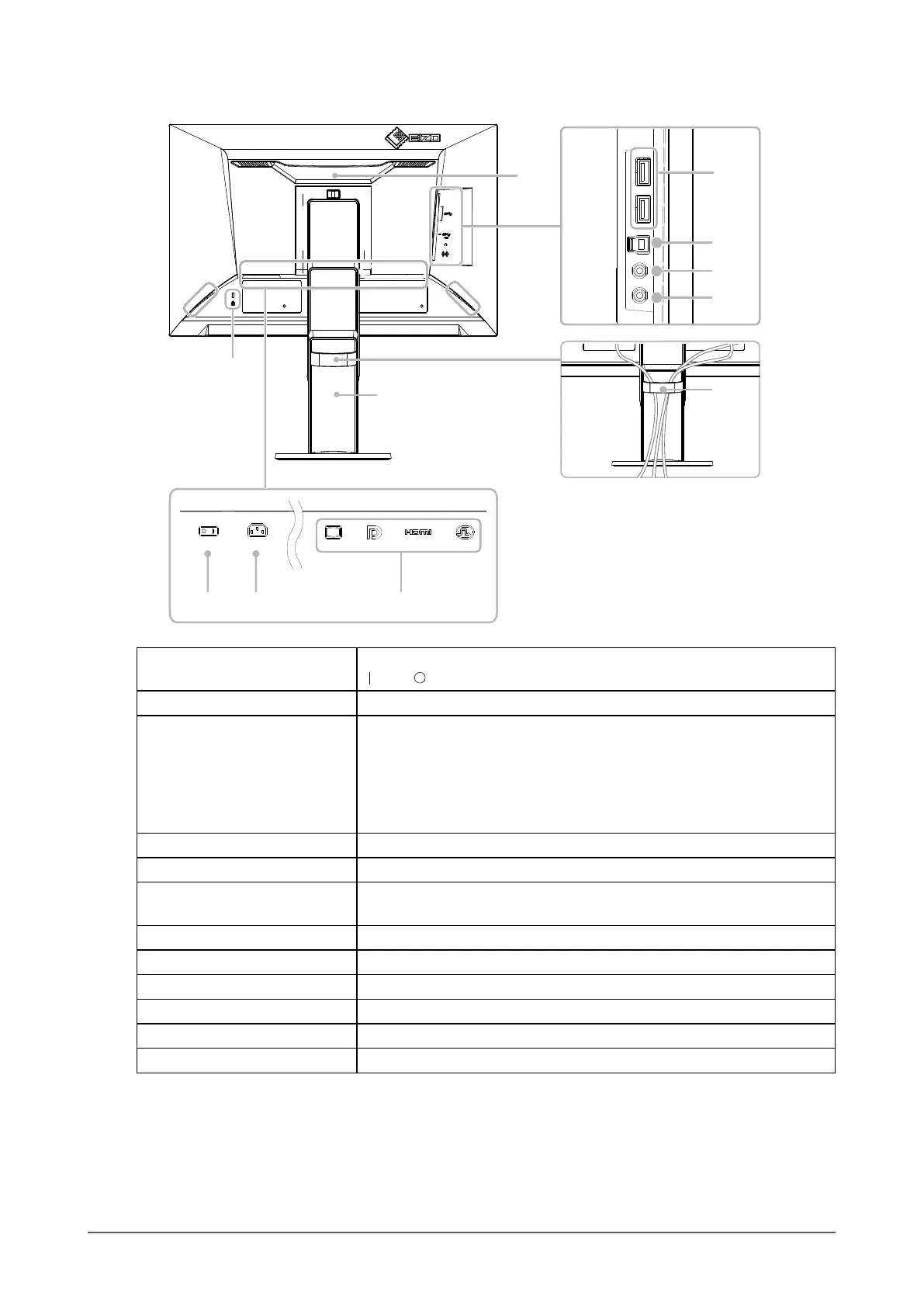
5. Main power switch Turns the main power on or off.
: On, : Off
6. Power connector Connects the power cord.
7. Input signal connectors The following connectors are available on the monitor rear in order of left
to right.
D-Sub mini 15-pin connector
DisplayPort connector
HDMI connector
DVI-D connector
8. Handle This handle is used for transportation
9. USB downstream port Connects to a peripheral USB device.
10. USB upstream port Connects to the USB cable when using software that needs a USB
connection, or when using the USB Hub function.
11. Headphone jack Connects to headphones.
12. Stereo mini jack Connects to a stereo mini jack cable.
13. Speakers Outputs audio.
14. Security lock slot Complies with Kensington’s MicroSaver security system.
15. Cable holder Holds the monitor cables.
16. Stand
*2
Adjusts the height and angle (tilt, swivel, and rotation) of the monitor.
*2 An optional arm (or optional stand) can be attached by removing the stand section (see
“6-1. Attaching
the Optional Arm” (page 32)).










 To Next Page