14
2 SCREEN ADJUSTMENT
Color Adjustment
This monitor provides following color adjustments function. Use each function
according to the purpose.
1. To set color temperature
2. To allow specific adjustments to Red, Green and Blue (R/G/B).
3. To eliminate dispartities in color temperature and brightness.
4. To brighten the image of photos or picture.
1.To set color temperature
Adjusts color by selecting color temperature
Procedure
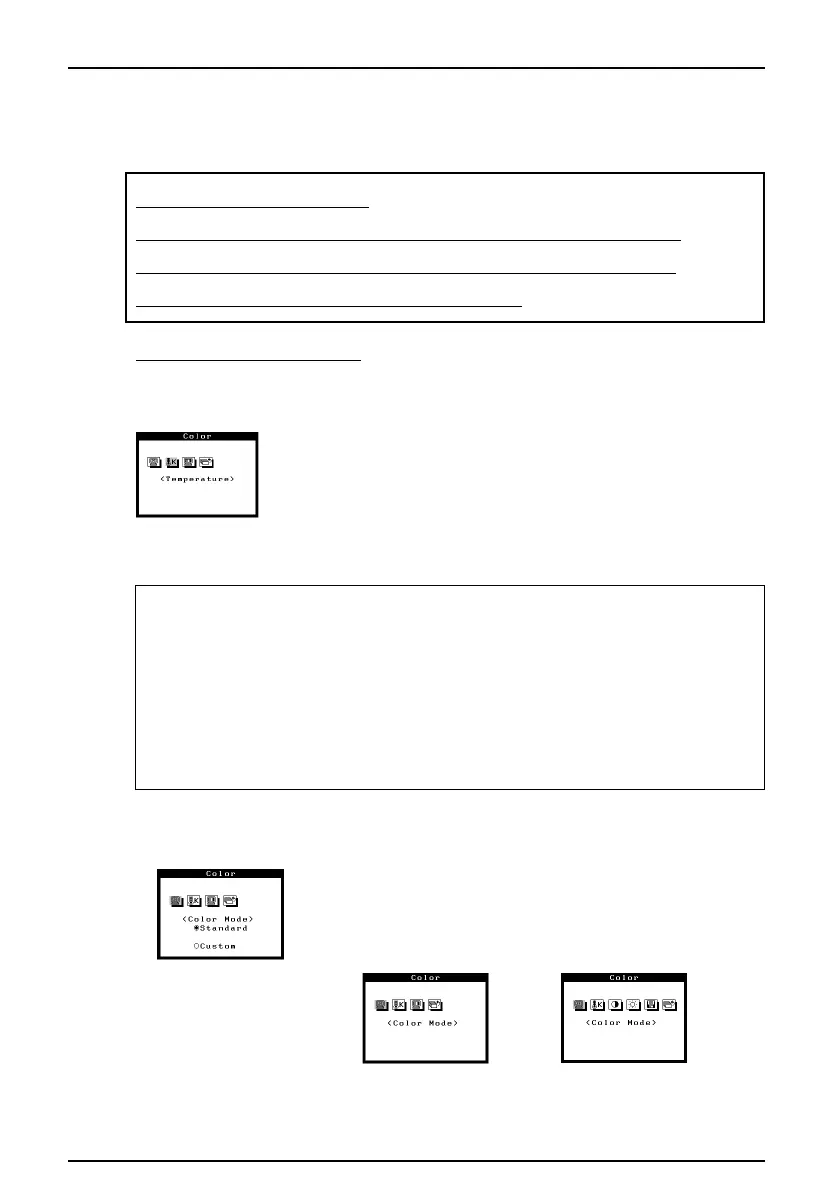
1) Select “Temperature” icon from the “Standard” adjustment
mode.
2) Adjujst the temperature by using the right or left arrow key.
Temperature canbe set from 4,000 K to 10,000 K in 500 K
increments. The default is set at 9,300 K.
What is color temperature?
Color temperature is a method to measure the white color tone, generally indicated
in degrees Kelvin. At high temperatures the white tone appears somewhat blue,
while at lower temperatures it appears somewhat red. Computer monitors generally
give best performance at high temperature settings.
5,000K: Often used in printing industry.
6,500K: Good for video-image display.
9,300K: Default setting for your EIZO monitor.
• The color adjustment mode
Procedure
1) Select “Color mode” icon from the “Color” menu.
2) Select “Standard” or “Custom” mode.
“Standard” mode menu
“Custom” mode menu












 To Next Page