22
2 SCREEN ADJUSTMENT
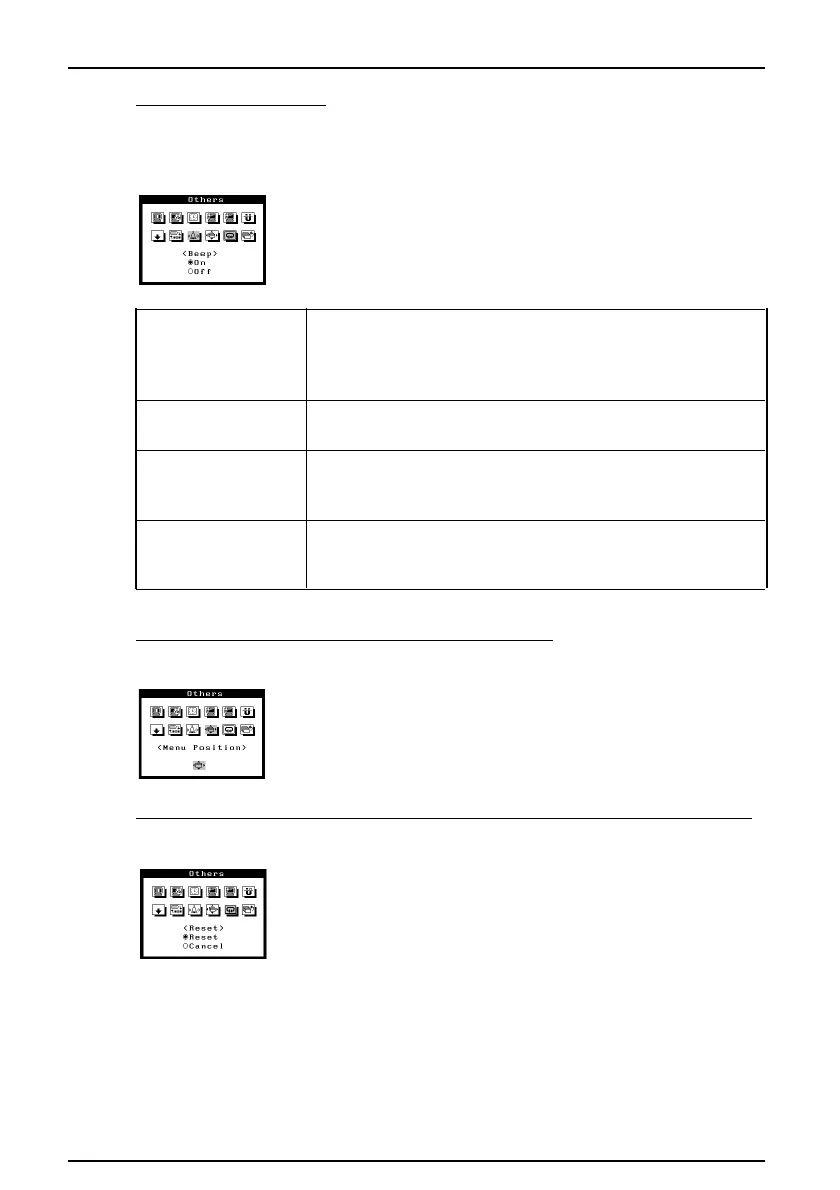
6. To set beeper on/off
To set the beepr is ON, the monitor will generate beep signals as shown below. To set
the beeper is OFF, the monitor will not beep.
Procedure
1) Select the beep “On" or "Off"
· ScreenManager item selected.
· ScreenManager parameter adjusted to minimum or
maximum limit.
· BNC/D-Sub selection button pressed.
· AUTO-SIZING button pressed.
· ScreenManager data-save executed.
· Monitor not connected correctly.
· PC turned off.
· Monitor received unsupported signal fequency.
· Monitor is in the advance notice mode of the Off Timer.
The monitor will be in the Off Timer Mode within 15
minutes.
7. To adjust menu position of the ScreenManager
Procedure
1) Select "Menu Position" and adjust the menu position as
desired by using the Arrow keys.
8. To return ScreenManager parameters to their factory default settings.
Procedure
1) Select "Reset".
Default settings are as follows.
Screen: · Contrast/Brightness: 100%/50 %
· Moiré : 0%/0%
Color: Standard/9,300 K
Others: · Fine Contrast: Text
· PowerManager: VESA DPMS/5 sec
· Off Timer: Disable
· Signal Filter 1: Mode 1
· Signal Filter 2: 100 %
· Button Setting: Auto Sizing
· Input Priority: D-Sub
· Beep: ON
Short beep
Long beep
Four short beeps
Two short beeps
every
fifteen seconds












 To Next Page