EasyManua.ls Logo

EJEAS V7 - Key Descriptions; Button Functionality Mapping

EJEAS V7
11 pages
Print Icon
To Next Page IconTo Next Page
To Previous Page IconTo Previous Page
Loading...
8
Handle EUC (optional)
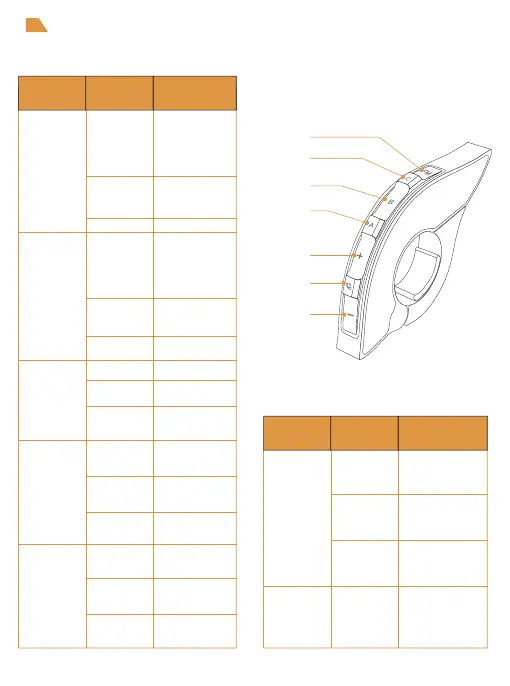
Key descriptions
FM Button
(V7 has no FM, so this
button can’t open FM)
Volume -
Volume +
Phone Button
Intercom
Button C
Intercom
Button B
Intercom
Button A
Double click
Intercom E pairing
Pushbuttons
Volume -
Volume +
Short press
Long press
Double click
Short press
Long press
Double click
Short press
Long press
Double click
Short press
Long press
Double click
Short press
Long press
Phone Button
Actions Function
Disconnecting
the intercom
Disconnecting
the intercom
Intercom A pairing
Intercom D pairing
Intercom B pairing
Last number redial
Answer the phone
when it comes
a call, hang up
Music play/pause
When no mobile
phone is connected
Connect the last
connected phone
Reject calls
Voice assistant
Next song when
music is playing.
Volume +
Previous song when
music is playing.
Volume -
None
None
Intercom
Button A
Intercom
Button B
Useless key
Volume -
+
Short press
Long press
Double click
Super
Long Press
Pushbuttons Actions Function
Disconnecting
the intercom
Clear handle
pairing records
Intercom C pairing
Intercom F pairing
Intercom
Button C

Related product manuals