SMS Gateway User Manual
Shenzhen Ejoin Technology Co.,Ltd.
47
3.6 Advanced Setting
3.6.1 Network settings
VPN settings
A virtual private network (VPN) extends a private network across a public network, such as
the Internet. It enables a computer or network-enabled device to send and receive data across
shared or public networks as if it were directly connected to the private network, while benefiting
from the functionality, security and management policies of the private network. This device
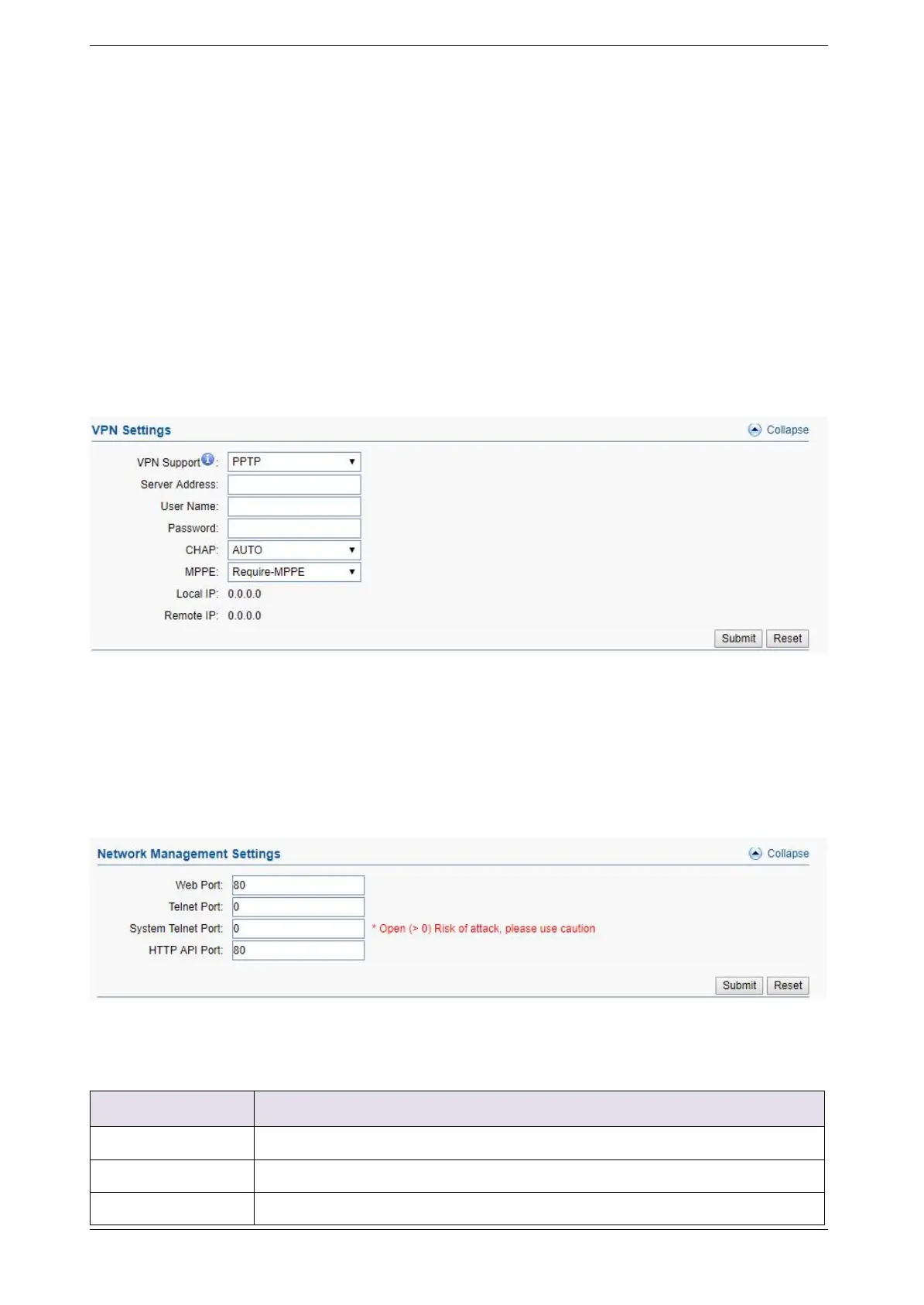
works as VPN(PPTP and openvpn) client mode only, if you want to use VPN function, please
input the VPN parameter on the VPN settings page.
Figure 3.6.1-1 VPN Settings
Network Settings
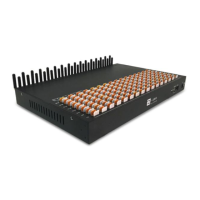
There are three ways to access the device: web, telnet and serial. web default port is 80, telnet
is 23 and serial is the com port you insert. Web configuration is widely used in this device.
Figure 3.6.1-2 Network Management Settings
Device web management port
Device telnet port, 0 means disabled
Device system shell by telnet, 0 means disabled



 To Next Page