SMS Gateway User Manual
Shenzhen Ejoin Technology Co.,Ltd.
36
Figure 3.4.6-1 Basic Settings
Switch sim card or not when one sim card reaches the value which set
Enabled: the failed sms will not count
Disabled: count failed sms
Enable: different port use different sms limit value.
Disable: all ports use same sms limit value.
The maximum sms which sim card can send.
The maximum sms which sim card can send every day.
The maximum sms which simcard can send every month.
Show active sim cards, default
Show all sim cards(including unactive sim cards)
Reset the sms count manually.
Table 3.4.6-1 Basic Settings
3.4.7 SMPP Settings
The Short Message Peer-to-Peer (SMPP) is a protocol used by the telecommunications
industry for exchanging SMS messages between Short Message Service Centers (SMSC) and/or
External Short Messaging Entities (ESME). The protocol is a level-7 TCP/IP protocol, which
allows fast delivery of SMS messages.
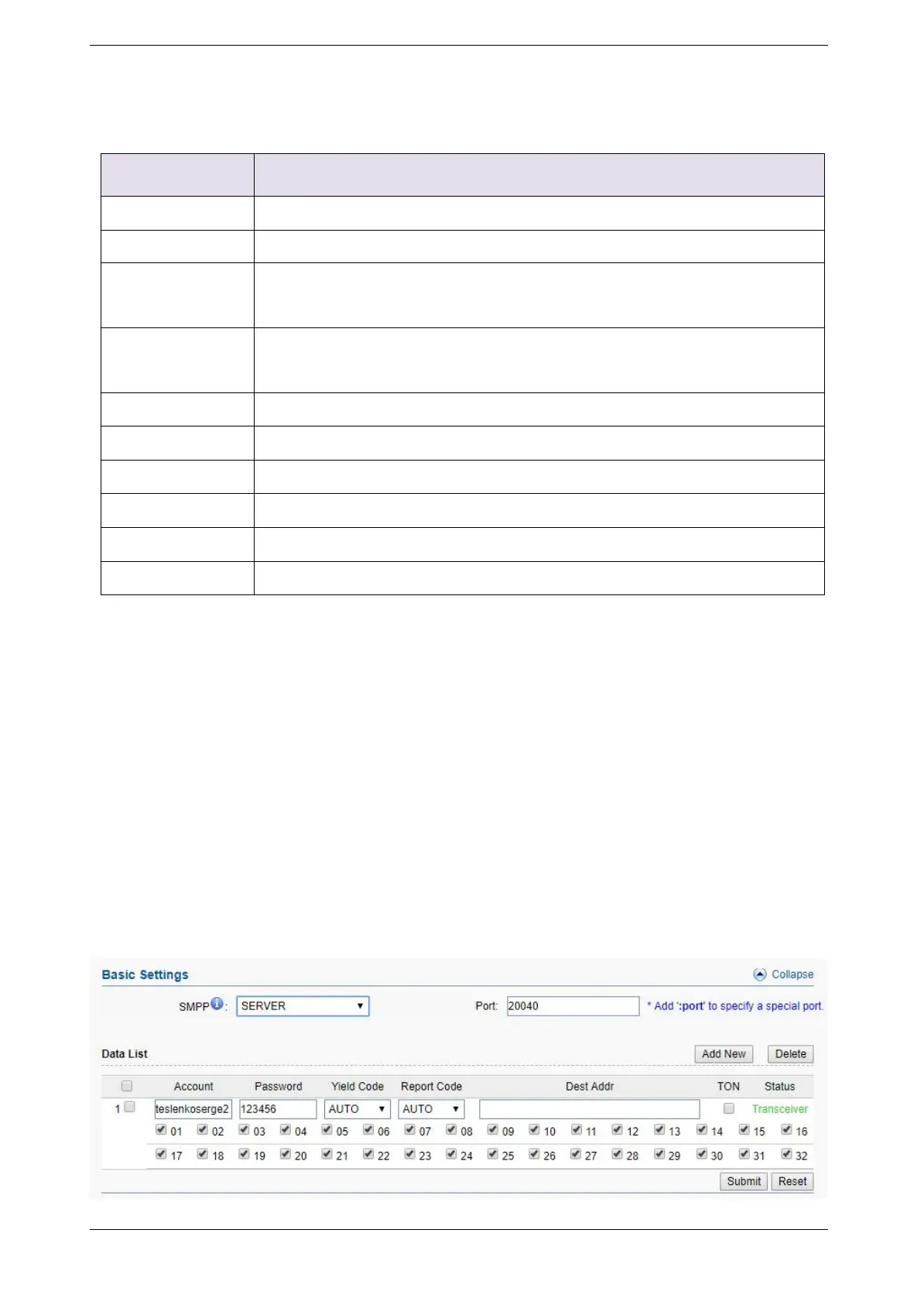
EJOIN device support SMPP V3.4, it can works as SMPP client and server, but we usually
used it as a SMPP server
BASIC settings



 To Next Page