EKO INSTRUMENTS CO., LTD. - Pyranometer MS-80/80S/80U - Instruction Manual Ver. 1
Pg. 47
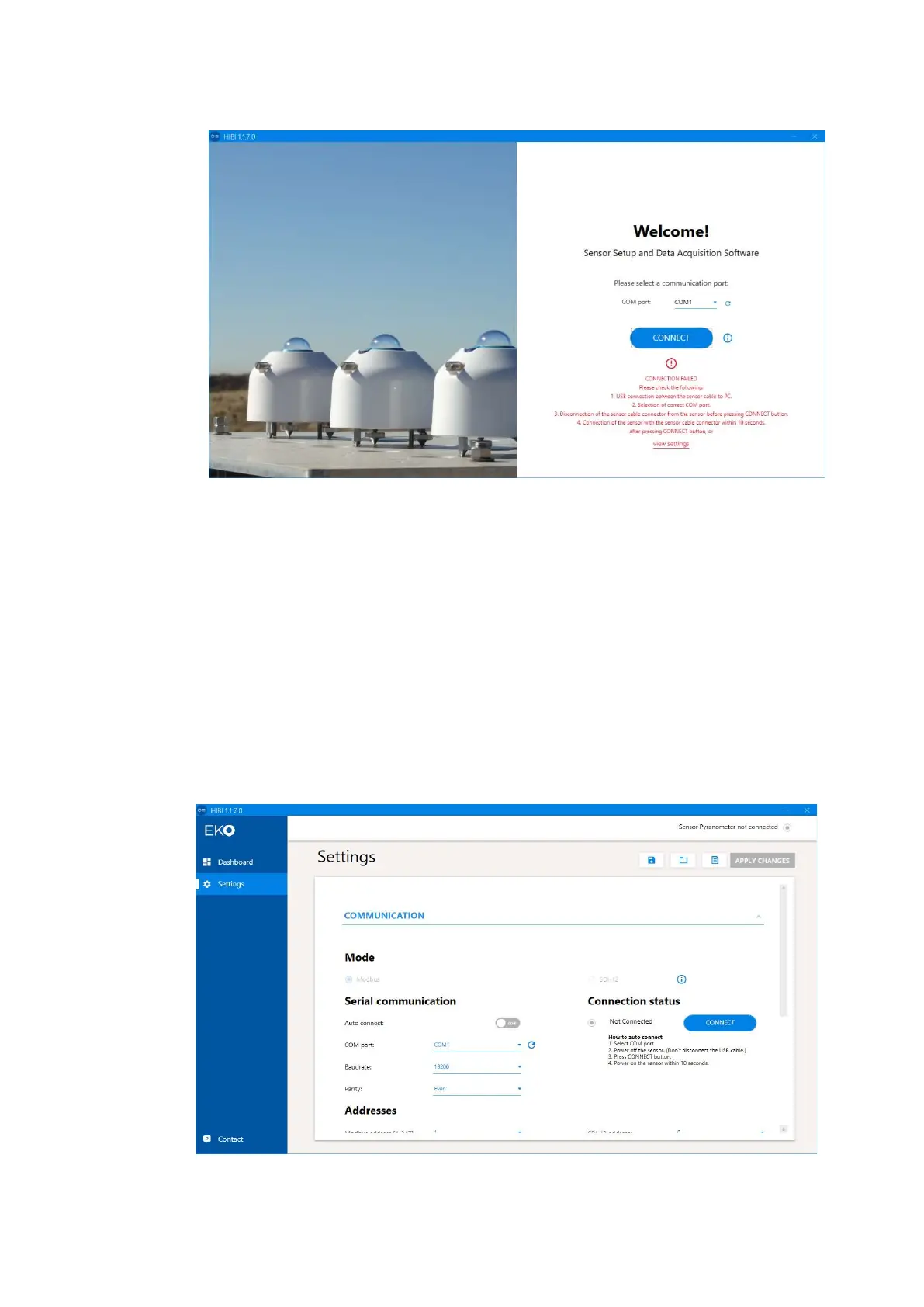
If the connection fails, the screen returns to the "Welcome" screen and "CONNECTION FAILED" is
displayed.
Make sure the connection settings are correct. To perform the ”Auto-connection” again, turn off the power of
the MS-80S, select "COM port", and then click "CONNECT".
For manual connections, click “View settings” at the bottom of “CONNECTION FAILED” to go to “Settings
screen”. (As for how to set and connect by “Manual connection”, refer to the procedures (4) Manual
connection) from the next section.
4) Manual connection
After turning on the power of the MS-80S, click "CONNECT" without selecting "COM port".
Clicking "view settings" at the bottom of the "CONNECTION FAILED" screen moves to the "Settings" screen.
(The same screen appears even when the “ Auto-connection” fails. To perform manual connection, set and
connect using this procedure.)
After that, click the “CONNECT” button in Connection status.
When the connection is completed, "Connected" is displayed.
"Sensor Pyranometer Connected" is also shown in the upper-right corner of the display.
Figure A3-8. CONNECTION FAILED
Figure A3-9. Manual connection



 To Next Page