EKO INSTRUMENTS CO., LTD. - Pyranometer MS-80/80S/80U - Instruction Manual Ver. 1
Pg. 48
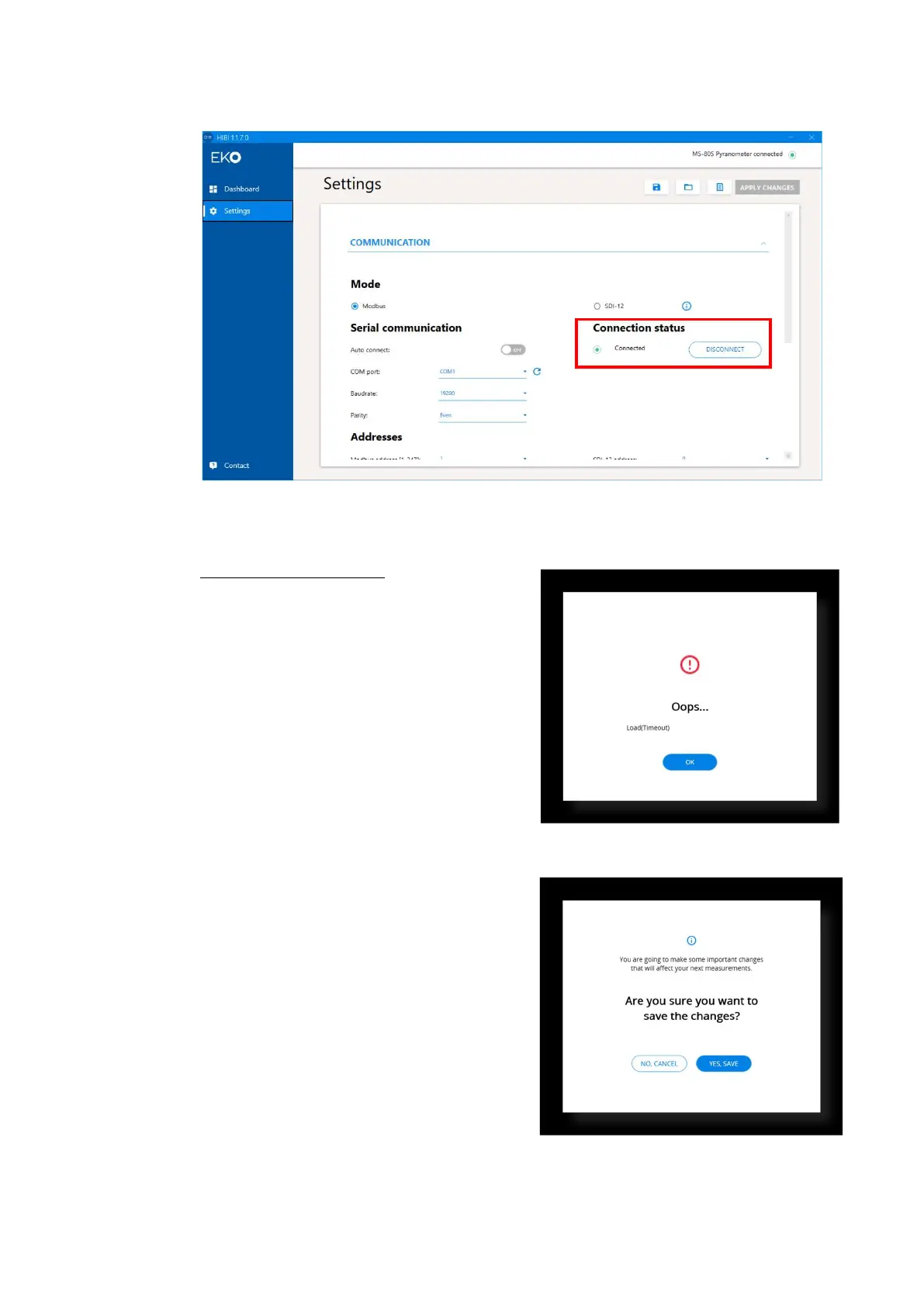
When the connection fails, the "Oops..." screen is displayed with the cause of the connection failure.
When connection fail appears
Check that the cable connection, COM port and the
communication requirements are correct.
When changing the connection condition after
successful connection, set "COM port", "Baud rate"
and "Parity" in the "Serial communication" setting of
the "COMMUNICATION" items and set "Modbus
address [1-247]" and "Register Type" in the
"Addresses" setting.
After entering the settings, click “APPLY CHANGES”
A confirmation window will be displayed.
Click “YES, SAVE” to make the settings for the MS-
80S.
The settings in "Settings" can be saved / read /
exported to CSV files.
Click the button with icons in the upper-right corner of
“Settings” window.
・ "Save" button: Save the settings.
・ “Read” button: Read out the settings.
・ “Output” button: Output the settings to CSV file
Figure A3-12. Apply changes screen
Figure A3-11. Oops screen
Figure A3-10. Disconnect appear



 To Next Page