EasyManua.ls Logo

ElectrIQ CD12P - User Manual

ElectrIQ CD12P
20 pages
Print Icon
To Next Page IconTo Next Page
Loading...
USER MANUAL
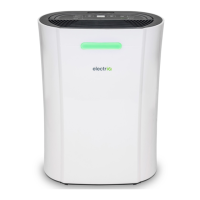
12 LITRE COMPRESSOR DEHUMIDIFIER
WITH DIGITAL HUMIDISTAT
CD12P
Thank you for choosing electriQ.
Please read this user manual before using this innovative
Dehumidier and keep it safe for future reference
Visit our page www.electriQ.co.uk for our entire range of Intelligent Electricals

Questions and Answers

  • M
    mcclurecalvinAug 16, 2025
    Why is my ElectrIQ CD12P not extracting water?
    • J
      Jennifer RichardsAug 16, 2025
      Your ElectrIQ Dehumidifier might not be extracting water for several reasons. First, check if the humidity level setting is lower than the current humidity in the room; if not, adjust it accordingly. Also, the room temperature might be too low for efficient water extraction, so try increasing the temperature or repositioning the unit. Finally, make sure that no intake grills or the discharge are blocked, and ensure the unit is at least 20 cm away from walls. Remove any obstructions and restart the unit.
  • D
    David HancockAug 19, 2025
    What to do if my ElectrIQ CD12P Dehumidifier does not operate?
    • Y
      yhamptonAug 19, 2025
      First, make sure the dehumidifier is properly plugged into the socket and the switch is turned on. Also, check if the tank full indicator is red. If it is, the tank may be full, the float may be displaced, or the tank may not be properly inserted. Empty the tank, check the float, and ensure the tank is correctly placed in the unit.
  • S
    Stephen SmithAug 22, 2025
    Why is my ElectrIQ CD12P Dehumidifier so noisy?
    • G
      Gary ClarkAug 22, 2025
      The noise during operation may be due to the unit being placed on an uneven surface. Ensure that the unit is placed on a flat, horizontal surface. Also, service the filters regularly as per user manual.
  • A
    Angela MullinsAug 26, 2025
    Why does the ElectrIQ CD12P Dehumidifier airflow seem weak?
    • B
      breannaparkerAug 26, 2025
      A weak airflow may be caused by a dirty or clogged filter. Please service the filters regularly as per user manual.
  • R
    rhendersonAug 28, 2025
    What to do if the defrost light is on and my ElectrIQ CD12P Dehumidifier stops regularly?
    • R
      Renee MartinAug 28, 2025
      If the defrost light is on and the unit stops regularly, it means the unit is in defrosting mode. Allow the unit to automatically defrost. This protection will clear once the unit completes its self-defrost cycle. If this occurs frequently, consider increasing the room temperature.
  • M
    Mary WallaceAug 31, 2025
    Why is my ElectrIQ CD12P Dehumidifier producing hot or cold air?
    • R
      Ryan HunterAug 31, 2025
      When the ElectrIQ dehumidifier is in dehumidifying mode, it absorbs humid air from the room and freezes it to reduce humidity. During the cold cycle, cold air should come out of the unit. During the defrost cycle, hot, dry air should come out of the outlet grill; this is normal operation.
  • M
    Melissa BrownSep 3, 2025
    What does E1 or E2 error mean on ElectrIQ CD12P?
    • W
      William SantiagoSep 3, 2025
      The E1 or E2 error code indicates a temperature sensor error. Use the unit within the prescribed temperature range. Unplug the unit, let it rest, and then plug it back in. If the error persists, call for service centre.
  • J
    Justin GarciaSep 6, 2025
    What does E3 or E4 error mean on ElectrIQ Dehumidifier?
    • D
      Dominique HendricksSep 6, 2025
      The E3 or E4 error code indicates a humidity sensor error. Use the unit within the prescribed humidity range. Unplug the unit, let it rest, and then plug it back in. If the error persists, call for service centre.
  • U
    ufisherSep 9, 2025
    What to do if my ElectrIQ CD12P Dehumidifier displays E5 or E6 error?
    • D
      David WyattSep 9, 2025
      The E5 or E6 error indicates an abnormal coil sensor temperature or current. Use the unit within the prescribed humidity and temperature range. Unplug the unit, rest it, and plug it back in. If the error repeats, call for service centre.
  • J
    Joseph ThompsonSep 12, 2025
    What to do if front louvres of ElectrIQ CD12P Dehumidifier do not open?
    • B
      Brian BrewerSep 12, 2025
      Check if anything is blocking the louvre. Try to gently move the louvres up and down while the unit is off. If the above fails return the unit to service centre.

Summary

SAFETY INSTRUCTIONS

General Safety Warnings

Important safety precautions for operating the dehumidifier, including electrical safety and child supervision.

ENERGY SAVING AND UNIT SAFETY PROTECTION TIPS

QUICK VISUAL SAFETY GUIDE

INSTALLATION

Reducing Noise Levels

Tips to reduce operational noise by placing the unit on a carpet or rubber mat.

Key Features

Highlights the key features and benefits of the electriQ dehumidifier.

PARTS

Optional Accessories

Details optional accessories like HEPA and Activated Carbon filters.

CONTROL PANEL

Power Button Operation

Description of the power button functionality for turning the appliance on/off.

Mode Button Selection

Explains the function of the mode button for selecting SMART and Air Purifier modes.

Humidity Setting Adjustment

How to adjust the desired relative humidity level using UP/DOWN buttons in SMART mode.

Humidity Indicator Light

Details the colour-coded humidity indicator light and its meaning.

TIMER PROGRAMMING

Intelligent Defrost Function

Explanation of the automatic defrost function when the coil sensor detects low temperature.

Tank Full Indicator

Indicator for when the water tank is full and the unit stops operating.

Optional Filter Usage

Guidance on using, cleaning, and replacing optional carbon and HEPA filters.

Humidity and Timer Display

Explains the functions of the 2-digit display for humidity and timer settings.

QUICK REFERENCE GUIDE

Power Button Usage

Brief instruction on how to turn the dehumidifier on and off using the power button.

Timer Functionality

How to adjust the timer duration for start/stop functions using the timer and adjustment buttons.

Humidity Level Adjustment

How to adjust the desired humidity level using UP and DOWN buttons in High/Low modes.

SMART and Laundry Modes

Description of SMART mode and recommended settings for using the unit to dry laundry.

OTHER FEATURES AND INDICATORS

Tank Full Light & Auto Defrost

Explanation of tank full light, auto defrost, and their operation.

Humidistat and Compressor Control

How the humidistat controls compressor and fan operation based on room humidity.

Auto-Restart and Power Delay

Functionality of automatic restart after power interruption and power-on delay.

Portable Design

Highlights the compact, lightweight design and castors for easy mobility.

POSITIONING THE DEHUMIDIFIER

Airflow Clearance

Ensuring adequate airflow by maintaining a minimum 20 cm clearance around the unit.

Optimal Usage Environment

Recommendations for enclosed spaces and keeping doors/windows closed for efficiency.

Surface Placement

Instruction to place the dehumidifier on a stable, flat, and dry surface.

WATER DRAINAGE

Using the Water Tank

Procedure for emptying the water tank manually when it is full.

Continuous Drainage Setup

Instructions for setting up continuous water drainage using a hose and drain outlet.

CARE AND MAINTENANCE

Cleaning Grille, Case & Filters

Steps for cleaning the exterior grille, case, and washable mesh filters.

Cleaning the Water Tank

Procedure for cleaning the water tank to prevent mould and bacteria growth.

End of Season Maintenance

Tasks to perform for seasonal storage and maintenance of the dehumidifier.

FREQUENTLY ASKED QUESTIONS

Troubleshooting Common Issues

Common issues, their causes, and solutions for troubleshooting the dehumidifier.

Technical Data

ElectriQ UK SUPPORT

Pre-Service Checks

Simple checks to perform before calling the service line for assistance.

ElectrIQ CD12P Specifications

General IconGeneral
BrandElectrIQ
ModelCD12P
CategoryDehumidifier
LanguageEnglish

Related product manuals