12
GENERAL OPERATION
Power switch
The power switch on the underside of the robot vacuum cleaner can be used to turn the unit on
and off. When the unit is turned on, the indicator LED light on the unit will illuminate to show
the battery status, as shown in the table below:
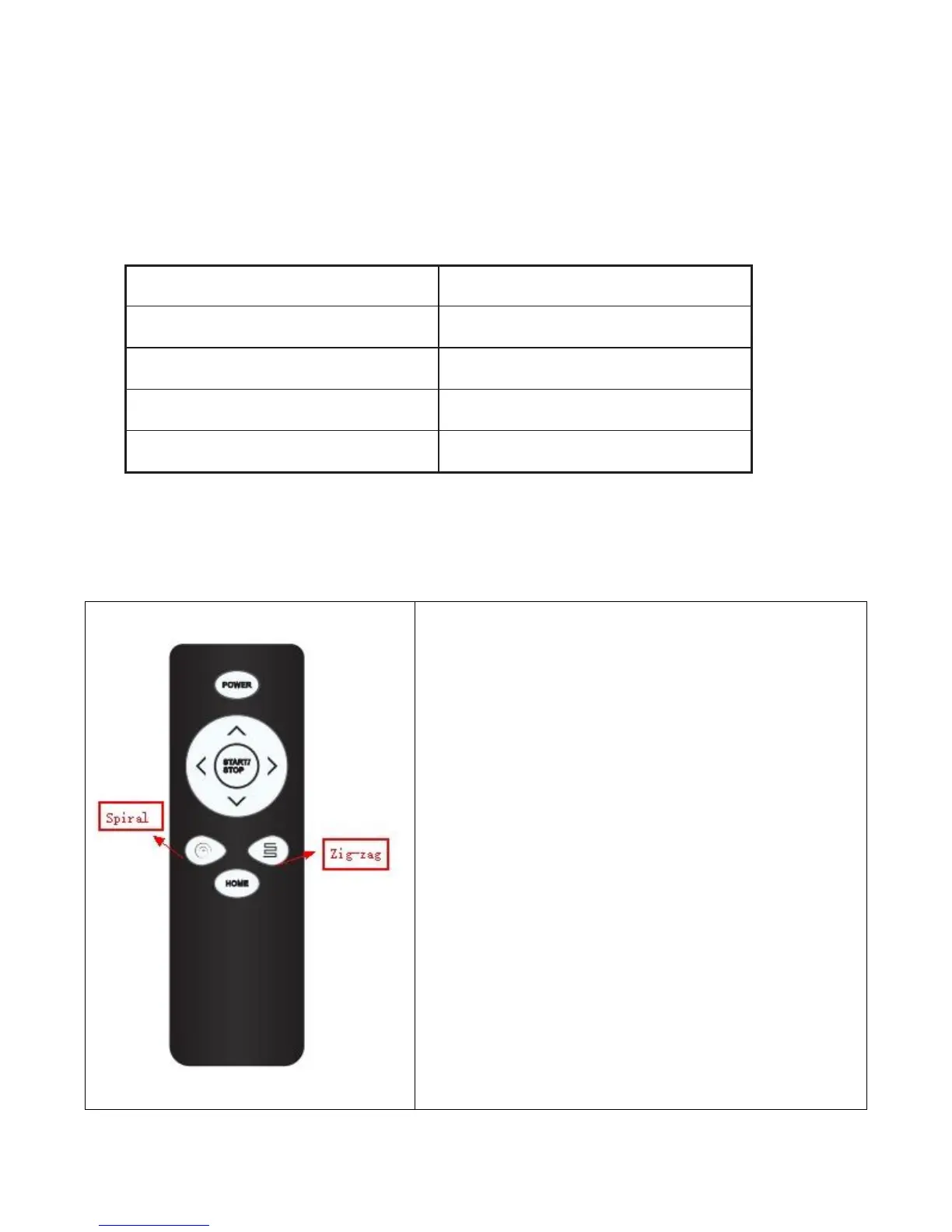
Power: Turn ON/OFF the robot. Other buttons only function
after the power button has been pressed to start the robot.
Start/Stop When you turn on the power switch, the robot is
standby, you need press the start/stop button to start/stop
the robot. Default cleaning mode is auto mode.
Directions: Move the robot towards desired direction; hold
the key to continue moving.
Spiral: While in auto mode if this key is pressed the robot
will start spiral cleaning mode, starting at a spot, working
away from it in a spiral.
Zig-Zag: While in auto mode if this key is pressed the robot
will start the zig-zag cleaning mode, covering the floor space
by working in a zig-zag pattern
Home: Press to return the robot to Charging Base.


 To Next Page