8
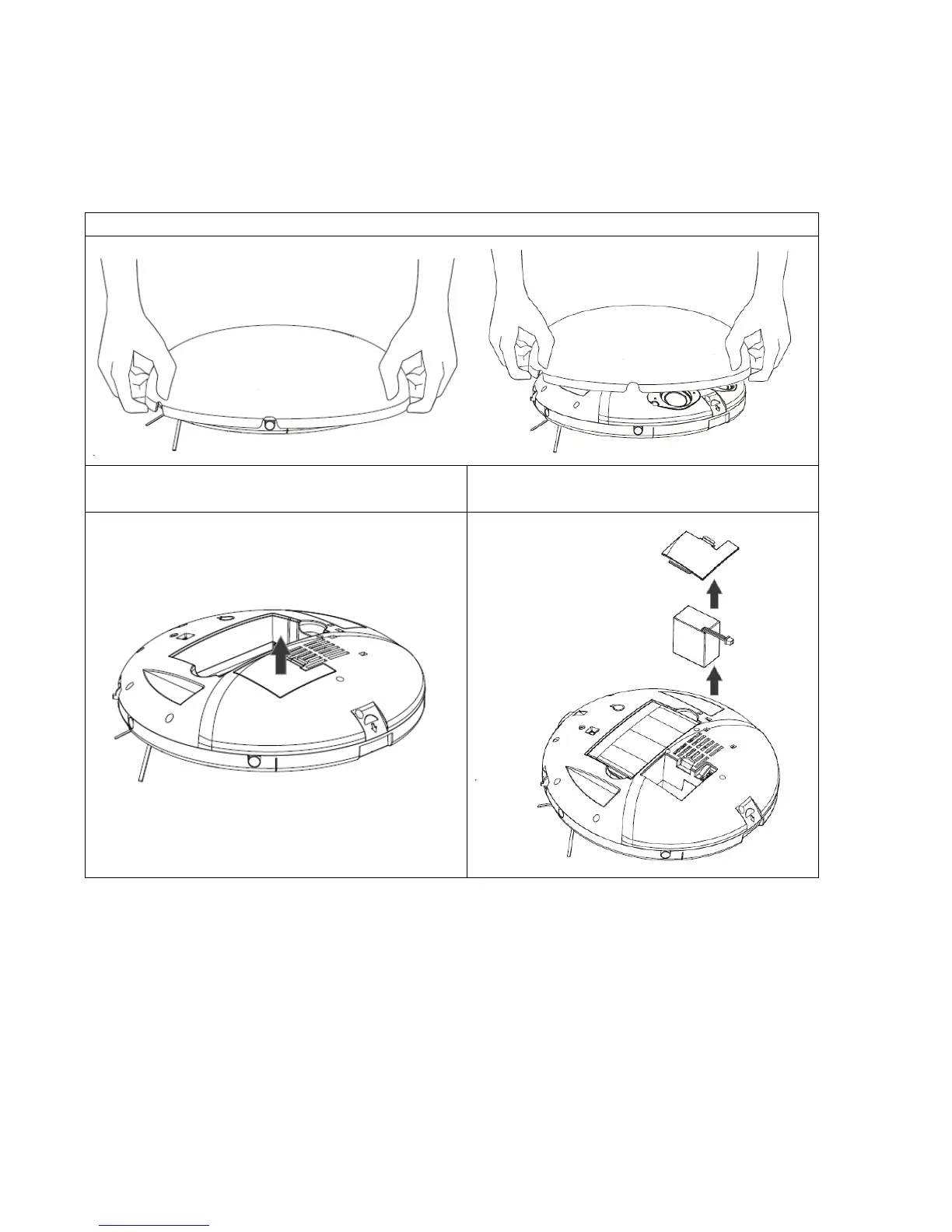
BATTERY INSTALLATION AND REMOVAL
The robot battery is user replaceable. If the battery stops holding its charge, please re-order a
replacement from the manufacturer or retailer.
To remove the battery, please follow the steps below:
Once the battery has been removed, a replacement can be fitted by following the steps above in reverse.
Charging
If the robot shuts down while working or the battery indicator flashes, please charge the robot
immediately. When the robot completes its cleaning cycle or the battery level is low, the robot will return to
its dock automatically as long as there is enough power left to do this.
1. Plug the charger into the power outlet. Insert the power cable into the docking station and place the
robot onto the docking station to charge
2. The power plug can be inserted on the side of the robot. If the battery indicator flashes, it means the
robot is charging normally.


 To Next Page