What is Mixdown:
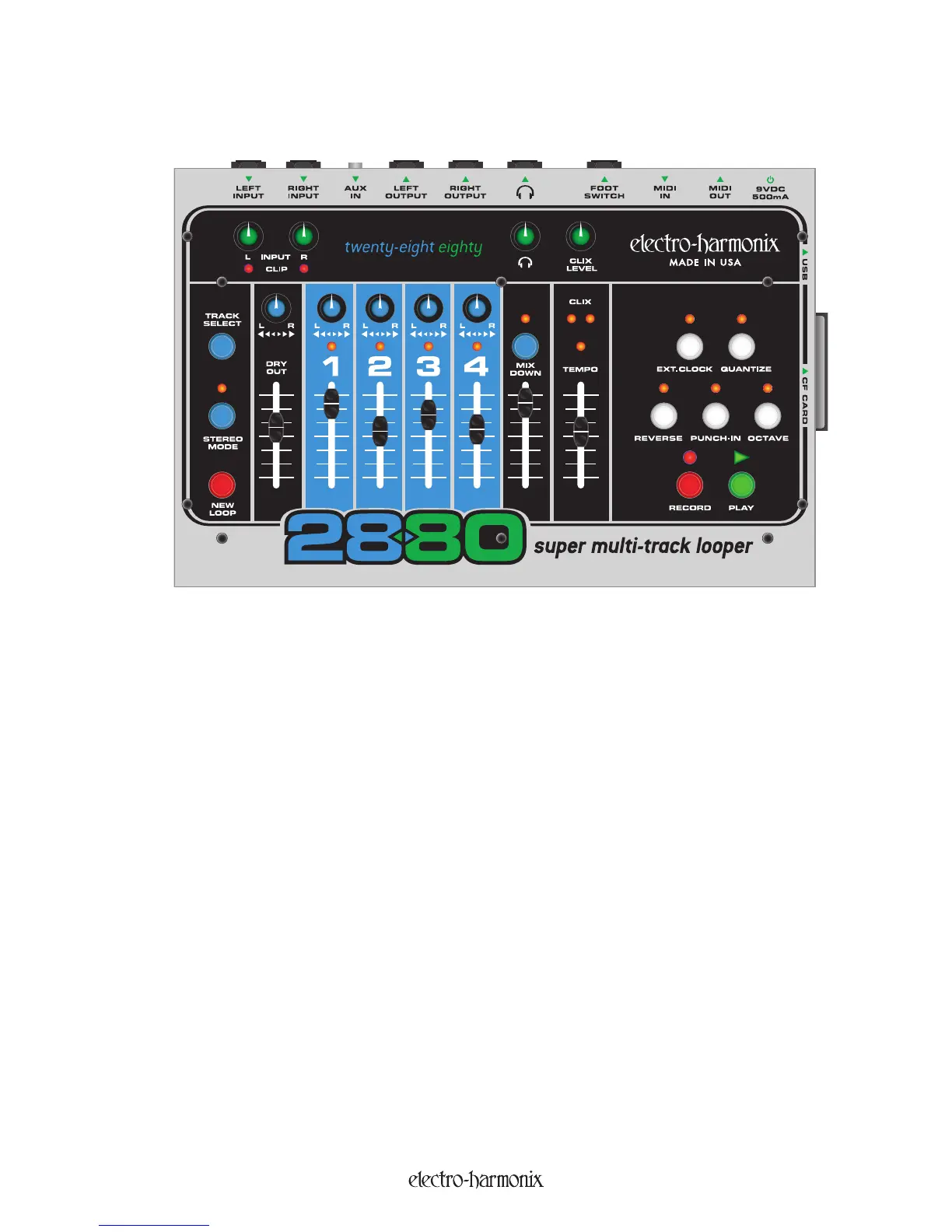
Looking at the 2880’s top panel, you can see it has a simple mixer that combines the 4 recorded tracks, the DRY
input signal and the Mixdown track, which are then sent to the stereo outputs. You can independently adjust the
volume of any of the 4 tracks, the DRY OUT and the Mixdown track. You can also adjust the stereo positioning of the
4 tracks and the DRY OUT.
During Mixdown, the 4 Record tracks are mixed internally, inside the 2880’s DSP. The output of the 4 Record tracks’
internal mixer is sent to the input of the Mixdown track as well as the OUTPUT jacks. The Mixdown track is a stereo
track so it records both the Left and Right sides of the stereo spectrum.
Since the Mixdown track is recording audio, any adjustments you make to the track faders or pan pots will be
recorded as audio onto the Mixdown track. What is getting recorded is not the fader movements but the change in
volume that the fader produces.
The Mixdown track works like any of the other 4 recording tracks. The differences are that the Mixdown track is
stereo not mono and therefore does not have a Pan Pot to turn. You cannot record audio from the Input jacks
directly to the Mixdown track. Only audio that is recorded on any of the 4 tracks will go to the Mixdown track.
While Overdubbing, if the MIXDOWN track is active, its fader will act like a Feedback control on a delay effect.
In-Depth Look at Mixdown
19


 To Next Page