How to Record a Multi-Track Loop:
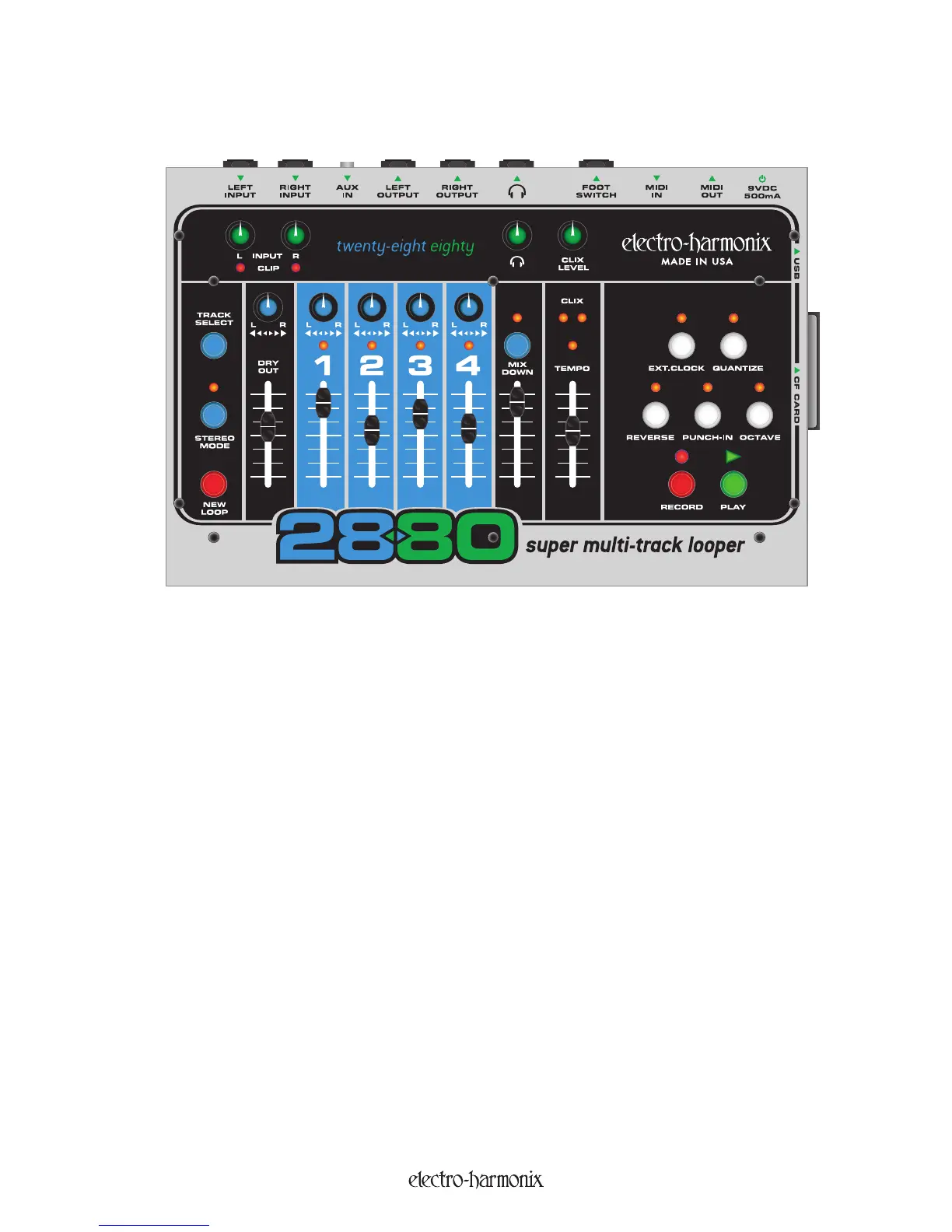
1. Plug your instrument into either the LEFT or RIGHT Inputs and adjust the corresponding Input Knob so
that the Clip LED (Light Emitting Diode) barely lights up on your loudest notes.
2. Connect the LEFT and/or RIGHT Outputs to an amplifier or mixer.
3. Raise the DRY OUT Fader so that you c
an hear your instrument.
4. If you are using Headphones, turn up the HEADPHONE knob.
5.
Make sure the QUANTI
Z
E LED is off.
6.
If you do not want to hear the C
LI
X metronome, turn the C
LI
X LEVEL knob down to zero.
7. Set the TEMPO slider to 50%.
8.
Press the NEW LOOP button to put the 2880 into Record-Ready mode. You should see the RECORD LED
blink r
apidly
.
9. Press the RECORD button to immediately start recording. Play your instrument. The 2880 will record onto
TR
ACK 1.
1
0.
When you are finished playing, hit either the REC
ORD or PLAY button to stop recording. Pressing RECORD
will stop recording and stop the 2880. Hitting PLAY will loop the 2880 back to the beginning, put the 2880
into OVERDUB mode and automatically continue recording onto TRACK 2. To exit OVERDUB mode, press
the R
ECOR
D button.
11. Raise the TRACK 1 Fader to hear the track you just recorded.
12. To record on another track, hit the TRACK SELECT button, you will cycle through the 4 tracks. Whichever
track LED is lit, is the track you will record on.
4
Quick Start Guide


 To Next Page