2
- CONTROLS -
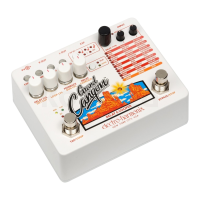
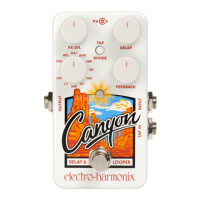
FX LVL Knob – Controls the output volume of the delay effect. When this
knob is at the minimum position, the output is only your dry signal. As the
knob is turned up, the delay output increases in volume. As the knob is
turned past 2 o’clock, the dry signal decreases in volume. When the knob
is at the maximum position, the output is only the delay output.
Note: in
S/H and LOOP modes, the dry signal remains at unity volume even as FX
LVL is turned to maximum
DELAY Knob – Controls the delay time of the CANYON, from a minimum
position of 5 milliseconds to a maximum of 3 seconds.
FEEDBACK Knob – Controls the number of repeats of the delayed signal.
As this knob is turned clockwise, the number of repeats increases.
In S/H mode, this knob controls the pluck detection sensitivity. As the
knob is turned clockwise, the sensitivity increases.
In LOOP mode, this knob controls how much of the existing loop is
preserved when overdubbing. As the knob is rotated clockwise, more of
the existing loop is preserved. At the maximum position, the loop will stay
the same volume while overdubbing.
MODE Knob – This knob is an 11-position rotary switch that selects which
of the CANYON’s delay modes is active.
TAP/DIVIDE Switch and LED – This switch controls the Tap Divide
setting. When the delay time is set using tap tempo, this button controls
the division of the tapped tempo. Press the switch to cycle through the
Tap Divide options, which are indicated by the LED color. Red indicates
quarter notes, orange indicates dotted eighth notes, and green indicates
eighth notes. If the LED does not change color when pressing this switch,
internal Tap Tempo is disabled. See “Tap Tempo with the CANYON” on
page 7 for the details of tap tempo use.
Footswitch – Press this footswitch to switch the pedal between bypass
and effect modes. When the pedal is in effect mode, the LED will be lit.
The footswitch can also be used to set the delay time by tapping it at least
two times. This functionality is enabled from the factory, but can be
disabled. See “Tap Tempo with the CANYON” on page 7 for details.






 To Next Page