Doc# E145701 5-4
5: Communication Installation
Electro Industries/GaugeTech™
Powered by Innovation™
RS485 allows you to connect one or multiple Shark® 100/50 meters to a PC or other
device, at either a local or remote site. All RS485 connections are viable for up to
4000 feet (1219.20 meters).
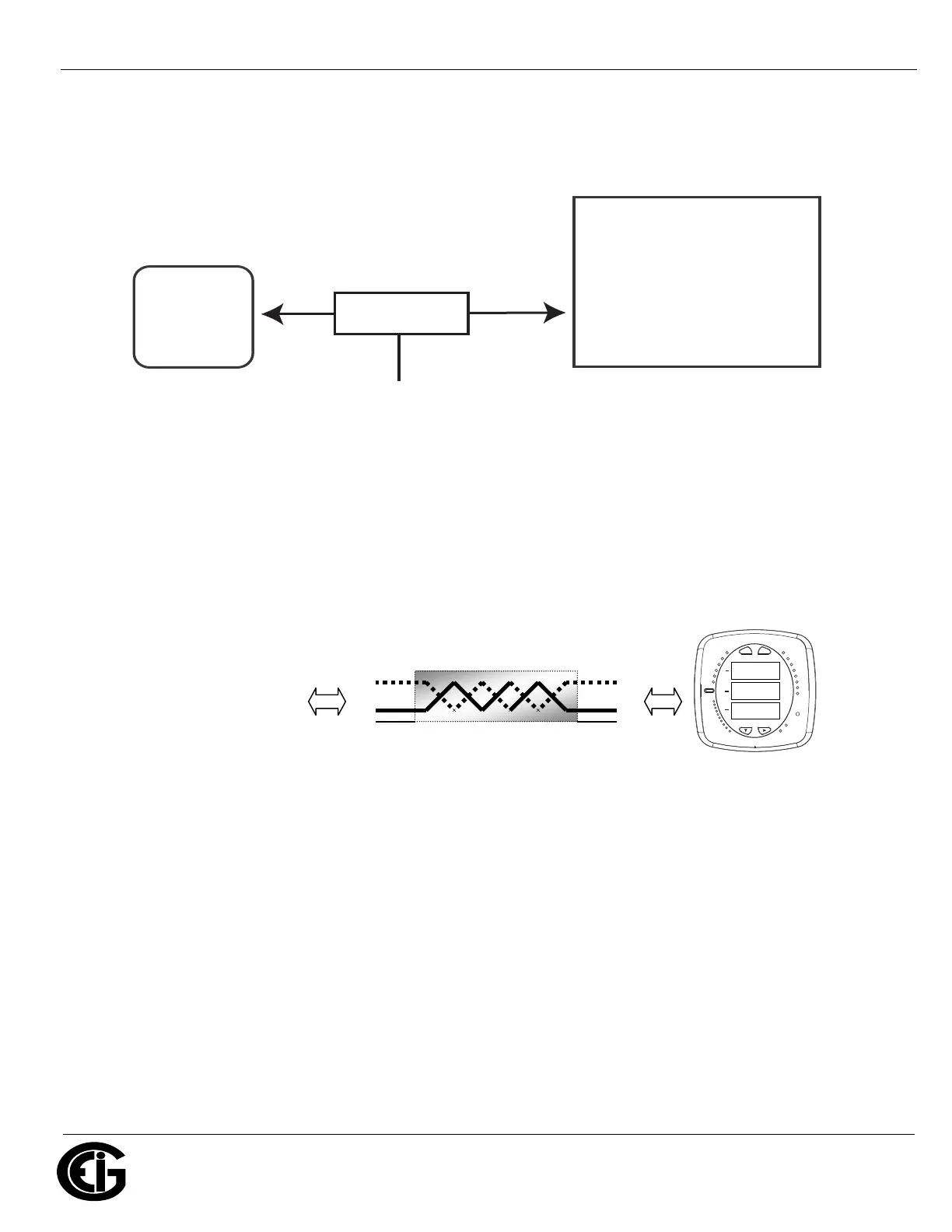
Figure 5.3: Shark® 100/50 Connected to PC via RS485
As shown in Figure 5.3, to connect a Shark® 100/50 to a PC, you need to use an
RS485 to RS232 converter, such as EIG’s Unicom 2500. See Section 5.1.2.1 for infor-
mation on using the Unicom 2500 with the Shark® 100/50.
Figure 5.4 shows the detail of a 2-wire RS485 connection.
Figure 5.4: 2-wire RS485 Connection
NOTES For All RS485 Connections:
• Use a shielded twisted pair cable 22 AWG (0.33 mm2) or larger, grounding the
shield at one end only.
• Establish point-to-point configurations for each device on a RS485 bus: connect (+)
terminals to (+) terminals; connect (-) terminals to (-) terminals.
Shark
PC
RS485/RS232
Converter
EIG Recommends the Unicom 2500
for RS485/RS232 Conversion
RS485
RS232
MAX
MIN
VOLTS L-N
AMPS
%LOAD
120%-
PRG
%THD
LM2
LM1
90%-
60%-
30%-
VOLTS L-N
W/VAR/PF
VA/Hz
Wh
KILO
VARh
VAh
Wh Pulse
MEGA
A
B
C
MENU
ENTER
From other RS-485 device
Connect :
• (−) to (−)
• (+) to (+)
• Shield(SH) to Shield(SH)
Shark meter RS485 connections
120
.0
120.0
120.0
+
-
SH
+
-
SH


 To Next Page