Doc# E145701 5-3
5: Communication Installation
Electro Industries/GaugeTech™
Powered by Innovation™
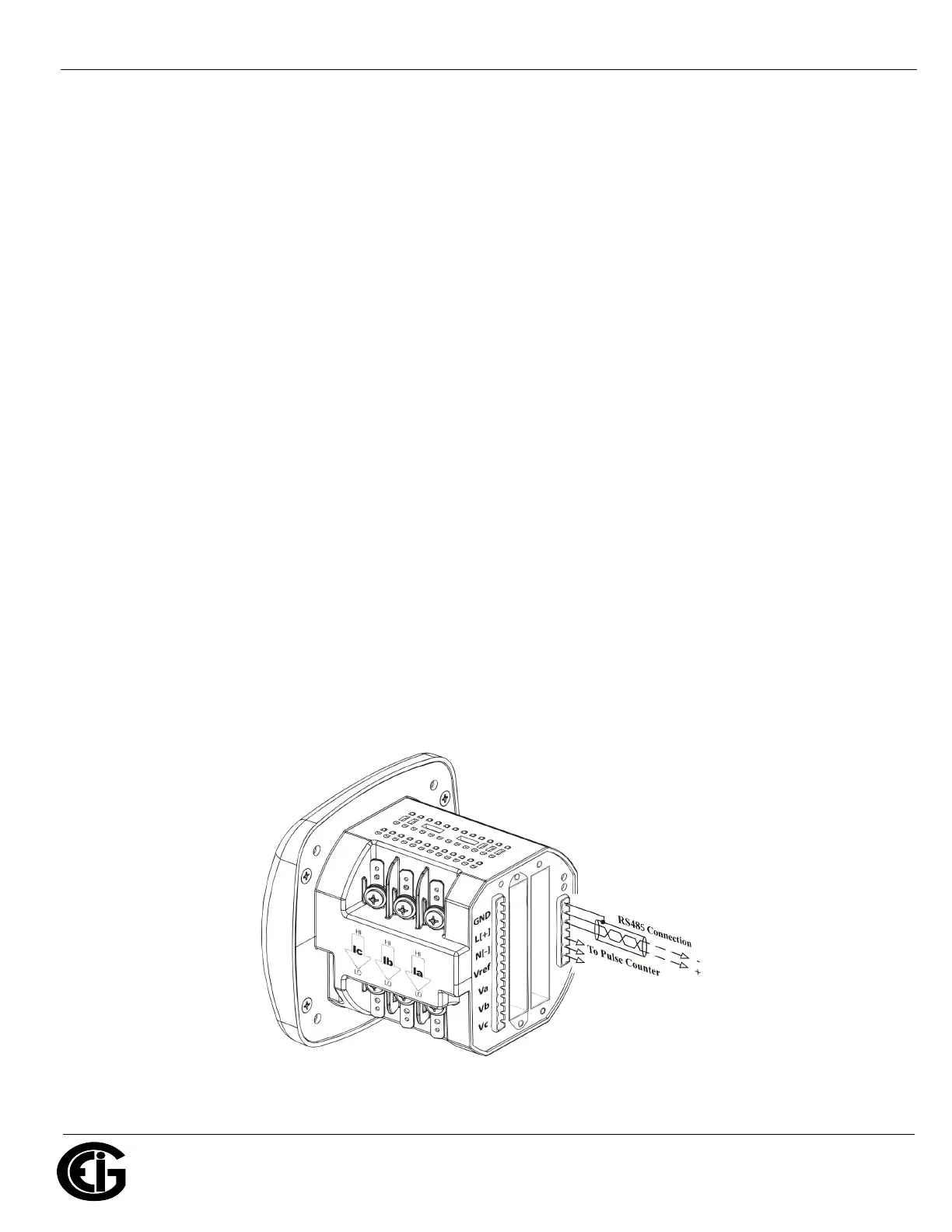
5.1.2: RS485/KYZ Output Com 2 (485P Option)
The 485P Option provides a combination RS485 and KYZ Pulse Output for pulsing
energy values. The RS485/KYZ Combo is located on the terminal section of the meter.
NOTES:
• The Shark® 100B meter and Shark® 100 meters with the INP10 option also have
a KYZ pulse output, but do not have an RS485 option (see Section 5.2 and Chap-
ter 7).
• The Shark® 50B meter has an RS485 port, but it is a dedicated BACnet MS/TP
Protocol port, used to connect to a BACnet system. It does not have a KYZ pulse.
See Section 2.2 for the KYZ Output specifications, and Section 6.3.1 for pulse
constants.
The Shark® 100/50/50B meter’s RS485 can be programmed with the buttons on the
face of the meter or by using CommunicatorPQA® software. See Chapter 6 for
instructions on these two modes.
Standard RS485 Port Settings
Address: 001 to 247
Baud Rate: 9600, 19200, 38400 or 57600
Protocol: Modbus RTU, Modbus ASCII, DNP3 (DNP3 is available with the Shark® 100
meter’s V3 and V4 only.)
Figure 5.2: 485P Option with RS485 Communication


 To Next Page