7ENGLISH
10
Preparation Mode Button
Press the Preparation Modes menu to
select one of the 5 preparation modes.
11
On / Off
This button has three functions: Tap the
button to activate the control panel.
If the appliance is not in use, touch the
button for the panel to enter rest mode.
The panel will show a countdown of 20
seconds for the appliance to cool down.
12
Start/Pause
Tap the button to start preparing your
food or to pause the process during
cooking. When paused, it is possible
to adjust the temperature/time of the
cycle if necessary.
NOTE: If the Air Fryer is paused at any
time for more than 10 minutes, the
appliance will return to the home screen.
13
Turn Food Indicator Light
This indication will appear halfway
through the cooking time for some
of the preset recipes and for manual
adjustment.
4.2 Preset Recipes
Select one of the 7 predefined preparation recipes:
NOTE: It is necessary to turn certain foods at halfway though the cooking time for uniform
texture. Use gloves or tongs to handle to ensure your safety and avoid accidents.
The cooking process pauses if the door is opened. Operation resumes once the door is closed.
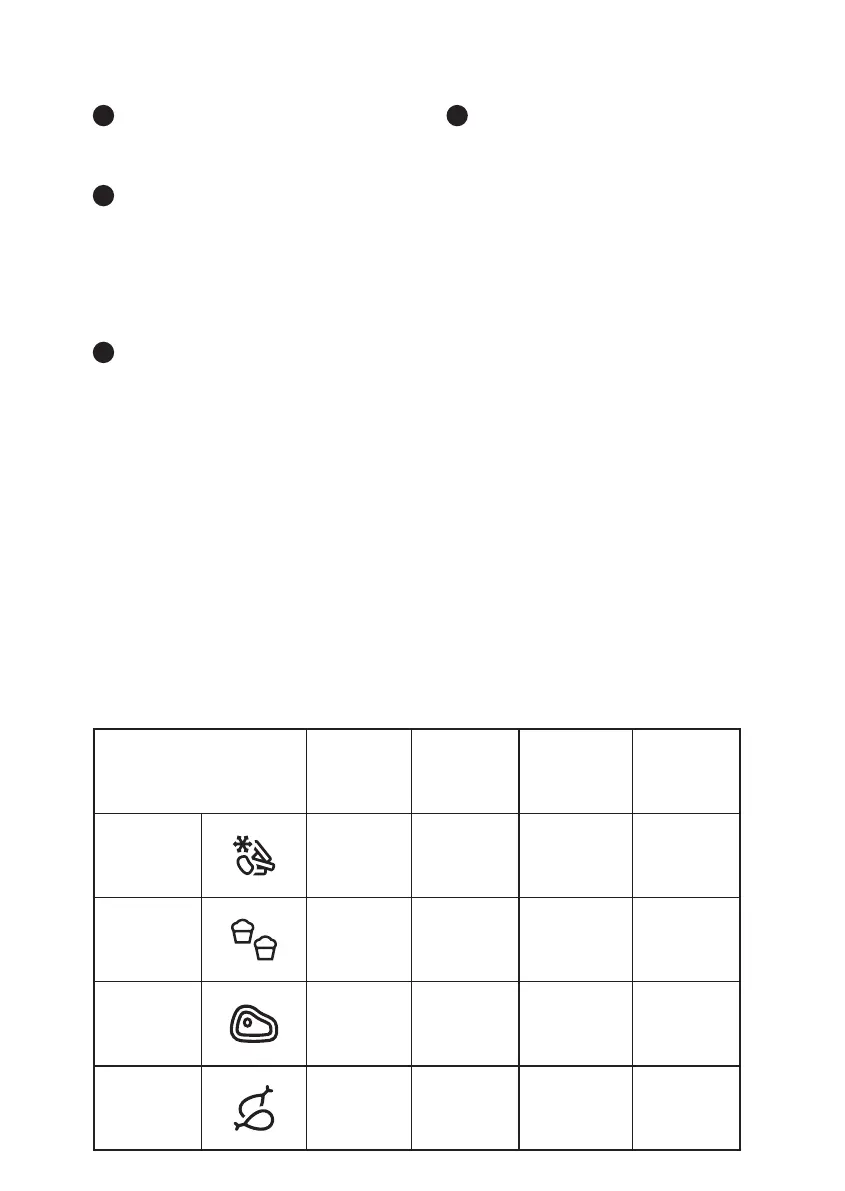
Food
Temp.
(°C)
Prep time
(minutes)
Portion
(kg)
Turn food
at halfway
point?
French Fries
180 20 0.4 Yes
Muffin
165 15
0.45
(50g x 9pcs)
No
Meat
180 30 0.9 Yes
Chicken
200 40 1 Yes





 To Next Page