Setting Your Preferences 5
User preferences
The _,) key controls options for preferences. The
display will show a digital abbreviation and a value
for every preference each time a key is pressed
one at a time,
Setting clock display
The clock display mode allows you to turn the
clock display on or off.
See the example below to change the clock display
to OFR
Please read the following instructions before
changing the user preferences functions:
• Press and continue to press USER PREF _(_
to navigate through the preferences.
+
• Press hi or lot° toggle between options for
each preference.
+
• Press hi or Io to increase or decrease numeric
values. You may also use the numeric keys to
input precise values.
, Press START _ to accept_a new option entry
USER PREF _.) to advance to the
or
press
next preference.
• Press CANCEL (_ to exit the preferences
mode.
Setting clock
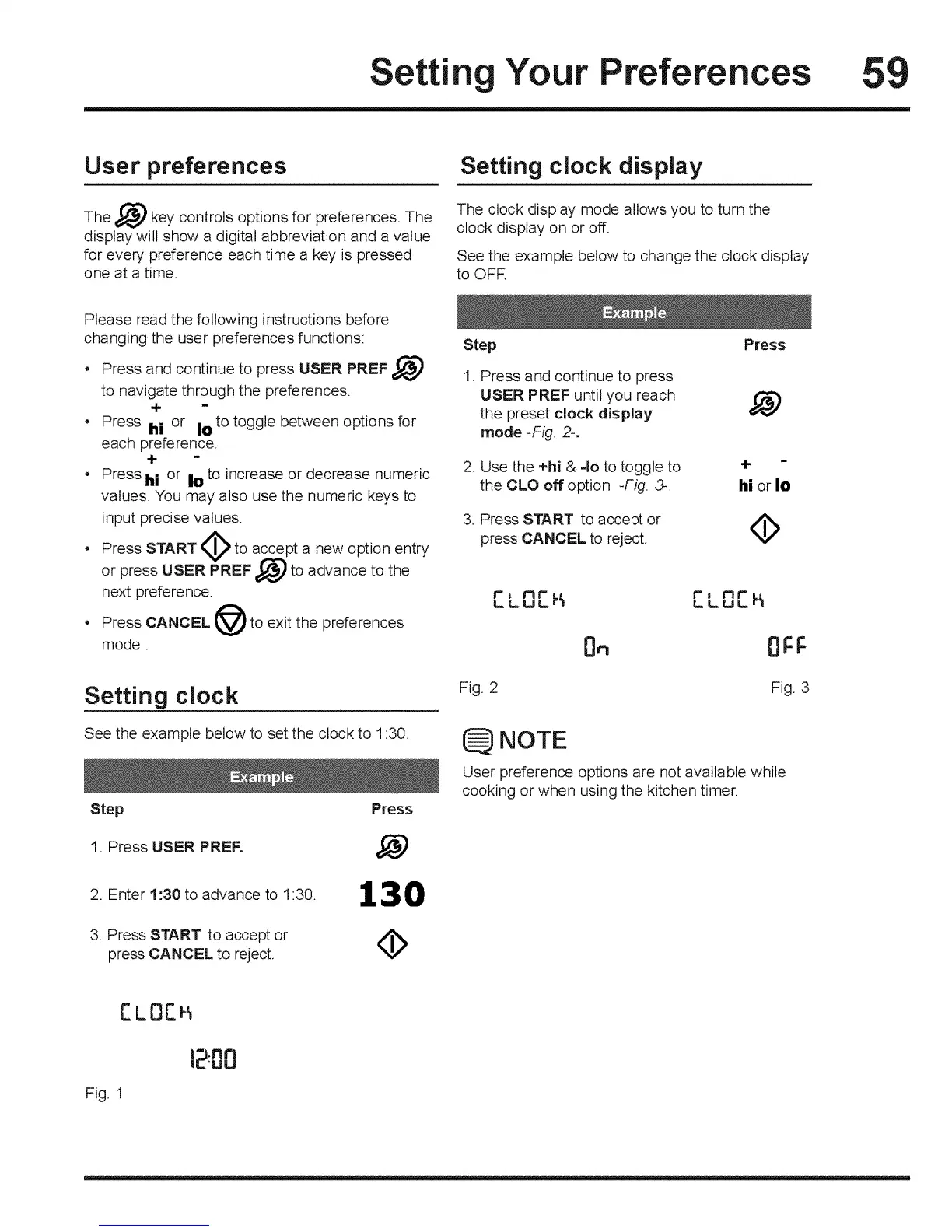
See the example below to set the clock to 1:30.
Step
1. Press USER PREE
2. Enter 1:30 to advance to 1:30.
3. Press START to accept or
press CANCEL to reject.
Press
130
Step Press
1. Press and continue to press
USER PREF until you reach
the preset clock display
mode-Fig 2-.
2, Use the +hi & 40 to toggle to
the CLO off option -Fig. 3-.
3= Press START to accept or
press CANCEL to reject.
4-
hi or Io
<b
r
LLO[_
Fig. 2
Bn
r nr
LLuL_
Fig. 3
NOTE
User preference options are not available while
cooking or when using the kitchen timer.
CuOC
Fig, 1
|_.nrl
(E'UU







 To Next Page