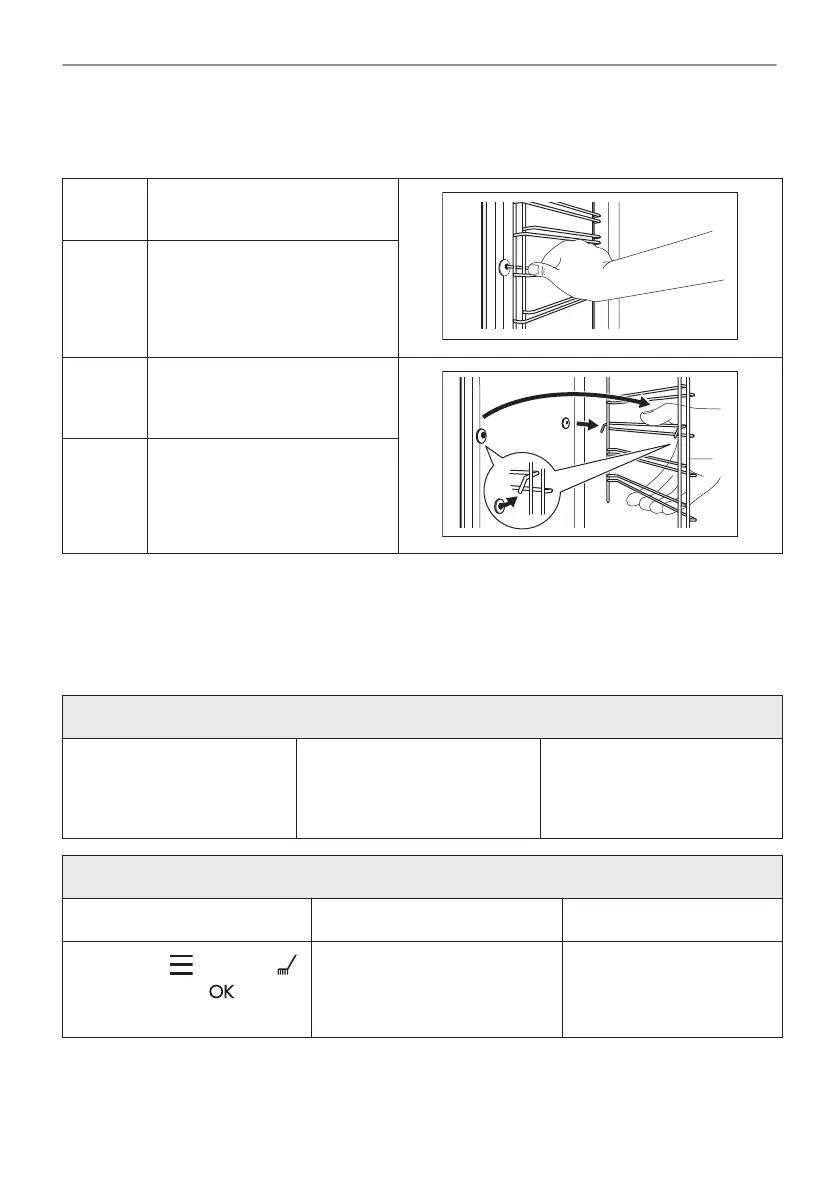
11.2 How to remove: Shelf supports
Remove the shelf supports to clean the oven.
Step 1 Turn off the oven and wait until
it is cold.
Step 2 Pull the front of the shelf sup‐
port away from the side wall.
Step 3 Pull the rear end of the shelf
support away from the side wall
and remove it.
Step 4 Install the shelf supports in the
opposite sequence.
11.3 How to use: Catalytic cleaning
The cavity is coated with catalytic enamel. It absorbs fat during catalysis. The catalytic enamel
is self cleaning, do not clean it with a cloth.
Spots or discolouration of the catalytic coating have no effect on the cleaning.
Clean one oven at a time.
Before the catalytic cleaning
Turn off the oven and wait
until it is cold.
Remove all accessories and
removable shelf supports.
Clean the oven floor and the
inner door glass with warm
water, soft cloth and mild de‐
tergent.
Clean the main oven with catalytic cleaning
Step 1 Step 2 Step 3
Select Menu / Cleaning
and press .
Duration: 1 h
When the cleaning ends the
signal sounds. The oven turns
off.
When the oven is cold,
clean the oven floor with a
wet soft cloth
22/32
CARE AND CLEANING



 To Next Page