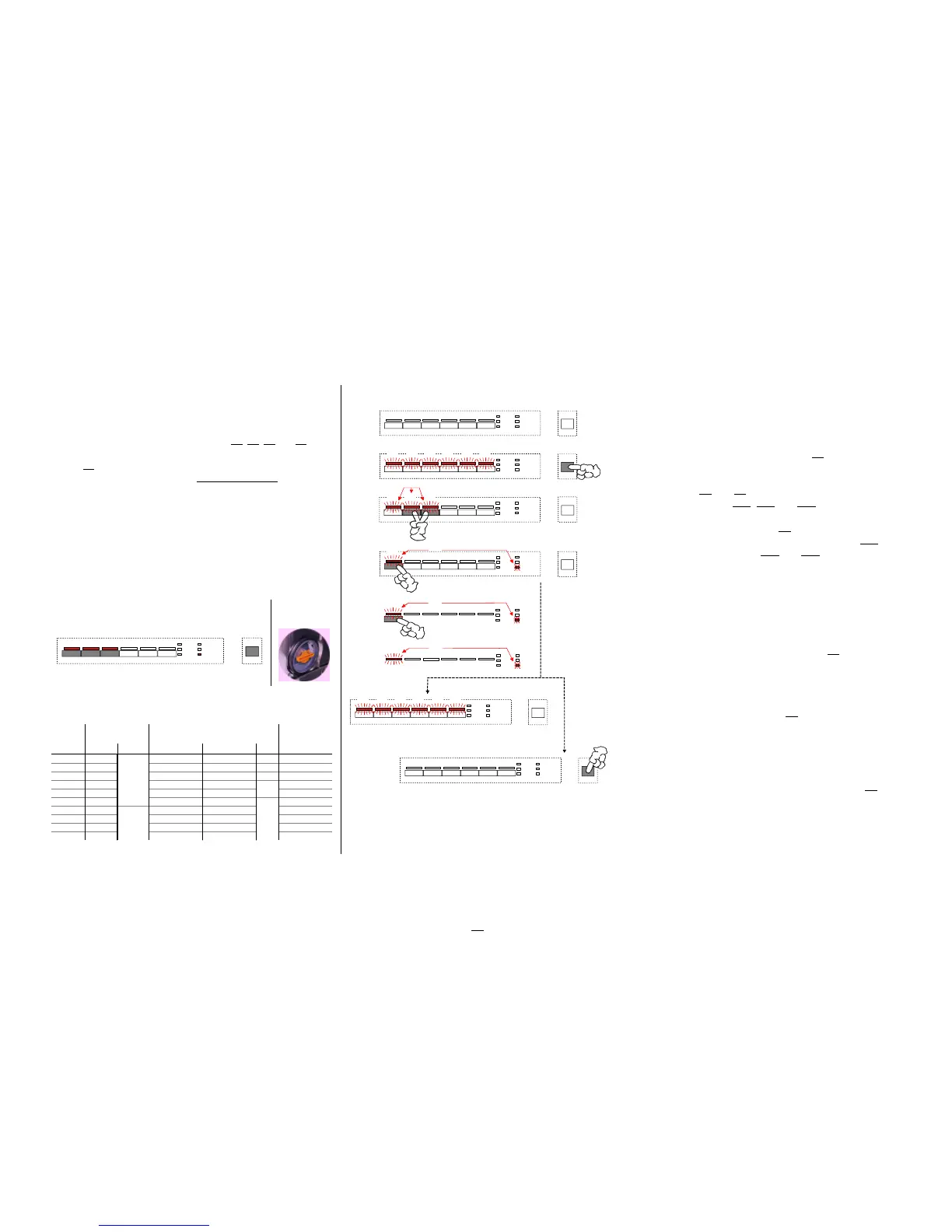
6.11. Customer function / setting of water hardness
General information Calling / changing / saving the "electronic" hardness area value
w
Setting and changing the water hardness area is executed in
Calling the function "set water hardness"
all designs resp. key arrangements analogously. he
Appliance in switched-off condition
w For that you always have to use the keys S0, S1, S2 and S3
independent of their variant-depending program load.
Switch on appliance by ON/OFF key S0 -- "prestart" mode
w
Key S1
is ALWAYS the "water hardness area key"
Ä
All LEDs of program and option keys are lit.
w Water hardness area 4 is preset by the manufacturer.
With setting "1L" it is generally not regenerated.
Press keys S2 and S3 simultaneously until the
A salt addition is not necessary.
confirmation LEDs LD1, LD2 and LD3 are flashing
w
A possible existing "salt" LED is not selected.
By actuating the function key S1 you now can call the
Electronic and mechanical setting with the appliance:
water hardness function. The confirmation LED LD1
w
Next to the "electronic" setting on the control panel described
continues flashing, LEDs LD2 and LD3 go out.
at the right you also have to pay attention to the mechanical The set hardness area is indicated optically by the coded
setting in the appliance by the 2-step blending switch. flashing of the "END" LED and in addition acoustically.
(see for that the table for hardness area values) ( see for that the table on the left side of this page! )
Changing the set hardness
Any further actuation of the function key S1 changes
the hardness area. This increases the value scrolling.
Table for hardness area values:
After pressing the function key S1 last you can leave
the special program as follows.
After 60 seconds all LEDs of program and option keys will
be lit automatically. The indication in the display goes out.
Now the appliance is again in the "prestart" mode
or
the appliance is switched off by the ON/OFF key S0
.
Saving the set water hardness
a The selected hardness area is saved directly
after every entry.
Verschneide-
schalter
1.
2.
4.
3.
... AUS nach 60sek. automatisch
LD1 LD2 LD3 LD4 LD5 LD6
S1 S2 S3 S4 S5 S6
LD7
LD8
LD9
LD10
LD11
LD12
S0
S0
LD1 LD2 LD3 LD4 LD5 LD6
Pro
Tastendruck
+ 1 Stufe
S2 S3
blinken
LD1
S1
ENDE
blinkt
codiertes blinken!
LD1 LD2 LD3
LD1
S1
ENDE
blinkt
codiertes blinken!
S0
LD1 LD2 LD3 LD4 LD5 LD6
LD1
ENDE
blinkt
codiertes blinken!
S0
... AUS durch manuelle Betätigung über Ein/Aus
EDW 1003 / VGA
LD1 LD2 LD3
S1 S2 S3
ENDE
S0
Anzeige
Ende-LED
Wasserhärte Bemerkung
Anzahl blinken
akustisch
elektronisch mechanisch in dH in mmol/L Bereich
1 mal
1
bis 4 bis 0,7 I
kein Regenerieren
2 mal
2
4 bis 10 0,7 bis 1,8 I / II
3 mal
3
11 bis 14 1,9 bis 2,5 II
4 mal
4
15 bis 18 2,6 bis 3,2
5 mal
5
19 bis 22 3,3 bis 3,9
6 mal
6
23 bis 28 4,0 bis 5,0
7 mal
7
29 bis 36 5,1 bis 6,4
8 mal
8
37 bis 42 6,5 bis 7,5
9 mal
9
43 bis 50 7,6 bis 8,9
10 mal
10
51 bis 70 9,0 bis 12,5
doppelt Regenerieren
Einstellung der
Härtestufe
0
III
IV
1
31



 To Next Page