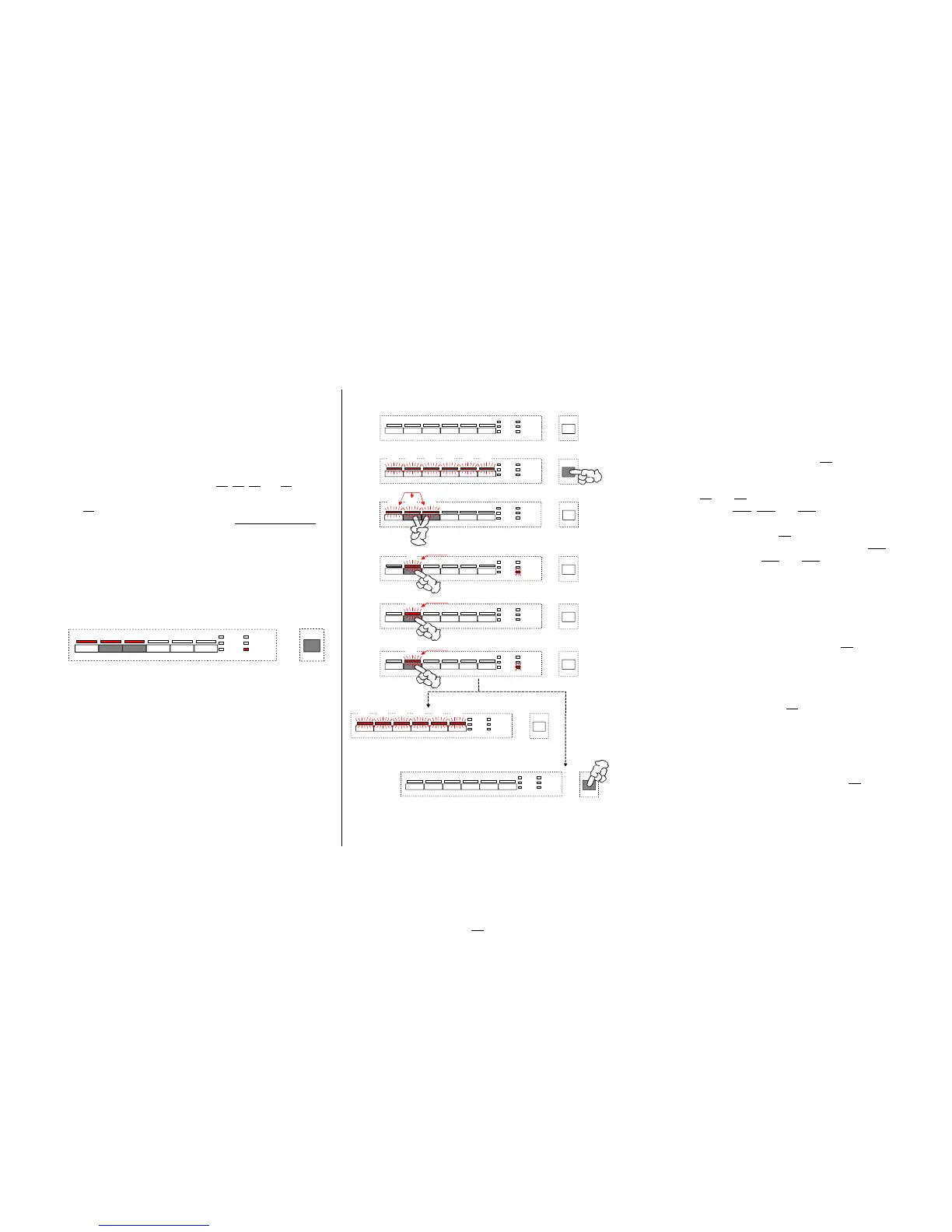
6.12. Customer function / deactivation of rinse-aid addition
General information Calling / changing / saving the rinse-aid addition deactivation
The function rinse-aid deactivation does not exist generally
Calling the function "deactivate rinse-aid addition"
and must be programmed in the software variant.
Appliance in switched-off condition
w
The deactivation resp. activation of the rinse-aid addition is
Switch on appliance with ON/OFF key S0 -- "prestart" mode
executed in all designs resp. key arrangements analogously. Ä
All LEDs of program and option keys are lit.
w For that you always have to use keys S0, S1, S2 and S3
independent of their variant-depending program load.
Press keys S2 and S3 simultaneously until the
w
Key S2
is ALWAYS the "rinse-aid disactivation key" confirmation LEDs LD1, LD2 and LD3 are flashing
w The rinse-aid addition is always set active by the manufacturer.
w
If the rinse-aid addition is deactivated, it means that no
By actuating the function key S2 you now can call the
more rinse-aid is added via the detergent dispenser.
function rinse-aid addition. The confirmation LED LD2
Along with the deactivation a variant-depending existing
continues flashing, LEDs LD1 and LD3 go out.
rinse-aid LED is also deactivated generally: The current condition whether the rinse-aid addition is
active or not is signalled by the "END" LED.
"END" LED on = rinse-aid addition on
"END" LED off = rinse-aid addition off
Deactivation resp. activation of rinse-aid addition
By any further actuation of the function key S2 you activate
resp. deactivate the addition alternating.
After pressing the function key S1 last you can leave the
special function as follows.
After 60 seconds all LEDs of program and option keys
are lit automatically.
Now the appliance is again in the "prestart" mode
or
the appliance is switched off by ON/OFF key S0
.
The currently valid condition is saved directly after any
entry.
1.
2.
4.
3.
... AUS nach 60sek. automatisch
LD1 LD2 LD3 LD4 LD5 LD6
S1 S2 S3 S4 S5 S6
LD7
LD8
LD9
LD10
LD11
LD12
S0
S0
LD1 LD2 LD3 LD4 LD5 LD6
S2 S3
blinken
ENDE
LD1 LD2 LD3
S0
LD1 LD2 LD3 LD4 LD5 LD6
S0
... AUS durch manuelle Betätigung über Ein/Aus
LD2
S2
blinkt
5.
ENDE
LD2
S2
blinkt
6.
ENDE
LD2
S2
blinkt
EDW 1003 / VGA
LD1 LD2 LD3
S2 S3
ENDE
S0
32



 To Next Page