EDW 7100
Q&CI Technical Support – RA
Chapter 3.1
Access Service Mode
The Service Mode can only be accessed after the Reset function has been carried out and the appliance is switched off.
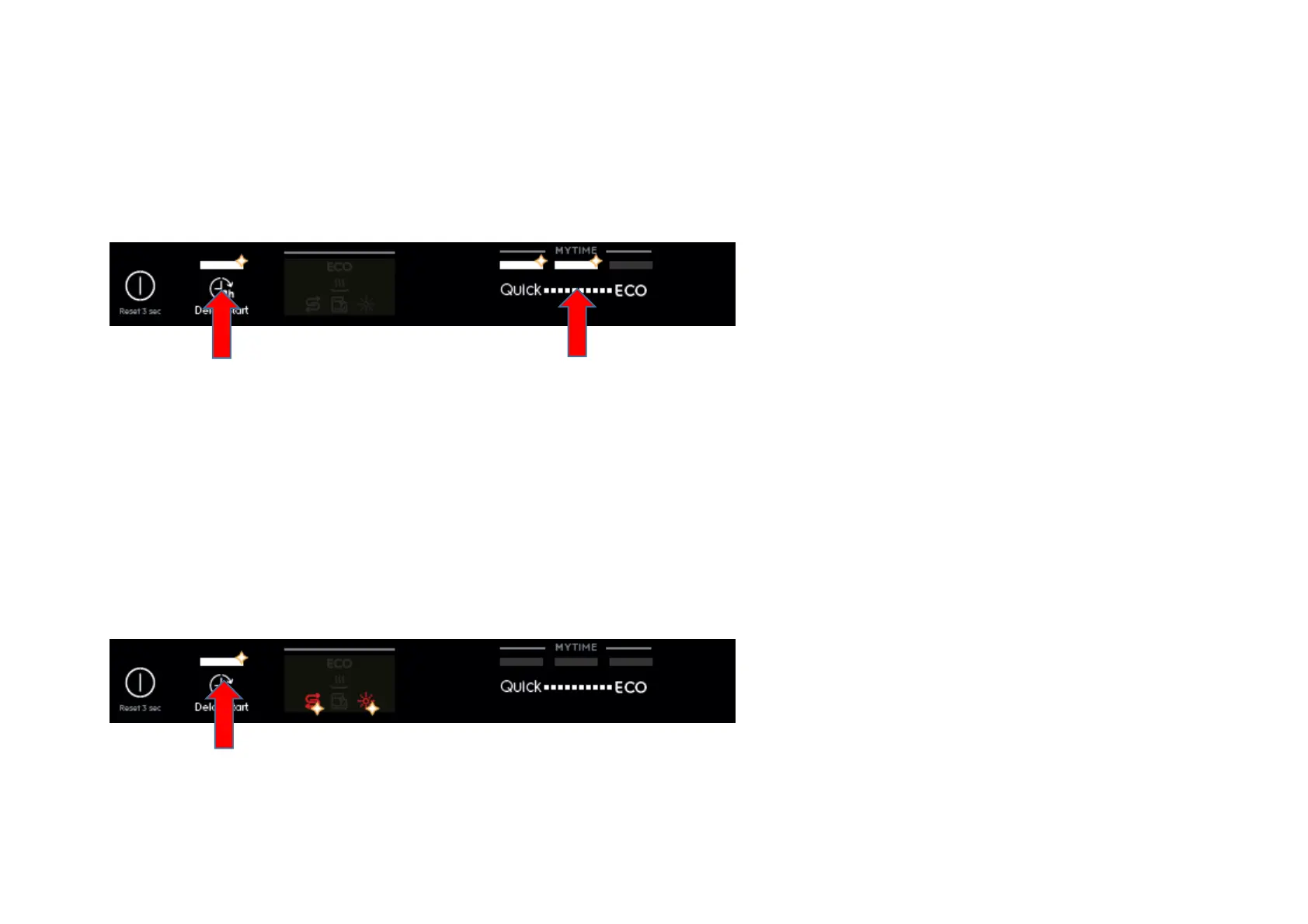
EDW 7100 is a touch key model. After Reset and off/on, press button S1+S3 simultaneously for at least 3 seconds to access Service Mode.
L1, L2 and L3 blink to indicate that Service mode is accessed.
Alarm Reading and Actuator Test
After accessed Service mode (L1, L2 and L3 blinking):
1
. Press button S1 to show the first alarm code.
L1 blinks to indicate the machine is in Alarm Reading.
The first alarm code saved is shown by the blinking sequences of Salt and Rinse aid icon. For example, “i43” is shown as Salt icon
blinks 4 times + Rinse aid icon blinks 3 times + Salt icon blinks 4 times + Rinse aid icon blinks 3 times… Please see the Alarm
Codes document for code description.
2. Press button S1 again to show the second alarm code.



 To Next Page