7
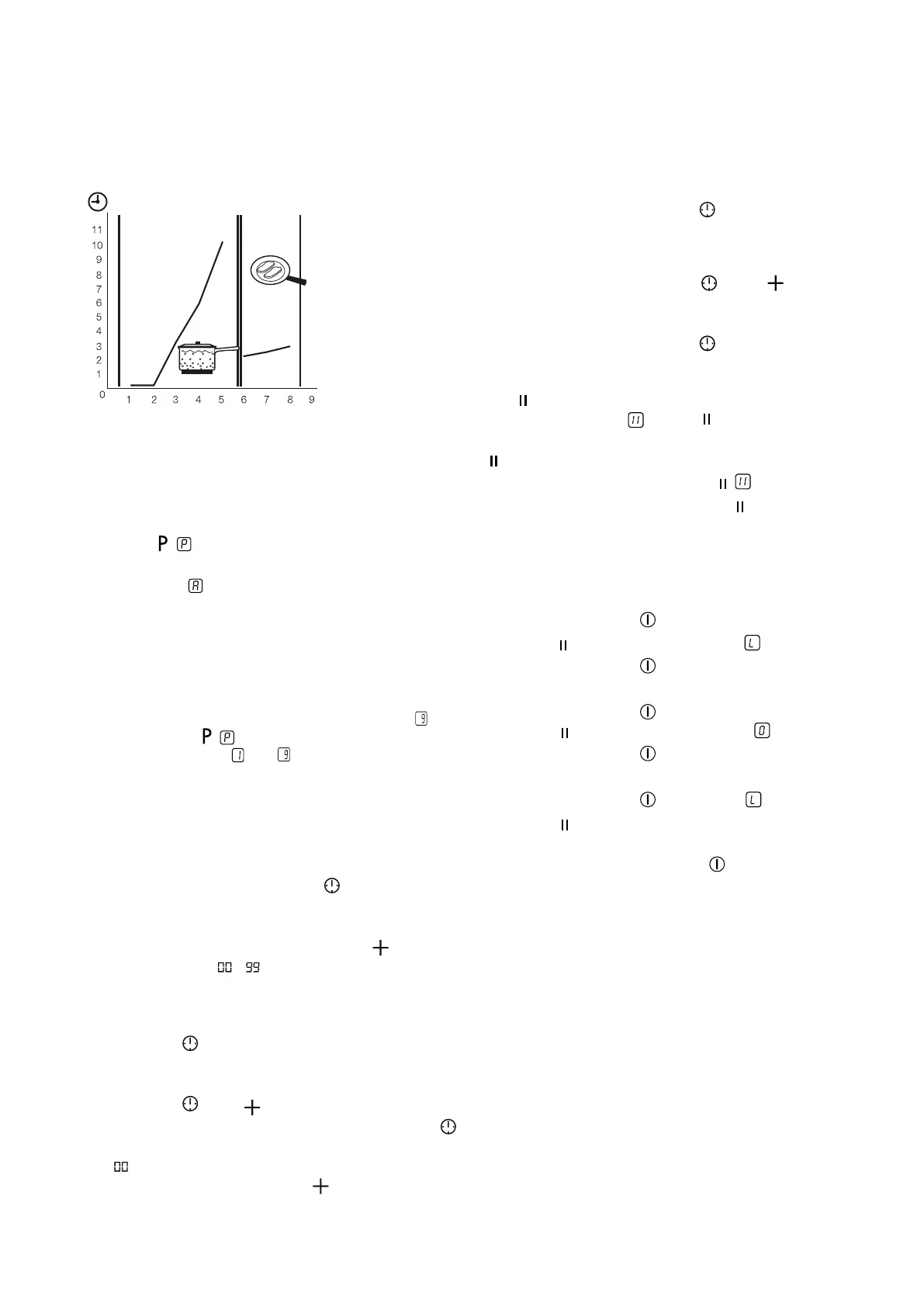
Automatic heat up
You can get a necessary heat setting in a shorter time
if you activate the Automatic Heat Up function. This
function sets the highest heat setting for some time
(see the graphic), and then decreases to the necessary
heat setting. To start the Automatic Heat Up function for
a cooking zone:
1. Touch ( comes on in the display).
2. Immediately touch the necessary heat setting. After
3 seconds comes on in the display. To stop the
function change the heat setting.
Switching on and off the power function
The Power function makes more power available to the
induction cooking zones. The Power function is activated
for 10 minutes at most. After that the induction cooking
zone automatically switches back to heat setting . To
switch on, touch , comes on. To switch off, touch a
heat setting between and .
Count down timer
Use the Count Down Timer to set how long the cooking
zone operates for one cooking session. Set the Count
Down Timer after the selection of the cooking zone. You
can set the heat setting before or after you set the timer.
• To set the cooking zone: touch again and again
until the indicator of the required cooking zone
comes on.
• Starting the Count Down Timer: touch of the timer
to set the time ( - minutes). When the indicator
of the cooking zone flashes slower, the time counts
down.
• Checking the remaining time: select the cooking
zone with . The indicator of the cooking zone
flashes faster. Display shows the remaining time.
• Changing the Count Down Timer: select the cooking
zone with touch or —.
• Stopping the timer: select the cooking zone with .
Touch —. The remaining time counts backwards to
. The indicator of the cooking zone goes out. To
switch off you can also touch and — at the same
time.
• When the time elapses, the sound operates and
00 flashes. The cooking zone switches off.
• Stopping the sound: touch .
Minute minder
You can use the timer as a Minute Minder while cooking
zones are not operating. Touch . touch or — of
the timer to select the time. When the time elapses, the
sound operates and 00 flashes.
• Stopping the sound: touch .
Keep warm
The function sets all cooking zones that operate to the
lowest heat setting ( ). When operates, you cannot
change the heat setting.
does not stop the timer function.
• To activate this function touch . comes on.
• To deactivate this function touch . The heat setting
that you set before comes on.
The child safety device
This function prevents an accidental operation of the
hob. Starting the child safety device:
• Start the hob with . Do not set the heat settings.
• Touch for 4 seconds. The symbol comes on.
• Stop the hob with .
Switching off the child safety device:
• Start the hob with . Do not set the heat settings.
Touch for 4 seconds. The symbol comes on.
• Stop the hob with .
Overriding the child safety device for one cooking session:
• Start the hob with . The symbol comes on.
• Touch for 4 seconds. Set the heat setting in less
than 10 seconds. You can operate the hob.
• When you stop the hob with , the child safety
device operates again.



 To Next Page