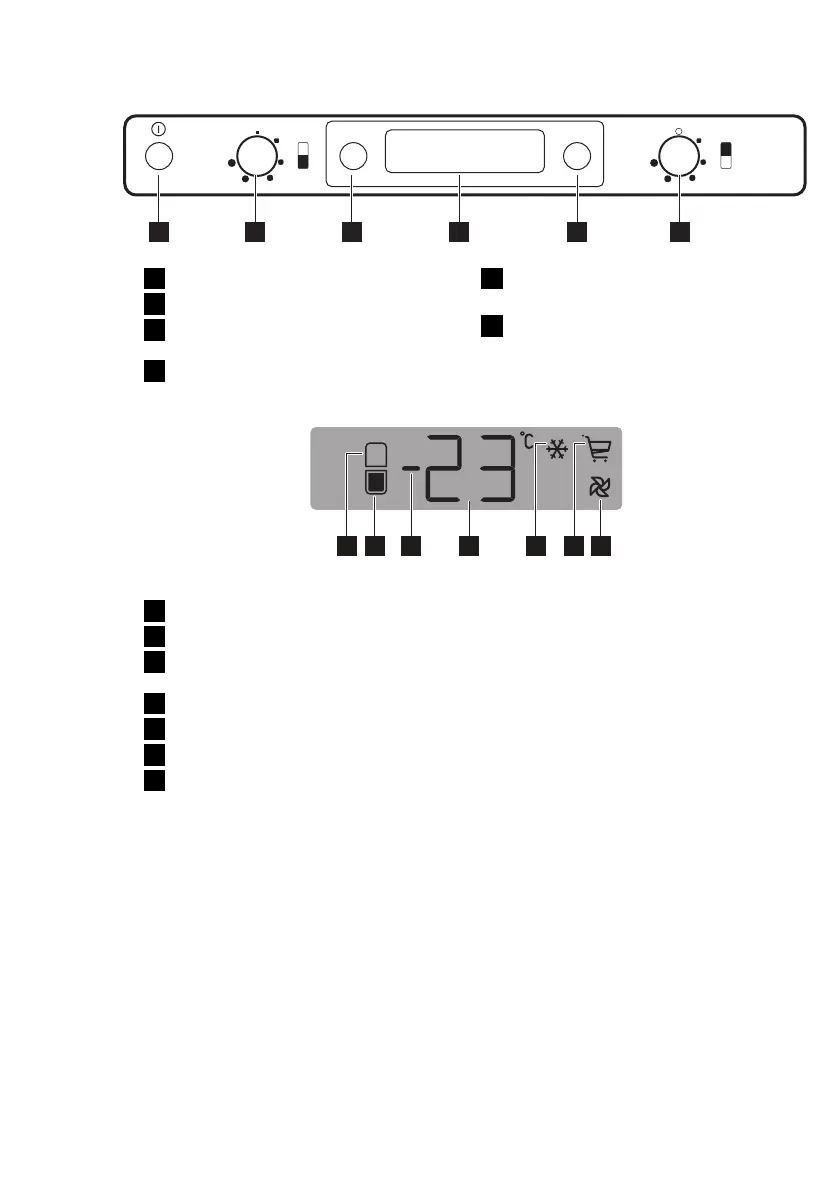
CONTROL PANEL
MODE˚C
123 4 5 6
1
ON/OFF switch
2
Freezer temperature regulator
3
Fridge-Freezer temperature indication
button
4
Display
5
Function button
Alarm reset switch
6
Fridge temperature regulator
Display
1 2 3 4 5 6 7
1
Fridge compartment indicator
2
Freezer compartment indicator
3
Positive or negative temperature indi-
cator
4
Temperature indicator
5
Action Freeze function
6
Shopping function
7
FreeStore function
SWITCHING ON
After plugging the plug into the power out-
let, if the display is not illuminated, press
ON/OFF switch.
As soon as the appliance is turned on, the
following signals will appear on the control
panel:
• Positive or negative temperature indica-
tor will be positive, indicating that the
temperature is positive
• the temperature flashes, the background
of the display is red and you will hear a
buzzer.
Press Function button and the buzzer will
go off (also refer to "Excessive temperature
alarm" ).
Set the desired temperature (refer to "Tem-
perature regulation").
SWITCHING OFF
The appliance is shut off by pressing ON/
OFF switch for more than 1 second.
After this, a countdown of the temperature
from -3 -2 -1 will be shown.
When the appliance is switched off, Display
also goes off.
TEMPERATURE INDICATION
Each time the Fridge-Freezer temperature
indication button is pressed, the display in-
dicates in sequence:
1.
– The Fridge compartment indicator is
on.
– The display indicates the latest set
temperature for the fridge.
2.
– The Freezer compartment indicator
is on.
1)
1)
In normal conditions.
6
www.electrolux.com



 To Next Page