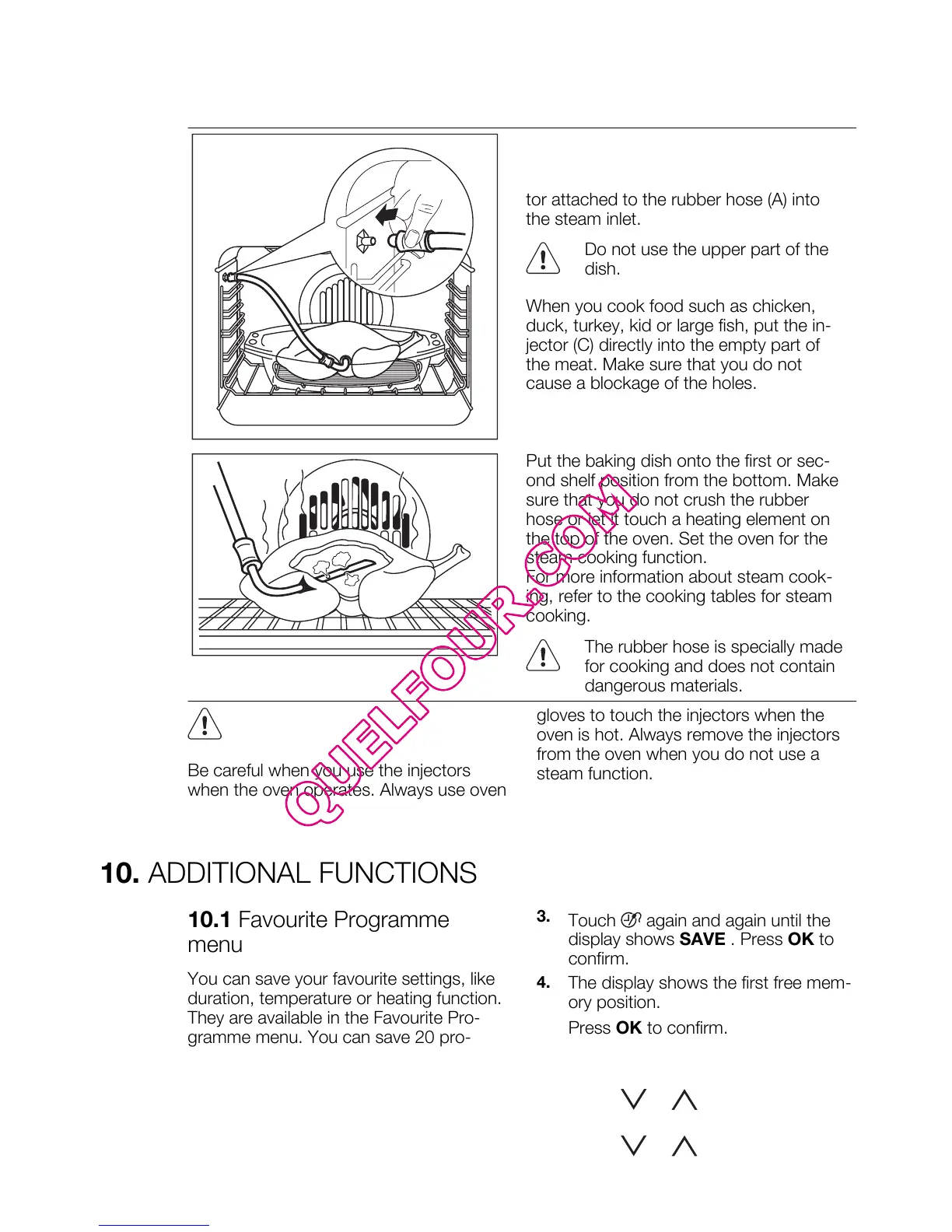
Direct steam cooking
Put the food onto the steel grill in the bak-
ing dish. Add some water. Put the injector
(C) into the rubber hose. Put the connec-
tor attached to the rubber hose (A) into
the steam inlet.
Do not use the upper part of the
dish.
When you cook food such as chicken,
duck, turkey, kid or large fish, put the in-
jector (C) directly into the empty part of
the meat. Make sure that you do not
cause a blockage of the holes.
Put the baking dish onto the first or sec-
ond shelf position from the bottom. Make
sure that you do not crush the rubber
hose or let it touch a heating element on
the top of the oven. Set the oven for the
steam cooking function.
For more information about steam cook-
ing, refer to the cooking tables for steam
cooking.
The rubber hose is specially made
for cooking and does not contain
dangerous materials.
Be careful when you use the injectors
when the oven operates. Always use oven
gloves to touch the injectors when the
oven is hot. Always remove the injectors
from the oven when you do not use a
steam function.
10. ADDITIONAL FUNCTIONS
10.1 Favourite Programme
menu
You can save your favourite settings, like
duration, temperature or heating function.
They are available in the Favourite Pro-
gramme menu. You can save 20 pro-
grammes.
Saving a programme
1.
Activate the appliance.
2.
Set a heating function or an Assisted
Cooking function.
3.
Touch again and again until the
display shows SAVE . Press OK to
confirm.
4.
The display shows the first free mem-
ory position.
Press OK to confirm.
5.
Enter the name of the programme.
The first letter flashes.
Touch
or to change the letter.
Press OK.
6.
Touch or to move the cursor
to the right or to the left. Press OK.
ENGLISH 17




 To Next Page